3Dconnexion SpaceMouse Wireless is our pick for the Best Wireless Mouse for 3D Modeling because its six-degrees-of-freedom sensor allows for intuitive, simultaneous panning, zooming, and rotation of complex digital models.
For professionals who require more extensive command access, the 3Dconnexion SpaceMouse Pro Wireless offers advanced navigation with a dedicated hand rest, while the 3Dconnexion CadMouse Compact serves as a precise, ergonomic companion for standard cursor-based tasks in CAD environments.
Selecting the right hardware for 3D design requires balancing specialized navigation tools with traditional input devices. While a 6DoF controller handles spatial movement, pairing it with a high-resolution mouse ensures that selection and command execution remain efficient throughout long design sessions.
For those looking to upgrade their entire workstation, our guide on the Best Wireless Mouse provides additional options for standard cursor tasks that complement specialized 3D hardware.
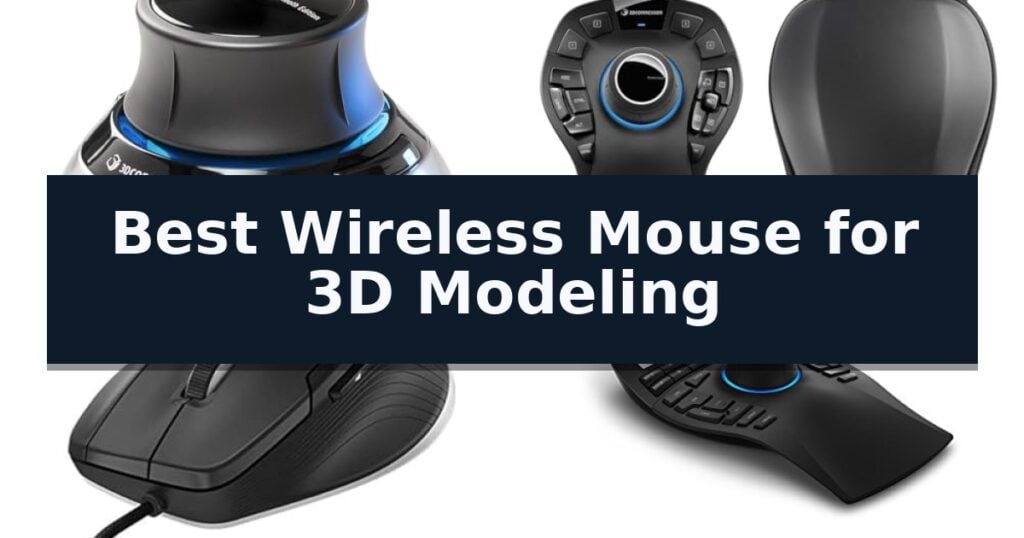
10 Best Wireless Mouse for 3D Modeling in 2026 Reviews
Quick Comparison
| Product | Best For | Key Strength | Score |
|---|---|---|---|
| 3Dconnexion SpaceMouse Wireless | Best Overall | Advanced 3D navigation via six-degrees-of-freedom sensor | 4.9 |
| 3Dconnexion SpaceMouse Pro Wireless | Professional 6DoF Control | Six-Degrees-of-Freedom (6DoF) sensor for intuitive model manipulation. | 4.7 |
| 3Dconnexion CadMouse Compact | Optimized for CAD Workflows | Dedicated middle mouse button reduces finger fatigue during 3D navigation. | 4.9 |
| 3Dconnexion SpaceMouse Enterprise | Advanced Multi-Key Navigation | Six-degrees-of-freedom (6DoF) sensor for intuitive 3D navigation. | 4.8 |
| 3Dconnexion SpaceNavigator | Essential 3D Model Panning | Advanced 6 degrees-of-freedom sensor for fluid 3D manipulation. | 4.3 |
| 3Dconnexion 3DX-700066 Spacemouse Wireless (With Carry Case And Universal Receiver) | Reliable Real-Time 3D Movement | Six-degrees-of-freedom (6Dof) sensor for precise 3D navigation | 4.9 |
| 3Dconnexion SpaceMouse Pro | Ergonomic 3D Design Support | Six-degrees-of-freedom (6Dof) sensor for intuitive 3D navigation | 4.8 |
| 3Dconnexion SpacePilot Pro | Integrated LCD Workflow Assistant | Six degrees-of-freedom sensor for intuitive 3D model manipulation. | 4.4 |
| Nulea M501 Wireless Trackball | Stable Thumb-Based Precision | Ergonomic thumb-operated trackball reduces wrist and arm fatigue. | 4.8 |
| Redragon M913 Wireless MMO Mouse | Programmable Macro Flexibility | 12 programmable side buttons for efficient shortcut mapping. | 4.6 |
How We Chose
Evaluating hardware for 3D modeling requires a focus on spatial control and workflow efficiency. We assess these devices based on their ability to reduce repetitive strain while increasing the speed of complex design tasks, prioritizing tools that offer seamless integration with professional software suites over generic input devices.
- Six-Degrees-of-Freedom (6DoF) sensor precision for spatial model manipulation.
- Programmable button count and intelligent function key integration.
- Ergonomic design and wrist support for extended professional use.
- Wireless connectivity reliability and battery longevity.
- Compatibility with industry-standard CAD and 3D modeling software.
1 3Dconnexion SpaceMouse Wireless — Precise 3D Navigation
Navigating complex 3D environments requires more than a standard mouse; it demands precise, multi-axis control that traditional peripherals simply cannot replicate. The 3Dconnexion SpaceMouse Wireless introduces a specialized controller cap designed for intuitive, simultaneous manipulation of 3D models and camera views, allowing for fluid panning, zooming, and rotating in a single motion.
This device is engineered for professional workflows, offering advanced 3D navigation that acts as a natural extension of the user's hand. By utilizing a six-degrees-of-freedom sensor, users can manipulate objects with high sensitivity, which is essential for detailed modeling tasks. The unit connects via wireless and USB-C connectivity, ensuring a clean, cable-free workspace while maintaining a reliable link to the workstation.
Portability and battery life are central to its design, featuring a rechargeable battery lasting up to 1 month between charges, which minimizes downtime during intensive projects. For users who move between workstations or travel for client presentations, the inclusion of a lightweight and durable carry case provides necessary protection for the controller.
Customization is handled through 2 programmable side buttons, which allow for quick access to frequently used application commands. While this device is a significant departure from standard input methods, it is specifically optimized for those who spend their day in CAD or 3D design software, providing a dedicated tool that complements, rather than replaces, a traditional mouse.
Best for: Professional 3D designers and CAD engineers who require precise, multi-axis object manipulation and camera control.
Skip if: Users who only perform basic 2D tasks or those who prefer a traditional mouse-only workflow without the need for specialized 3D navigation hardware.
- Advanced 3D navigation via six-degrees-of-freedom sensor
- Long-lasting rechargeable battery with up to one month of use
- Flexible connectivity options including wireless and USB-C
- Portable design with an included durable carry case
- Specialized input method requires a learning curve for new users
- Limited to two programmable buttons compared to high-end multi-button mice
2 3Dconnexion SpaceMouse Pro Wireless — Professional 6DoF Control
Navigating complex 3D environments requires precise, fluid input that standard mice often fail to provide. The 3Dconnexion SpaceMouse Pro Wireless addresses this by utilizing a specialized Six-Degrees-of-Freedom (6DoF) sensor, allowing users to intuitively pan, zoom, and rotate models with a single controller cap. This sensor technology translates subtle hand movements into smooth, multi-axis navigation, which is essential for maintaining focus during intricate design tasks.
Designed for professional workflows, this device offers both wireless and USB-C connectivity to maintain a clean workspace while ensuring reliable signal transmission. The inclusion of Bluetooth Low Energy support provides additional flexibility for modern workstation setups where port availability is at a premium, allowing for seamless integration into various professional environments without the clutter of extra cables.
Power management is handled by an integrated rechargeable Li-poly battery with 1100 mAh capacity, intended to support extended design sessions without frequent interruptions. The ergonomic layout is specifically engineered to reduce the physical strain often associated with long-term 3D modeling tasks, promoting a more comfortable hand position during prolonged use.
While this device excels at spatial manipulation, it is intended to function as a companion to a standard mouse rather than a replacement. Users should verify that their specific 3D modeling software supports 3Dconnexion's proprietary input protocols to fully leverage the device's capabilities, as this is a specialized tool designed to augment, not replicate, traditional point-and-click functionality.
Best for: Professional 3D designers and engineers who require precise, intuitive spatial navigation within complex modeling software.
Skip if: Users looking for a traditional mouse replacement or those whose primary software does not support 6DoF input devices.
- Six-Degrees-of-Freedom (6DoF) sensor for intuitive model manipulation.
- Flexible wireless and USB-C connectivity options.
- Long-lasting rechargeable Li-poly battery.
- Bluetooth Low Energy support for versatile pairing.
- Requires a secondary mouse for standard point-and-click tasks.
- Software compatibility must be verified for specific modeling applications.
3 3Dconnexion CadMouse Compact — Optimized for CAD Workflows
Precision in digital design requires hardware that minimizes input latency and maximizes control, which is where the 3Dconnexion CadMouse Compact distinguishes itself. Engineered specifically for professional CAD workflows, this device centers its utility around a dedicated middle mouse button, a feature that eliminates the strain of clicking a scroll wheel during complex 3D navigation and model manipulation.
The mouse features a compact ergonomic shape that supports various grip styles while maintaining a small footprint on a crowded workstation. Its performance is driven by a high-resolution sensor designed to track accurately across various surfaces, ensuring that every movement translates precisely to the screen. This level of responsiveness is critical when working with intricate geometries where pixel-perfect selection is required.
Usability is further enhanced by the Smart Mouse Wheel 2, which provides controlled scrolling and zooming capabilities tailored for CAD software environments. With 7 buttons total, 5 of which are programmable, users can map frequently used commands directly to the mouse, streamlining repetitive tasks and reducing reliance on keyboard shortcuts. The inclusion of these customizable inputs allows for a more fluid interaction with professional design applications.
While the device is built for efficiency, its wired USB connection ensures a consistent, uninterrupted signal, which is a common preference in environments where wireless interference might impact precision. The 3Dconnexion CadMouse Compact balances a specialized feature set with a refined form factor, making it a focused tool for those who prioritize specific CAD functionality over general-purpose versatility.
Best for: Professional CAD designers and engineers who require a dedicated middle mouse button and programmable inputs in a space-saving, ergonomic form factor.
Skip if: Users who prioritize wireless connectivity or require a larger, full-sized mouse chassis for specific palm-grip preferences.
- Dedicated middle mouse button reduces finger fatigue during 3D navigation.
- Smart Mouse Wheel 2 offers precise control for zooming and scrolling.
- 5 programmable buttons allow for customized application-specific workflows.
- Compact ergonomic design fits well in limited desk spaces.
- Wired USB connection lacks the mobility of wireless alternatives.
- Compact size may not suit users who prefer a larger, full-palm grip.
4 3Dconnexion SpaceMouse Enterprise — Advanced Multi-Key Navigation
Navigating complex digital environments requires precision, and the 3Dconnexion SpaceMouse Enterprise is engineered specifically to streamline this workflow through its signature six-degrees-of-freedom (6DoF) sensor. This allows designers to intuitively manipulate 3D models or camera views with fluid, simultaneous control that standard mice cannot replicate.
Beyond its core navigation capabilities, the device serves as a comprehensive command center for professional software. It features 31 programmable keys, including 12 Intelligent Function Keys that automatically update their assignments based on the active application. A built-in color LCD provides visual feedback by displaying the actual icons from your software toolbar, ensuring you always know which command is mapped to each key.
The hardware is designed for heavy-duty professional use, incorporating 8 keyboard modifiers—such as Ctrl, Shift, Alt, and Esc—directly into the layout. This integration minimizes the need to reach for a traditional keyboard, keeping your focus entirely on the modeling workspace. With a substantial 3-year manufacturer's warranty, the unit is built to withstand the demands of daily, intensive 3D design sessions.
While its size and specialized layout are optimized for professional workstations, the device is a dedicated navigation tool rather than a replacement for a standard pointing device. It is intended to be used in conjunction with a traditional mouse to provide a dual-handed workflow, maximizing efficiency during complex modeling tasks.
Best for: Professional 3D modelers and CAD designers who require high-precision navigation and rapid access to a large library of software-specific commands.
Skip if: Users seeking a compact or portable solution, or those who prefer a single-device setup for all computer interactions.
- Six-degrees-of-freedom (6DoF) sensor for intuitive 3D navigation.
- 31 programmable keys with Intelligent Function Keys that adapt to your software.
- Color LCD for clear visual command mapping.
- Comprehensive 8 keyboard modifiers integrated into the housing.
- 3-year manufacturer's warranty.
- Large physical footprint requires significant desk space.
- Specialized design is intended for dual-handed use rather than as a standalone mouse replacement.
5 3Dconnexion SpaceNavigator — Essential 3D Model Panning
Navigating complex 3D environments requires more than a standard mouse; it demands precise, multi-axis control. The 3Dconnexion 3DX-700028 SpaceNavigator 3D Mouse addresses this through an advanced 6 degrees-of-freedom optical sensor, allowing users to intuitively manipulate digital objects in three-dimensional space.
By utilizing this controller, designers can simultaneously pan, zoom, and rotate 3D models with a single hand. This fluid motion is designed to reduce the repetitive strain often associated with traditional input devices during long modeling sessions. The device features 2 programmable function keys, which provide quick access to application-specific commands, streamlining the workflow for CAD engineers and architects.
The hardware is compact, measuring 3 inches by 3 inches with a 2-inch height, ensuring it occupies minimal desk space. The SpaceNavigator SE model is specifically configured to include a commercial use license and full technical support, making it a viable integration for professional design environments.
While this device excels at spatial navigation, it is intended to function as a secondary input tool alongside a standard mouse rather than a complete replacement. Users should verify that their specific 3D software supports 3Dconnexion hardware to ensure full functionality of the programmable keys and navigation axes.
Best for: Professional 3D designers, CAD engineers, and architects who require simultaneous multi-axis control for complex modeling tasks.
Skip if: Users seeking a single-device solution for general desktop navigation or those who do not work within 3D-specific design software.
- Advanced 6 degrees-of-freedom sensor for fluid 3D manipulation.
- Simultaneous pan, zoom, and rotate capabilities.
- Programmable function keys to customize workflow.
- Compact footprint suitable for professional workstations.
- Not a replacement for a standard mouse.
- Requires software compatibility with specific 3D design applications.
6 3Dconnexion 3DX-700066 Spacemouse Wireless (With Carry Case And Universal Receiver) — Reliable Real-Time 3D Movement
Navigating complex 3D environments requires a level of control that standard peripherals often struggle to provide. The 3Dconnexion 3DX-700066 Spacemouse Wireless addresses this by utilizing a specialized six-degrees-of-freedom (6Dof) sensor, allowing designers to intuitively pan, zoom, and rotate digital models with high precision. By moving the controller cap, users can manipulate objects in a 3D space with fluid, simultaneous movements that are difficult to replicate with a traditional mouse and keyboard setup.
Designed for professional workflows, this device offers wireless freedom through a reliable 2.4GHz connection, ensuring your workspace remains uncluttered while maintaining real-time responsiveness. The hardware features a compact, stylish design with an elegant brushed steel base that fits easily alongside a standard mouse, and it includes two programmable buttons for quick access to common commands. This small footprint ensures the device does not dominate your desk space, while the weighted base provides the stability needed for consistent, fine-tuned control during long modeling sessions.
Efficiency is a core focus, as the unit is capable of operating for up to one month of battery life between charges. This longevity reduces the need for frequent cable management, supporting long-term productivity in demanding modeling environments. When the battery does eventually require a charge, the wireless nature of the device allows for continued operation, ensuring that your workflow remains uninterrupted.
The device comes with a convenient carry case, making it a practical choice for professionals who transition between different workstations. It is backed by a 2-year manufacturer's warranty, providing long-term support for its specialized input capabilities. While the learning curve associated with a 6Dof controller is a known trade-off, the precision gained in 3D manipulation often justifies the time spent mastering the interface.
Best for: Professional 3D designers and engineers who require precise, intuitive navigation of complex digital models.
Skip if: Users who only perform basic 2D tasks or those who prefer a traditional mouse-only workflow without the need for specialized 3D navigation hardware.
- Six-degrees-of-freedom (6Dof) sensor for precise 3D navigation
- One month of battery life for extended wireless usage
- Compact footprint with a durable brushed steel base
- Includes carry case for portable professional use
- Specialized input device that requires a learning curve for new users
- Limited to two programmable buttons compared to high-end multi-button mice
7 3Dconnexion SpaceMouse Pro — Ergonomic 3D Design Support
The 3Dconnexion SpaceMouse Pro is engineered specifically for complex 3D environments, utilizing a proprietary six-degrees-of-freedom (6Dof) sensor that allows users to intuitively pan, zoom, and rotate digital models. This specialized input device is designed to streamline professional workflows by offloading navigation tasks from a standard mouse, providing a more ergonomic and precise control scheme for CAD and 3D modeling software.
Beyond its core navigation sensor, the device features a full-sized, soft-coated hand rest to support the wrist during extended design sessions. It integrates 15 programmable keys, including intelligent function keys that adapt to the active application, and dedicated quick view keys for rapid perspective changes. The inclusion of keyboard modifiers—such as Ctrl, Alt, Shift, and Esc—directly on the device minimizes the need to reach for a traditional keyboard while working.
The unit measures approximately 8 inches by 5.6 inches by 2.3 inches, providing a stable footprint on the desk. It functions as a corded device with a 3-foot cable, ensuring consistent connectivity without the latency concerns associated with wireless alternatives. The on-screen display provides visual feedback for key assignments, and the device is compatible with major operating systems including Microsoft Windows, macOS, and Linux.
While the 3Dconnexion SpaceMouse Pro offers significant advantages for 3D navigation, it is a specialized tool that requires a learning curve to master the 6Dof sensor. Users should ensure their primary modeling software supports 3Dconnexion hardware to fully utilize the programmable keys and on-screen display features.
Best for: Professional 3D modelers and CAD designers who require precise, ergonomic navigation and frequent access to complex software shortcuts.
Skip if: Users who primarily perform 2D tasks or those who require a portable, wireless workspace solution will find this large, corded device unnecessary.
- Six-degrees-of-freedom (6Dof) sensor for intuitive 3D navigation
- 15 programmable keys for efficient workflow customization
- Ergonomic soft-coated hand rest for comfort during long sessions
- Integrated keyboard modifiers to reduce keyboard reliance
- Corded design limits placement flexibility compared to wireless models
- Large physical footprint requires significant desk space
8 3Dconnexion SpacePilot Pro — Integrated LCD Workflow Assistant
Navigating complex 3D environments requires more than a standard pointer, and the 3Dconnexion SpacePilot Pro 3D Mouse 3DX-700036 is engineered specifically to address the needs of professional engineers. By utilizing a six degrees-of-freedom (6Dof) sensor, this device allows for simultaneous panning, zooming, and rotating of models, providing a level of control that traditional mice cannot replicate.
The hardware is designed for heavy-duty workflows, featuring 31 programmable keys that offer deep application integration. The LCD Workflow Assistant provides real-time access to essential commands and function key assignments, keeping critical tools visible without cluttering the primary workspace. This integration is supported by Dual-Function QuickView Navigation Keys that allow users to snap to specific views instantly.
Ergonomics are prioritized through an advanced wrist design intended to reduce fatigue during extended modeling sessions. The build quality reflects its focus on professional environments, measuring 11.7 inches in length and weighing approximately 1.32 pounds. This substantial footprint provides a stable base for the high-precision navigation required in MCAD applications.
While this device excels at complex navigation, it is a specialized tool rather than a replacement for a standard mouse. It functions as a companion peripheral, meaning users must maintain a traditional mouse for standard clicking and selection tasks. Its size and feature set are optimized for dedicated workstations where space and workflow efficiency are the primary concerns.
Best for: Professional engineers and designers requiring high-precision, simultaneous 3D model manipulation and extensive command mapping.
Skip if: Casual users or those with limited desk space who only require basic 2D navigation and standard pointer functionality.
- Six degrees-of-freedom sensor for intuitive 3D model manipulation.
- 31 programmable keys for extensive custom command mapping.
- Integrated LCD Workflow Assistant for immediate access to toolsets.
- Advanced wrist design for improved comfort during long sessions.
- Large physical footprint requires significant desk space.
- Not a standalone replacement for a standard computer mouse.
9 Nulea M501 Wireless Trackball — Stable Thumb-Based Precision
Precision is paramount when manipulating complex 3D environments, and the Nulea M501 Wireless Trackball addresses this by shifting cursor control from the wrist to a dedicated thumb-operated trackball. This design choice minimizes repetitive arm movement, allowing for sustained focus during long modeling sessions. By keeping the palm in a natural position, the device helps reduce muscle stress, which is a significant factor for designers spending hours at their workstations.
The device features 4 DPI levels to adjust cursor sensitivity, providing the necessary control for both broad navigation and fine-tuned vertex adjustments. Its 6-button layout includes dedicated back and forward buttons to streamline workflow navigation. It is important to note that these buttons are not programmable, which represents a trade-off for users who rely on custom macro assignments for specialized software commands.
Connectivity is handled via Bluetooth or a 2.4G USB receiver, supporting up to 3 devices simultaneously. Switching between connected hardware is managed by a button on the bottom of the chassis, facilitating a clean transition between a primary workstation and secondary devices. This flexibility is particularly useful for those managing multiple displays or operating across different computer systems.
Power is supplied by a rechargeable battery, eliminating the need for disposable cells. The unit includes a charging cable, though users should note that it requires a standard 5V charger or a computer USB port, as fast chargers are not supported for this model. Adhering to these charging requirements is essential to maintaining the long-term health of the internal battery.
Best for: Designers who prioritize ergonomic comfort and want to reduce wrist strain during extended 3D modeling tasks.
Skip if: Users who require programmable buttons or specific macro support for complex software workflows will find this mouse limiting.
- Ergonomic thumb-operated trackball reduces wrist and arm fatigue.
- Multi-device connectivity allows switching between three devices via Bluetooth or USB.
- Adjustable DPI settings provide flexible control for precise cursor movement.
- Rechargeable battery removes the need for frequent battery replacements.
- Non-programmable buttons limit customization for professional software workflows.
- Charging limitations require avoiding fast chargers to maintain battery health.
10 Redragon M913 Wireless MMO Mouse — Programmable Macro Flexibility
Precision and efficiency are essential when navigating complex 3D environments, and the Redragon M913 Wireless MMO Mouse is engineered to streamline these workflows through its extensive array of programmable inputs. By offering 12 side buttons, this device allows designers to map frequently used tools and shortcuts directly to their thumb, reducing reliance on keyboard-based commands during intensive modeling sessions.
The mouse utilizes an Optical Pixart 3335 gaming sensor to ensure instantaneous registration of every movement within 1ms, providing the responsiveness required for detailed vertex manipulation or precise object placement. Users can toggle between five onboard DPI levels, ranging from 1000 to 16000, with the ability to fine-tune sensitivity by ± 100 DPI to match specific project requirements.
Versatility is a core component of its design, featuring both 2.4Ghz wireless and USB-C wired modes. This dual-connectivity ensures that workflow remains uninterrupted, whether the user prefers a cable-free workspace or requires a direct connection for extended tasks. The internal battery is optimized for longevity, offering up to 80 hours of use in eco-mode, or 45 hours with the 16.8 million color lighting effects active.
Customization is managed through dedicated software that supports remapping all 16 buttons, even while operating in wireless mode. This level of control enables a highly personalized interface, allowing the mouse to adapt to various 3D software environments and individual design habits.
Best for: 3D modelers who require extensive macro-key mapping and the flexibility of dual-mode wireless connectivity.
Skip if: Users who prefer a minimalist mouse design or those who find a high button count on the side of the chassis distracting for their workflow.
- 12 programmable side buttons for efficient shortcut mapping.
- Dual-mode connectivity supporting both 2.4Ghz wireless and USB-C wired operation.
- High-precision Optical Pixart 3335 sensor with 1ms response time.
- Customizable DPI settings up to 16000 for varied sensitivity needs.
- High button density may require a learning curve for ergonomic comfort.
- Battery life trade-off when utilizing full RGB lighting effects.
Best Wireless Mouse for 3D Modeling Buying Guide
Spatial Navigation vs. Standard Input
In 3D modeling, standard mice are often insufficient for complex spatial tasks. A dedicated 3D controller provides six-degrees-of-freedom, allowing you to move, rotate, and zoom in a single fluid motion that a traditional optical mouse cannot replicate.
Most professionals benefit from a dual-device setup. By using a 3D controller in the non-dominant hand and a high-precision mouse in the dominant hand, you can perform selection and navigation tasks simultaneously, significantly reducing the time spent switching tools.
Programmable Command Efficiency
The ability to map application-specific commands to physical buttons is a major productivity booster. Look for devices that offer intelligent function keys, which automatically update their mapping based on the software environment you are currently using.
Having frequently used tools like extrude, fillet, or view-reset mapped to your mouse or controller buttons minimizes keyboard reliance. This keeps your focus on the model and reduces the physical fatigue associated with constant menu navigation.
Ergonomics for Long Sessions
3D modeling often involves long hours at a workstation, making ergonomic support essential. Devices with contoured shapes or integrated wrist rests help maintain a natural hand position, which is critical for preventing strain during intensive design phases.
Consider the weight and footprint of your input devices. A stable base is necessary for controllers to prevent sliding during use, while a lightweight, compact mouse can be easier to maneuver for precise, high-resolution cursor movements.
Wireless Connectivity and Power
Wireless freedom is increasingly important for maintaining a clean, flexible workspace. Modern 2.4GHz and Bluetooth connections provide the low-latency performance required for real-time 3D interaction without the clutter of cables.
Battery life is a primary consideration for wireless tools. Look for devices that offer at least a month of operation on a single charge to avoid frequent interruptions. USB-C charging is a preferred feature for its speed and convenience in modern professional setups.
Software Integration and Compatibility
The effectiveness of a 3D modeling device is largely determined by its driver support and software compatibility. Ensure your chosen hardware is natively supported by your primary CAD or rendering applications to take full advantage of advanced features.
Check that the manufacturer provides regular driver updates to maintain compatibility with the latest versions of your design software. This ensures that your hardware remains a reliable part of your workflow as your digital tools evolve.
Frequently Asked Questions
Do I need a 3D mouse if I already have a high-end gaming mouse?
While a gaming mouse offers high DPI and extra buttons, it lacks the 6DoF sensor required for simultaneous 3D navigation. A 3D mouse is a specialized tool that complements, rather than replaces, your standard mouse.
Can I use a 3D controller with any software?
Most 3D controllers are designed for major CAD and modeling software. It is best to check the manufacturer's compatibility list to ensure your specific design application supports the device's advanced navigation features.
Is a wireless 3D mouse as responsive as a wired one?
Modern wireless 3D mice use advanced 2.4GHz or Bluetooth technology that provides real-time, low-latency performance indistinguishable from wired versions for most professional design tasks.
How do I clean my 3D navigation controller?
Use a soft, lint-free cloth lightly dampened with water or a mild cleaning solution. Avoid using harsh chemicals or abrasive materials that could damage the sensor or the finish of the device.
What is the benefit of a dedicated middle mouse button in CAD?
In many CAD applications, the middle mouse button is the default control for panning or rotating the view. A dedicated button ensures this action is always accessible without accidental scrolling or clicking.
Conclusion: Our Top Pick
Our top pick is 3Dconnexion SpaceMouse Wireless. Choosing the right input hardware for 3D modeling is an investment in both your productivity and physical comfort. By prioritizing devices that offer specialized spatial control and customizable command mapping, you can streamline your workflow and focus more on the creative aspects of your design.
Whether you opt for a compact wireless controller or a full-featured professional unit, ensure the device aligns with your specific software environment. A well-integrated setup will provide the precision and efficiency needed to handle complex 3D projects with ease.