Gsou W33 Wireless Webcam is our pick for the Best Wireless Webcam because it balances high-definition video output with a reliable 2.4G wireless connection that avoids common network interference.
When selecting a camera for remote work or streaming, the primary challenge is maintaining a stable signal without the clutter of long cables. A wireless unit provides the flexibility to position your camera for the best angle, but it requires careful attention to battery longevity and transmission range to ensure your feed remains consistent throughout a meeting.
Experienced users should prioritize models that offer simple plug-and-play functionality via a dedicated USB receiver rather than relying on standard Wi-Fi, which can be prone to latency. Evaluating the physical controls, such as manual focus rings and privacy shutters, is equally important for maintaining image quality and security during sensitive calls.
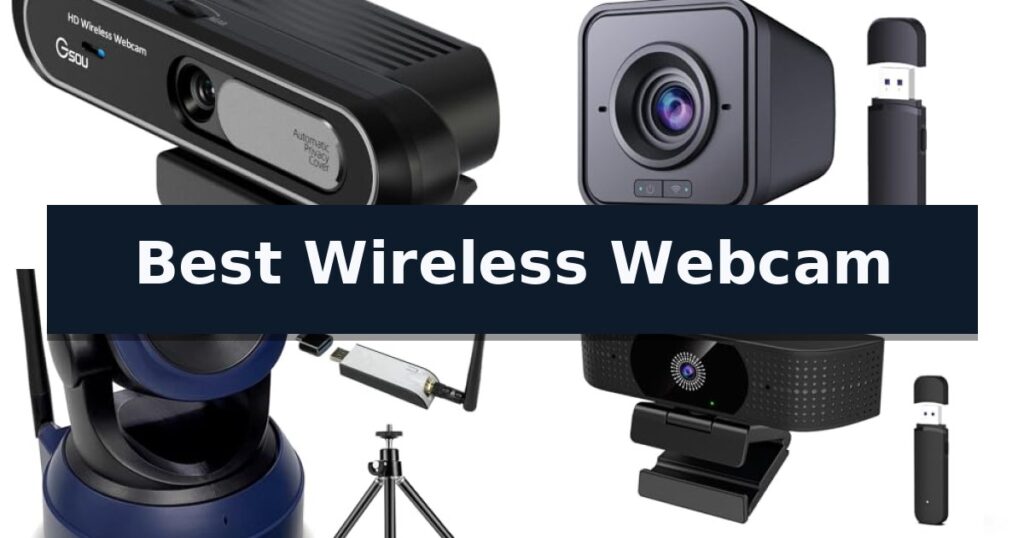
4 Best Wireless Webcam in 2026 Reviews
Quick Comparison
| Product | Best For | Key Strength | Score |
|---|---|---|---|
| Gsou W33 Wireless Webcam | Best Overall | 6-hour battery life for extended cordless use. | 4.9 |
| TOALLIN WL168 Wireless Webcam | Easiest Plug-and-Play Setup | 2.4G wireless connectivity for cable-free placement. | 4.4 |
| Gsou K30 Wireless Webcam | Longest Battery Life | 9-hour battery life for extended use without needing a power source. | 4.9 |
| SynthMeet ST92 Wireless Webcam | Flexible Positioning Without Battery | 2.4GHz wireless connectivity allows for placement up to 65 feet from the receiver. | 4.5 |
How We Chose
Selecting the right wireless webcam requires a focus on signal reliability and power management. As reviewers, we examine how these devices handle high-bandwidth video transmission without tethering, prioritizing models that offer consistent 1080p output, intuitive plug-and-play integration, and sufficient battery life to support professional-grade video conferencing sessions without unexpected interruptions.
- Wireless transmission stability and range
- Battery capacity and continuous runtime
- Video resolution and sensor clarity
- Ease of setup and device compatibility
- Physical privacy and focus control features
1 Gsou W33 Wireless Webcam — Best for Long-Range Meetings
The Gsou W33 Wireless Webcam distinguishes itself through a specialized 2.4G private protocol that enables high-bandwidth, interference-free video transmission without relying on Wi-Fi or Bluetooth. This design choice ensures low-latency streaming while providing a secure, dedicated connection for professional environments.
Equipped with a high-capacity 5000mAh rechargeable battery, this camera offers up to 6 hours of continuous operation, allowing for cordless freedom during extended meetings or presentations. The manual focus ring provides precise control over image clarity, eliminating the common issue of autofocus hunting during close-up product demonstrations or wide-angle room shots.
Security is integrated through an auto-electric privacy shield that automatically opens when a call begins and closes upon termination. For additional peace of mind, a manual slide mechanism physically blocks the lens, ensuring protection against unauthorized access. The unit is designed for versatility, featuring a 1/4" screw mount compatible with tripods and a secure fit for ultra-thin monitors or flat-screen TVs.
Setup is simplified via a plug-and-play 2.4G USB receiver, which requires no drivers and maintains compatibility with Windows, macOS, and Linux. With a wireless range of up to 65ft, the camera provides significant flexibility for users who need to move around their workspace without the constraints of traditional wired connections.
Best for: Professionals who require a portable, secure, and cord-free video conferencing solution for long meetings or dynamic presentation spaces.
Skip if: Users who prefer a permanent, wired desk setup and do not require battery-powered mobility or wireless transmission.
- 6-hour battery life for extended cordless use.
- 2.4G private protocol ensures secure, low-latency transmission.
- Auto-electric privacy shield provides automated and physical lens protection.
- Professional manual focus ring allows for precise image control.
- Manual focus requires user adjustment rather than automated tracking.
- Battery-dependent operation necessitates periodic recharging.
2 TOALLIN WL168 Wireless Webcam — Easiest Plug-and-Play Setup
The TOALLIN WL168 Wireless Webcam simplifies video conferencing by eliminating the need for cumbersome cables, utilizing a 2.4G wireless connection that supports an indoor range of up to 20 meters. This plug-and-play device comes pre-paired with a dedicated USB receiver, allowing for immediate use upon connection to a computer.
Equipped with a 1080p 1/2.9" CMOS sensor, the camera captures video at 1920 x 1080 resolution and 30fps. Its 70-degree wide-angle lens is designed to ensure multiple participants remain visible during meetings. For audio, the unit features a built-in noise-canceling microphone with a far-field voice pick-up range of up to 5 meters, which uses an algorithm to reduce background noise and amplify speech.
Power is managed via a rechargeable 1500mA lithium battery, providing a maximum of 3 hours of continuous operation. The device requires approximately 2.5 hours to fully charge while in a shutdown state. Users should note that the camera should be powered off and the USB receiver unplugged when not in use to preserve battery life.
The system includes a straightforward re-pairing process if connectivity is lost, indicated by flashing green lights on both the camera and receiver. Additionally, the camera offers a horizontal image mirroring feature, which can be toggled by long-pressing the wireless pairing button, providing flexibility for different streaming or conferencing setups.
Best for: Users who require a portable, cable-free camera solution for meeting rooms or flexible workspace setups.
Skip if: Users who need a camera for continuous, all-day streaming, as the 3-hour battery life will require frequent recharging.
- 2.4G wireless connectivity for cable-free placement.
- Plug-and-play setup with pre-paired USB receiver.
- Noise-canceling microphone with 5m pick-up range.
- 1080p HD resolution with 70-degree field of view.
- Limited 3-hour battery life requires recharging during long sessions.
- Manual power management needed to preserve battery when idle.
3 Gsou K30 Wireless Webcam — Longest Battery Life
The Gsou K30 Wireless Webcam offers a distinct advantage for users needing flexibility, as it features a detachable telescopic tripod stand and a 2.4GHz USB receiver that enables wireless operation up to 65 feet away. This setup allows for versatile placement during video conferences or streaming sessions without the constraints of a wired connection.
Equipped with a high-quality HD CMOS sensor, this camera captures video at 1080p resolution at 30FPS. It utilizes H.264 encoding to maintain fluent motion even when bandwidth is limited, ensuring clear visuals for professional or personal calls. The unit also includes a built-in microphone designed to pick up audio clearly within a 2-meter range.
Power management is a core strength of the device, which houses a 5200mAh rechargeable battery. This capacity supports up to 9 hours of continuous working time on a single charge, providing reliability during extended meetings or long streaming sessions. The device requires approximately 4 to 5 hours to reach a full charge via a 5V output.
Privacy and compatibility are prioritized through the use of 2.4GHz FHSS and digital encryption technology, which helps protect the signal from unauthorized access. The webcam is plug-and-play compatible with a wide range of operating systems, including Windows, Mac OS, Chrome OS, and Android, requiring no additional drivers for setup.
Best for: Users who require a portable, cable-free camera setup for long meetings or streaming sessions where a 9-hour battery life is essential.
Skip if: Users who require advanced features like optical zoom or those who prefer a permanent, hard-wired connection for maximum signal stability.
- 9-hour battery life for extended use without needing a power source.
- Wireless transmission up to 65 feet via 2.4GHz receiver.
- Plug and play functionality across multiple operating systems.
- Encrypted signal for enhanced privacy during use.
- Manual focus requires physical adjustment rather than automated software control.
- No zoom function available on the camera lens.
4 SynthMeet ST92 Wireless Webcam — Flexible Positioning Without Battery
Achieving flexible camera placement without being tethered to a computer port is the primary advantage of the SynthMeet ST92 Wireless Webcam. This device utilizes a 2.4GHz wireless connection, allowing users to position the camera up to 65 feet away from the USB receiver, providing freedom to adjust framing and background angles for streaming or conferencing.
The SynthMeet ST92 Wireless Webcam captures video at 1080P 30fps and features a 92-degree wide-angle lens to accommodate more content within the frame. Its physical design supports 360-degree rotation and 90-degree downward tilting, which assists in fine-tuning the view for online teaching or gaming setups.
Audio quality is managed through a built-in noise-reducing microphone, intended to minimize background interference during professional calls. The unit is designed for plug-and-play functionality, requiring no additional drivers for operation across Windows, MacOS, and Chrome OS platforms.
It is important to note that this is a no-battery version of the webcam. While it offers wireless signal transmission, the camera must be powered via a USB cable during use. This design choice ensures continuous operation without the need for recharging, provided the user has a power source available near the mounting location.
Best for: Users who need flexible camera positioning for streaming or conferencing and have a nearby USB power source.
Skip if: Users who require a truly portable, battery-operated webcam that does not need a constant wired power connection.
- 2.4GHz wireless connectivity allows for placement up to 65 feet from the receiver.
- 92-degree wide-angle lens provides a broader field of view.
- 360-degree rotation and 90-degree tilt offer versatile angle adjustments.
- Plug-and-play setup eliminates the need for driver installation.
- Requires constant USB power as the unit does not contain an internal battery.
Best Wireless Webcam Buying Guide
Signal Reliability and Range
Most wireless webcams utilize a 2.4GHz USB receiver to establish a direct link between the camera and your computer. This method is generally more stable than relying on your home or office Wi-Fi network, as it minimizes latency and avoids interference from other connected devices.
When choosing a model, verify the stated transmission distance. While many units claim a range of up to 65 feet, physical obstructions like walls or furniture can impact signal strength. Always ensure a clear line of sight between the camera and the USB receiver for the most consistent performance.
Battery Life and Power Management
Battery capacity is a critical factor for users who need to conduct long meetings or record extended sessions. Models with higher milliamp-hour (mAh) ratings typically offer longer runtimes, but actual performance can vary based on usage intensity and video settings.
If you frequently host back-to-back meetings, consider a camera that supports extended operation or offers a wired power mode. Some models allow you to operate the camera while it is charging, which provides a useful safety net if you forget to power it up before a call.
Image Quality and Focus Control
While 1080p resolution is the standard for professional video calls, the quality of the sensor and the lens determines how sharp your image actually appears. A high-quality sensor ensures that colors remain accurate and motion stays fluid, even in varying lighting conditions.
Manual focus rings are a significant advantage over fixed-focus or basic autofocus systems. They allow you to dial in the perfect sharpness for your specific environment, preventing the common issue of the camera constantly hunting for focus during a presentation.
Privacy and Security Features
Privacy is a top concern for any camera connected to a computer. Look for models that include physical lens covers or motorized shutters that automatically close when the camera is not in use.
Digital security is also managed through the wireless protocol. Models using encrypted 2.4GHz transmission are generally safer than those that might broadcast over open networks, as they prevent unauthorized access to your video feed.
Mounting and Portability
The physical design of the webcam dictates where you can place it. A versatile mount that fits both thin laptop bezels and standard tripods offers the most flexibility for different room setups.
If you travel frequently, a compact and lightweight design is essential. Ensure the camera is durable enough to handle being moved between locations and that the mounting hardware is easy to adjust without needing specialized tools.
Frequently Asked Questions
Do I need to install special software to use these webcams?
Most wireless webcams are plug-and-play, meaning they use a standard USB receiver that your computer recognizes as a generic camera device without requiring additional drivers.
Can I use a wireless webcam with a smart TV?
Compatibility varies by TV model. While many work with video conferencing apps installed on the TV, you should check your specific TV's support for external USB cameras.
How do I know if my camera is charged?
Most models feature LED indicators on the body that change color or blink to signal low battery levels or indicate that the device is actively charging.
What happens if the wireless signal drops during a call?
If the signal is lost, your video feed will typically freeze or go black in your conferencing software. You may need to power cycle the camera or re-pair it with the USB receiver to restore the connection.
Is manual focus better than autofocus?
Manual focus is often preferred for professional setups because it prevents the camera from accidentally refocusing on background movement, ensuring your subject remains sharp throughout the call.
Conclusion: Our Top Pick
Our top pick is Gsou W33 Wireless Webcam. Choosing the right wireless webcam depends on your specific need for mobility versus the requirement for long-term power. The Gsou W33 stands out for its balance of battery life and manual focus control, making it a reliable choice for professional environments.
Before purchasing, assess your typical meeting duration and the distance between your desk and the camera. Prioritizing a stable 2.4GHz connection and physical privacy features will ensure a seamless and secure experience for all your video communications.