Ergoevol Memory Foam Mouse Pad is our top choice for the Best Mouse Pad for Vertical Mouse, offering a specialized contoured shape that promotes natural wrist alignment during long work sessions. The YIWEI Ergonomic Mouse Pad provides a distinct 8-degree slope for those needing a more pronounced angle to reduce wrist bone pressure, while the Armanza Ergonomic Wrist Support Pad features integrated massage bumps designed to enhance circulation for users prone to fatigue.
Selecting the right surface for a vertical mouse requires balancing ergonomic geometry with tracking performance. Because vertical mice hold the hand in a handshake position, the mouse pad must provide a wrist rest that aligns with this unique orientation rather than forcing the wrist into a flat, horizontal plane.
For users specifically managing discomfort, we also cover the Best Mouse Pad for Carpal Tunnel to help you find additional support solutions. If you are looking for general surface recommendations, our guide to the Best Mouse Pad provides a broader look at materials and sizes.
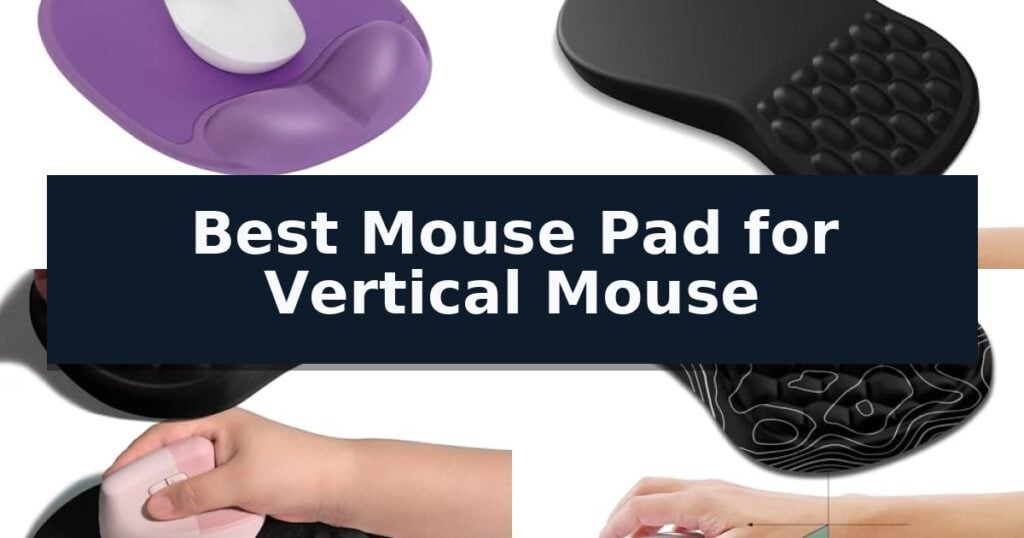
6 Best Mouse Pad for Vertical Mouse in 2026 Reviews
Quick Comparison
| Product | Best For | Key Strength | Score |
|---|---|---|---|
| Ergoevol Memory Foam Mouse Pad | Best Overall | High-density memory foam provides contoured wrist support. | 4.9 |
| YIWEI Ergonomic Mouse Pad | Neutral angle for vertical mice | 8° slope promotes a neutral wrist angle. | 4.8 |
| Armanza Ergonomic Wrist Support Pad | Pressure-relieving slope for vertical mice | Integrated memory foam provides slow-rebound support. | 4.8 |
| Hokafenle Ergonomic Mouse Pad | Contoured support for vertical mice | 8-degree ergonomic slope for improved wrist alignment. | 4.9 |
| TECKNET Ergonomic Massage Mouse Pad | Breathable support for vertical mice | 8-degree tilt for improved wrist and palm alignment. | 4.5 |
| MROCO Ergonomic Tilt Mouse Pad | Structured tilt for vertical mice | 6° ergonomic tilt promotes a more natural wrist position. | 4.3 |
How We Chose
When evaluating the best mouse pad for vertical mouse setups, we focus on how the support structure interacts with the unique vertical grip. An experienced reviewer prioritizes the transition between the wrist rest and the tracking surface, ensuring the pad provides stable, long-term comfort without hindering the specific movement patterns required by ergonomic mice.
- Wrist rest height and contour alignment for vertical mouse ergonomics
- Surface material friction for precise optical or laser tracking
- Base material stability and non-slip performance on various desk surfaces
- Durability of edges and memory foam rebound consistency
- Size footprint relative to available desk space
1 Ergoevol Memory Foam Mouse Pad — Tailored for vertical mouse alignment
Maintaining proper wrist posture during extended computer sessions is essential for comfort, and the Ergoevol Memory Foam Mouse Pad is specifically engineered to address this need. Its design focuses on providing a stable, supportive foundation for vertical and ergonomic mice, ensuring that your wrist remains in a natural, aligned position throughout the day.
The core of this pad features high-density memory foam, which contours to your wrist to help distribute pressure evenly. This material choice is intended to minimize strain during intensive tasks, whether you are gaming, studying, or managing creative projects. The surface is crafted from a smooth, low-friction PP material, which facilitates precise tracking and consistent mouse movement, while also being easy to clean.
Stability is managed by a non-slip PU base, which keeps the pad firmly anchored to most desktop surfaces, preventing unwanted shifting during use. Measuring 7.9L x 9.1W inches, the pad provides a compact footprint that fits well in various workspace configurations without sacrificing essential support area.
Beyond its functional attributes, the pad features soft lavender tones designed to add a touch of aesthetic appeal to your desk. By combining ergonomic support with a durable, easy-to-maintain surface, this accessory serves as a practical addition to any productivity-focused setup.
Best for: Users of vertical or ergonomic mice who require consistent wrist support and a smooth tracking surface for daily productivity.
Skip if: Users who prefer a large-format desk mat that covers the entire keyboard and mouse area, or those who require a fabric-based surface texture.
- High-density memory foam provides contoured wrist support.
- Smooth, low-friction PP surface ensures precise mouse tracking.
- Non-slip PU base maintains stability on desktop surfaces.
- Compact design optimized for vertical and ergonomic mice.
- Fixed size may be too small for users accustomed to oversized desk mats.
2 YIWEI Ergonomic Mouse Pad — Neutral angle for vertical mice
The YIWEI Ergonomic Mouse Pad addresses wrist discomfort through an integrated 8° slope, which is designed to shift pressure away from the wrist bone and onto the cushion. This specific angle aims to promote a more neutral hand position, a feature particularly relevant for users of vertical mice who seek to maintain ergonomic alignment during extended desk sessions.
Engineered with slow-rebound memory foam, the pad contours to the user's wrist within approximately one minute and is designed to resist flattening or sagging over time. The surface is constructed from micro-textured Lycra, which provides a balance of low friction for mouse movement and the consistency required for precise cursor control in creative or professional applications.
Practicality in a workspace is supported by the pad's 11.8 x 7.9-inch footprint, which is sized to fit alongside a full keyboard on narrower desks. The base is constructed from PU material to maintain stability on glass, wood, or laminate surfaces, while the stitched edges are included to prevent fraying at the seams.
Maintenance is straightforward, as the material can be wiped clean with a damp cloth. The design is ambidextrous, allowing it to be positioned for either left- or right-handed use, and it is compatible with wired, wireless, and vertical mouse sensors.
Best for: Users of vertical mice who require a consistent, ergonomic wrist support that maintains its shape during long periods of desk work.
Skip if: Users who require a large-format desk mat that covers the entire keyboard and mouse area, as this pad is designed for a compact, mouse-specific footprint.
- 8° slope promotes a neutral wrist angle.
- Slow-rebound memory foam resists long-term sagging.
- Stitched edges prevent fraying at the seams.
- Micro-textured Lycra surface ensures consistent tracking.
- Compact dimensions may not suit users who prefer a full-desk surface coverage.
3 Armanza Ergonomic Wrist Support Pad — Pressure-relieving slope for vertical mice
Maintaining a neutral wrist position is essential when using vertical mice, and the Armanza Ergonomic Joint Wrist Support Mouse Pad addresses this with a specialized slope design. By incorporating raised massage points, this pad encourages an adjustable wrist joint angle that helps disperse pressure during extended computer use.
The core of the Armanza Ergonomic Joint Wrist Support Mouse Pad is its thick, integrated memory foam. This material is engineered to provide a soft, supportive surface that rebounds slowly, ensuring consistent comfort without losing its shape over time. The base is constructed from a high-adhesion PU material, which offers superior stability compared to standard rubber bases, keeping the pad firmly in place on your desk.
Surface performance is handled by a professional silky Lycra fabric. This high-spun glossy material is designed to facilitate smooth mouse movement while maintaining the tracking accuracy required for precise cursor positioning. At 11.8 by 7.9 inches, the pad provides sufficient surface area for various mouse types, including vertical and ergonomic models, and is suitable for both left-handed and right-handed users.
This mouse pad is a practical solution for those seeking to improve their workspace ergonomics. Its design focuses on relieving wrist strain through its contoured slope and pressure-dispersing foam, making it a functional addition to any desk setup where a vertical mouse is used.
Best for: Users of vertical or ergonomic mice seeking a memory foam wrist rest with a sloped, pressure-relieving design.
Skip if: Users who prefer a completely flat mouse pad surface or those with limited desk space who require a smaller footprint than 11.8 by 7.9 inches.
- Integrated memory foam provides slow-rebound support.
- High-adhesion PU base prevents sliding during use.
- Ergonomic slope design with massage points for pressure relief.
- Silky Lycra fabric ensures smooth tracking and precision.
- Fixed slope design may not suit all wrist angles.
- 11.8-inch length requires a dedicated amount of desk space.
4 Hokafenle Ergonomic Mouse Pad — Contoured support for vertical mice
The Hokafenle Ergonomic Mouse Pad addresses wrist strain through a specialized 8-degree massage slope design. This structural incline is engineered to maintain the wrist in a neutral, comfortable position, which is particularly beneficial when using vertical mice that require a different hand orientation than traditional flat models.
Beyond its ergonomic shape, the pad features a high-quality, slow-rebound memory foam core that provides consistent support without losing its form over time. The integrated massage bulge is designed to improve air circulation between the user's wrist and the surface, helping to mitigate heat buildup during extended periods of computer use.
The surface is covered in a smooth Lycra fabric that facilitates accurate cursor positioning, ensuring compatibility with various mouse types including wireless options. Measuring 11.8×7.9×1.2 inches, the pad offers a generous sliding area that accommodates both right-handed and left-handed users while providing comprehensive wrist support.
Stability is managed by a high-adsorption PU base, which keeps the pad firmly anchored to the desk surface. This prevents unwanted shifting during precise movements, allowing for a stable interface between the user and their vertical mouse.
Best for: Users seeking an ergonomic, memory-foam-supported surface to alleviate wrist strain while using a vertical mouse.
Skip if: Users with extremely limited desk space who require a smaller footprint than the 11.8-inch width provided by this model.
- 8-degree ergonomic slope for improved wrist alignment.
- Slow-rebound memory foam that resists deformation.
- Massage bulge design to enhance airflow and reduce sweating.
- High-adsorption PU base for superior desk stability.
- Fixed 11.8-inch width may be too large for compact workstations.
5 TECKNET Ergonomic Massage Mouse Pad — Breathable support for vertical mice
Maintaining a neutral wrist position is essential when using a vertical mouse, and the TECKNET Ergonomic Massage Mouse Pad addresses this with a scientifically tested 8-degree tilt. This design choice aims to provide optimal palm and wrist support, which can be a significant factor in reducing discomfort during extended periods of computer use.
Beyond its ergonomic geometry, the pad incorporates built-in massage beads designed to improve air circulation and reduce arm fatigue. The surface is crafted from premium memory foam and fabric, balancing comfort with the tracking precision required for both gaming and professional office tasks.
Stability is managed by a non-slip PU base, ensuring the pad remains stationary during intensive movements. Measuring 12×8 inches, the TECKNET Ergonomic Massage Mouse Pad offers a spacious area that accommodates various mouse types, including vertical, wireless, and gaming models, for both left and right-handed users.
While this pad provides structured support, its effectiveness is influenced by individual hand shape and desk height. Users should ensure their workstation setup promotes a correct sitting posture to fully benefit from the ergonomic design, as improper positioning may limit the intended relief.
Best for: Users seeking a supportive, memory foam surface with an integrated tilt to complement a vertical mouse setup.
Skip if: Users who prefer a completely flat, non-contoured surface or those with specific desk height constraints that conflict with an 8-degree incline.
- 8-degree tilt for improved wrist and palm alignment.
- Built-in massage beads to help reduce arm fatigue.
- Spacious 12×8 inch surface compatible with various mouse types.
- Non-slip PU base for reliable stability during use.
- Ergonomic effectiveness is dependent on individual posture and desk height.
6 MROCO Ergonomic Tilt Mouse Pad — Structured tilt for vertical mice
Achieving a neutral wrist position while using a vertical mouse requires more than just a change in grip; it often necessitates a specialized surface that accounts for the unique angle of your hand. The MROCO Ergonomic Tilt Mouse Pad addresses this by incorporating a 6° ergonomic tilt directly into its design, specifically engineered to promote a more natural wrist alignment during extended computer use.
Beyond its structural tilt, this mouse pad features a structured memory foam wrist rest that prioritizes firm pressure distribution over overly soft cushioning. This design choice is intended to provide stable support for office workers, students, and gamers who spend long hours at a desk. The pad measures 11.8 x 7.8 x 1.2 inches, providing a balanced footprint that fits most standard workspaces while remaining easy to maintain with a simple damp cloth.
The surface of the MROCO Ergonomic Tilt Mouse Pad is crafted from a smooth Lycra fabric, which is optimized for consistent tracking with most optical and laser mice. To ensure stability during use, the underside is equipped with an anti-slip micro-texture base that keeps the pad firmly in place on various desk surfaces. The unit is also constructed using recycled post-consumer polyester, reflecting a focus on material sourcing.
For those transitioning to an ergonomic setup, it is important to note that the structured nature of the memory foam may require a short adjustment period. The pad is designed for reliable, everyday support and includes an 18-month after-sales service to provide additional peace of mind for the user.
Best for: Users seeking structured wrist support and a natural hand angle specifically tailored for vertical mouse usage.
Skip if: Users who prefer ultra-soft, plush wrist rests or those with extremely limited desk space who require a smaller footprint.
- 6° ergonomic tilt promotes a more natural wrist position.
- Structured memory foam provides firm, stable pressure distribution.
- Smooth Lycra surface ensures consistent tracking for optical and laser mice.
- Anti-slip micro-texture base prevents unwanted movement during use.
- Structured support may require a short adjustment period for new users.
- Fixed tilt design is not adjustable for different hand sizes or preferences.
Best Mouse Pad for Vertical Mouse Buying Guide
Understanding Vertical Mouse Ergonomics
Vertical mice are designed to keep the forearm in a neutral position, reducing the twisting of the radius and ulna bones. A compatible mouse pad must support this alignment by providing a wrist rest that does not force the hand back into a pronated, flat position.
Look for pads with a sloped or contoured design that accommodates the side of the hand. If the wrist rest is too high or too stiff, it may create new pressure points rather than relieving existing discomfort.
Surface Friction and Tracking Accuracy
The tracking surface material determines how easily the mouse glides. Smooth, low-friction surfaces like polypropylene or high-quality Lycra are generally preferred for vertical mice, as they allow for fluid movement without requiring excessive force from the hand.
Ensure the surface is compatible with your specific mouse sensor. While most modern optical and laser sensors perform well on standard fabric or plastic pads, textured surfaces can occasionally cause tracking jitter at high DPI settings.
Stability and Base Material
A non-slip base is essential for maintaining a consistent workspace. PU or rubberized bases provide the necessary grip to prevent the pad from sliding during rapid or repetitive movements, which is particularly important if you use a high-sensitivity setting.
Test the pad on your specific desk material, such as glass, laminate, or wood. Some bases offer better adhesion to smooth surfaces, while others are designed for more textured desk materials.
Memory Foam and Support Longevity
High-density memory foam is the industry standard for wrist support because it conforms to the user's anatomy. However, the quality of the foam determines how quickly it will lose its shape or develop permanent indentations over time.
Consider pads that feature slow-rebound properties. This indicates a higher density foam that will provide consistent support throughout the workday rather than bottoming out after a few months of use.
Size and Desk Integration
The footprint of the mouse pad should match your available desk real estate and usage style. Larger pads offer more room for broad movements, which can be beneficial for graphic design or gaming, while compact pads are better suited for crowded office environments.
Measure your desk space before purchasing, keeping in mind that vertical mice often require a slightly different clearance than traditional flat mice. Ensure the pad does not conflict with your keyboard tray or other peripherals.
Frequently Asked Questions
Do I really need a special mouse pad for a vertical mouse?
While a standard pad can work, a pad designed for vertical mice often features a specific slope or contour that better accommodates the handshake grip, helping to maintain the ergonomic benefits of your mouse.
How do I clean my memory foam mouse pad?
Most fabric-topped memory foam pads can be wiped down with a damp cloth and a mild soap solution. Avoid soaking the foam, as it can take a long time to dry and may degrade the material.
Will a vertical mouse pad work with a left-handed setup?
Many ergonomic mouse pads are symmetrical or designed to be rotated, making them suitable for both left and right-handed users. Check the product dimensions and shape to ensure it fits your specific setup.
Why does my wrist still hurt after using an ergonomic pad?
Ergonomic accessories are meant to support, not fix, poor posture. Ensure your desk height, chair adjustment, and overall sitting posture are also optimized for your body to get the full benefit of the equipment.
How long should a memory foam wrist rest last?
With daily use, high-quality memory foam should maintain its shape for at least 12 to 18 months. If you notice it staying compressed or losing its rebound, it may be time for a replacement.
Conclusion: Our Top Pick
Our top pick is Ergoevol Memory Foam Mouse Pad. Choosing the right mouse pad for a vertical mouse is a critical step in optimizing your ergonomic workstation. By focusing on high-density materials and appropriate slope angles, you can significantly improve your comfort during long hours of computer use.
Always prioritize the fit between your specific mouse shape and the pad's wrist rest. A well-matched combination will provide the necessary support to reduce strain and keep your workspace efficient and comfortable.