Logitech G502 HERO Gaming Mouse earns our recommendation for the Best Multi-Button Mouse because its combination of 11 programmable buttons and a high-precision sensor provides a versatile foundation for both productivity and gaming.
Selecting a mouse with extra inputs requires balancing the physical layout of buttons with the software flexibility needed to map them effectively. For users who prioritize specialized layouts, the Razer Naga V2 HyperSpeed Wireless MMO Gaming Mouse offers an extensive grid for complex macro management, while the Corsair Scimitar RGB Elite Gaming Mouse provides an adjustable thumb slider to ensure those buttons remain accessible regardless of hand size.
Beyond the button count, experienced users should evaluate how the mouse fits their primary grip style and whether they require wireless freedom or the reliability of a wired connection. We focus on how these hardware features translate into daily efficiency and long-term comfort.
For those exploring the broader market of Best Multi-Button Mice, it is helpful to compare how different button configurations impact daily comfort. If you are specifically looking for a Best Multi Button Gaming Mouse, consider how wireless connectivity affects your desk setup and charging habits.
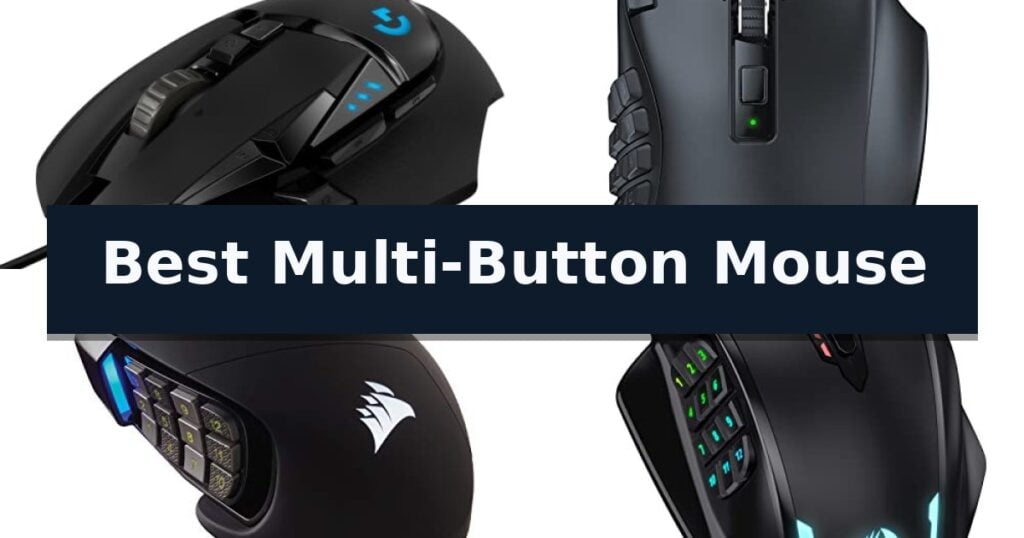
10 Best Multi-Button Mouse in 2026 Reviews
Quick Comparison
| Product | Best For | Key Strength | Score |
|---|---|---|---|
| Logitech G502 HERO Gaming Mouse | Best Overall | HERO 25K sensor for high-precision tracking. | 4.9 |
| Razer Naga V2 HyperSpeed Gaming Mouse | Ultimate MMO Command Center | 19 programmable buttons for complex macro management | 4.4 |
| Corsair Scimitar RGB Elite Gaming Mouse | Adjustable Thumb Grid Layout | Patented Key Slider Control System for personalized button positioning. | 4.5 |
| Redragon M908 Wired Gaming Mouse | Budget-Friendly Macro Powerhouse | 18 programmable buttons for extensive macro and keybinding customization. | 4.6 |
| ASUS ROG Spatha X Gaming Mouse | Premium Wireless MMO Performance | 12 programmable buttons optimized for complex MMO/MOBA macros | 4.8 |
| UtechSmart Venus Pro Gaming Mouse | Wireless Freedom for MMOs | 16 fully programmable buttons for complex macro assignments. | 4.6 |
| Logitech M720 Triathlon Wireless Mouse | Best for Multi-Device Workflows | Multi-device pairing for up to three computers or tablets. | 4.3 |
| Strikonx SM809 Pro Gaming Mouse | Modular Side Panel Versatility | Modular side panels allow for quick switching between button configurations. | 4.7 |
| TECKNET Wireless Mouse | Productivity Focused Side Scrolling | Side-mounted scroll wheel for efficient horizontal navigation. | 4.5 |
| Logitech G305 LIGHTSPEED Gaming Mouse | Compact Wireless Precision | Ultra-fast LIGHTSPEED wireless connectivity for lag-free performance. | 4.5 |
How We Chose
When evaluating a multi-button mouse, we prioritize the physical ergonomics and the software interface required to manage complex inputs. An experienced reviewer assesses how these devices handle rapid, repetitive tasks, ensuring that additional buttons are placed intuitively to reduce strain and improve execution speed during demanding workflows or gaming sessions.
- Button placement and accessibility for different hand sizes
- Software compatibility for macro recording and remapping
- Sensor tracking accuracy and DPI adjustability
- Ergonomic shape and weight distribution
- Connectivity options including wired, 2.4GHz wireless, and Bluetooth
1 Logitech G502 HERO Gaming Mouse — Iconic Customizable Control
Precision control is the hallmark of the Logitech G502 HERO Wired Gaming Mouse, a device engineered for users who demand granular customization in their peripheral setup. At the heart of this mouse lies the HERO 25K sensor, which provides tracking up to 25,600 DPI without the interference of smoothing, filtering, or acceleration, ensuring that every movement is translated with high fidelity.
The physical design emphasizes adaptability through its adjustable weight system. Users can arrange up to five 3.6g weights to achieve a personalized balance and feel that matches their specific handling style. This level of physical tuning is complemented by the mechanical switch button tensioning system, which utilizes metal pivot hinges to provide a crisp, tactile click response across the primary buttons.
Functionality is further expanded by 11 programmable buttons and a dual-mode hyper-fast scroll wheel, allowing for complex command mapping suited to diverse workflows or gaming scenarios. The integration of LIGHTSYNC technology enables fully customizable RGB lighting, which can be synchronized with other software-supported activities to create a cohesive aesthetic.
Designed for durability and performance, this wired peripheral includes on-board memory to save settings directly to the device. With its ergonomic form factor and robust feature set, it serves as a versatile tool for those requiring a high degree of input customization.
Best for: Users who require extensive button mapping and physical weight customization for precision-oriented tasks.
Skip if: Users who prefer a wireless workspace or those who find a high-button count design overly complex for standard daily navigation.
- HERO 25K sensor for high-precision tracking.
- Adjustable weight system for personalized balance.
- 11 programmable buttons for extensive customization.
- Mechanical switch tensioning for consistent, crisp clicks.
- Wired-only connection limits desk placement flexibility.
- Complex button layout may require a learning curve for new users.
2 Razer Naga V2 HyperSpeed Gaming Mouse — Ultimate MMO Command Center
The Razer Naga V2 HyperSpeed Wireless MMO Gaming Mouse is built for complex command execution, featuring 19 programmable buttons that allow users to map essential actions and advanced macros directly to their fingertips. This design is focused on providing a comprehensive control center for players who require quick access to a high volume of inputs during intensive gaming sessions.
Performance is driven by the Focus Pro 30K Optical Sensor, which is engineered for tracking across various surfaces, including glass. The mouse incorporates Razer HyperScroll Technology, offering users the ability to toggle between free-spin mode for rapid scrolling and tactile mode for precise, stepped feedback. Connectivity options include Razer HyperSpeed Wireless (2.4 GHz) for low-latency performance and Bluetooth for extended usage.
Durability and power management are key components of its construction. The device utilizes Mechanical Mouse Switches Gen-2 with gold-plated contact points, rated for a lifespan of up to 60 million clicks to resist degradation. For extended play, the mouse supports up to 400 hours of battery life on Bluetooth or 250 hours using the low-latency HyperSpeed connection.
To ensure optimal performance, users can utilize the Razer Synapse App to customize settings and accuracy. The mouse measures 4.71 inches in length and 2.96 inches in width, providing a specific ergonomic footprint designed to accommodate its button layout while maintaining a weight of approximately 0.21 pounds.
Best for: Gamers who require a high number of programmable inputs and macros for MMO-style gameplay.
Skip if: Users who prefer a lightweight, minimalist mouse design or those who do not require extensive button mapping.
- 19 programmable buttons for complex macro management
- Dual-mode wireless connectivity with low-latency 2.4GHz and Bluetooth options
- Long battery life reaching up to 400 hours
- High-precision sensor capable of tracking on glass surfaces
- Larger physical footprint due to the multi-button configuration
- Requires battery replacement rather than integrated rechargeable power
3 Corsair Scimitar RGB Elite Gaming Mouse — Adjustable Thumb Grid Layout
The Corsair Scimitar RGB Elite Gaming Mouse is defined by its Patented Key Slider Control System, which allows users to physically reposition the 12-button side grid to match their specific grip style and hand size. This mechanical adjustment ensures that every button remains within reach during intense gaming sessions, providing a tailored ergonomic experience that is rare in high-density input devices.
Designed for complex macro management, the mouse features 17 fully programmable buttons that are ideal for executing frequent actions in MMOs and MOBAs. Under the hood, it utilizes a native 18,000 DPI optical sensor powered by a custom PixArt PMW3391, which supports granular tracking adjustments in 1 DPI increments to suit individual sensitivity preferences.
Durability is a core focus of the construction, evidenced by the inclusion of 50 million click-rated Omron switches and a robust, braided cable. These components are housed within a comfortable contoured shape that includes a dedicated right-side finger rest, intended to reduce fatigue during extended periods of use.
Compatibility is broad, supporting PC, Mac, PS5, PS4, and Xbox platforms. Users can manage complex configurations through iCUE software, which provides the interface for mapping macros and customizing the lighting profiles across the device.
Best for: MMO and MOBA gamers who require extensive macro mapping and a highly adjustable side-button layout.
Skip if: Users who prefer a lightweight, minimalist mouse design or those who do not require a high volume of programmable side buttons.
- Patented Key Slider Control System for personalized button positioning.
- High-precision 18,000 DPI optical sensor with 1 DPI adjustment steps.
- 17 fully programmable buttons for complex macro execution.
- Durable 50 million click-rated Omron switches.
- Heavier footprint due to the complex side-grid and button array.
- Requires iCUE software for full customization of advanced features.
4 Redragon M908 Wired Gaming Mouse — Budget-Friendly Macro Powerhouse
The Redragon M908 Wired Gaming Mouse centers its design around a high-precision Pixart PAW3327 sensor, offering adjustable sensitivity up to 12,400 DPI to accommodate varying gaming and productivity requirements. This wired peripheral provides a stable, lag-free connection via a 6ft braided-fiber cable, ensuring consistent input during high-intensity tasks.
Equipped with 18 programmable buttons, including 12 dedicated MMO side buttons, this mouse allows for extensive macro remapping to streamline complex workflows or in-game actions. Users can manage these configurations through five distinct memory profiles, each identifiable by a specific RGB backlight color. The integrated lighting system supports 16.8 million color options and can be disabled if a more understated aesthetic is preferred.
Physical customization is a core component of the Redragon M908 Wired Gaming Mouse, which includes an 8-piece weight tuning set. By adjusting the weight using the 2.4g increments, users can modify the mouse's feel to suit their personal ergonomic preference. The chassis is supported by durable TEFLON feet pads designed to facilitate smooth movement across various surfaces.
Compatibility is broad, supporting programmable features on Windows 2000 through Windows 10, while maintaining standard functionality on Mac OS. The construction emphasizes durability with a gold-plated USB connector and a reinforced braided cable, making it a functional tool for users who prioritize button density and hardware-level customization.
Best for: Gamers and power users who require a high volume of programmable side buttons and physical weight adjustment.
Skip if: Users who prefer a lightweight, minimalist mouse or those who require wireless connectivity for their workspace.
- 18 programmable buttons for extensive macro and keybinding customization.
- 8-piece weight tuning set allows for personalized balance and feel.
- High-precision sensor with adjustable DPI up to 12,400.
- Five memory profiles with dedicated color-coded lighting for quick switching.
- Wired-only connection limits desk placement flexibility compared to wireless models.
- Aggressive ergonomic design may not suit all hand sizes or grip styles.
5 ASUS ROG Spatha X Gaming Mouse — Premium Wireless MMO Performance
The ASUS ROG Spatha X Wireless MMO Gaming Mouse distinguishes itself with a specialized 12-button layout designed specifically for the complex inputs required in MMO and MOBA titles. By integrating six side buttons into its ergonomic frame, this peripheral provides direct access to macros and abilities, allowing for more streamlined control during intense gameplay sessions.
Performance is driven by a 19,000 DPI optical sensor that maintains high tracking accuracy across both wired and wireless modes. Users can choose between a low-latency 2.4GHz RF connection or a standard USB-C wired connection, ensuring consistent responsiveness. The inclusion of a magnetic charging dock simplifies power management, offering up to 67 hours of battery life with RGB lighting disabled, while a quick 15-minute charge provides up to 12 hours of use.
Durability and customization are central to the design, featuring hot-swappable ROG Micro Switches. These switches are rated for a 70-million-click lifespan, and the push-fit socket design allows users to replace them easily to adjust click force or extend the hardware's longevity. The mouse also includes a flexible ROG Paracord cable to reduce drag during wired operation.
Practicality is further enhanced by the DPI On-The-Scroll feature, which allows for sensitivity adjustments on the fly without the need for additional software. The package comes complete with a travel pouch, replacement switches, and a screwdriver, providing a comprehensive set of tools for maintenance and portability.
Best for: Elite MMO and MOBA gamers who require extensive macro customization and a high-performance, ergonomic wireless interface.
Skip if: Users who prefer a lightweight, minimalist mouse or those with smaller hand sizes may find the large, multi-button design of this model cumbersome.
- 12 programmable buttons optimized for complex MMO/MOBA macros
- Hot-swappable switch sockets for easy customization and maintenance
- Dual-mode connectivity featuring low-latency 2.4GHz wireless
- Magnetic charging dock for convenient power management
- Large, heavy ergonomic footprint may not suit all grip styles
- Complex button layout requires a learning curve for non-MMO tasks
6 UtechSmart Venus Pro Gaming Mouse — Wireless Freedom for MMOs
The UtechSmart Venus Pro Wireless MMO Gaming Mouse distinguishes itself through a high-capacity 1000mA battery that supports up to 70 hours of wireless gameplay on a single charge. Designed for complex command execution, this device features 16 fully programmable buttons, including 12 thumb-grip buttons angled specifically for ergonomic thumb-tip access.
Performance is driven by a custom PixArt PMW3335 optical sensor, offering an adjustable DPI range from 100 to 16,000 and a 1000 Hz polling rate. The mouse utilizes 2.4 GHz wireless technology to minimize latency, providing a stable connection within a 10-meter range, while also supporting a 1.5m wired connection for professional-level reliability.
The chassis is engineered for extended sessions, featuring a grinding coating on the surface to improve grip friction and provide a sweat-resistant, skin-friendly texture. To manage power efficiency, the mouse includes an auto-sleeping mode and low-power consumption settings, with battery monitoring accessible through the proprietary UtechSmart software.
This device balances customization with comfort, allowing users to map complex macros to reduce response times during intensive gaming. While the extensive button layout provides significant utility for MMO players, the ergonomic design and specialized surface coating ensure the mouse remains comfortable during long-duration use.
Best for: MMO gamers who require extensive macro customization and long wireless battery life.
Skip if: Users who prefer a minimalist, lightweight mouse design without the complexity of a 16-button layout.
- 16 fully programmable buttons for complex macro assignments.
- 70-hour battery life with power-saving auto-sleep modes.
- High-precision 16,000 DPI optical sensor for accurate tracking.
- Ergonomic sweat-resistant coating for improved grip and comfort.
- High button count may require a learning curve for non-MMO users.
7 Logitech M720 Triathlon Wireless Mouse — Best for Multi-Device Workflows
Managing multiple devices simultaneously requires hardware that can keep pace with shifting workflows. The Logitech M720 Triathlon Wireless Mouse addresses this by allowing users to pair with up to three devices, enabling seamless transitions between computers, laptops, or tablets with the simple touch of a button.
Beyond its multi-device capability, this mouse is engineered for sustained use. It features a sculpted design with a rubber body intended for a comfortable palm grip. The device is powered by a single battery that provides up to 24-month battery life, reducing the frequency of maintenance.
Productivity is further enhanced through Logitech FLOW technology, which allows for the movement of cursors, text, and files across multiple computers. Users can also utilize the 6 customizable buttons to assign specific shortcuts, tailoring the interface to their individual workflow requirements via Logitech software.
The hardware includes dual connectivity options, supporting both Bluetooth and the included USB-A Unifying receiver. The latter allows for the connection of up to 6 compatible peripherals to a single port. Additionally, the mouse features hyper-fast scrolling, providing the ability to navigate long documents quickly with an instant-stop function and a switchable click-to-click mode.
Best for: Users who frequently switch between multiple computers, laptops, or tablets and require a single, ergonomic input device to manage their workflow.
Skip if: Users who require an ambidextrous design or a specialized gaming mouse with a higher button count for complex macro configurations.
- Multi-device pairing for up to three computers or tablets.
- Long-lasting 24-month battery life for reduced maintenance.
- Logitech FLOW support for cross-computer file and text transfer.
- Customizable buttons for personalized productivity shortcuts.
- Right-handed ergonomic design limits suitability for left-handed users.
8 Strikonx SM809 Pro Gaming Mouse — Modular Side Panel Versatility
The Strikonx SM809 Pro Gaming Mouse distinguishes itself through a highly modular design, featuring four interchangeable magnetic side panels that allow users to toggle between a compact 3-button layout and a dense 9-button thumb grid. This flexibility, combined with its 16 fully programmable buttons, provides a tailored interface for complex macro management in MMORPGs and productivity workflows.
Engineered for high-performance tracking, this device utilizes the PAW3311 optical sensor, which supports an adjustable sensitivity of up to 24000 DPI. The chassis features a breathable hollow honeycomb shell, a design choice intended to reduce overall weight and improve airflow during extended sessions. To ensure versatility across different environments, the mouse supports tri-mode connectivity, including 2.4GHz wireless, Bluetooth 5.0, and a USB-C wired connection.
Usability is enhanced by a web-based configuration portal, which eliminates the need for proprietary software installations. Users can remap keys, adjust DPI settings, and manage RGB lighting profiles directly through the browser, with all configurations stored on the mouse's onboard memory. This plug-and-play capability ensures that custom settings remain active when moving between different computers or operating systems.
The ergonomic right-hand contour is built to accommodate larger hands, aiming to reduce wrist strain during prolonged use. Power management is handled by a 1000mAh battery, supplemented by an intelligent power-saving mode that dims the RGB lighting when the device is idle to extend runtime. The unit is compatible with Windows, Mac, Linux, and mobile devices, offering a broad range of application for both gaming and daily computing.
Best for: MMORPG players and power users who require a highly customizable button layout and the flexibility of tri-mode wireless connectivity.
Skip if: Users with small hands or those who prefer a symmetrical, ambidextrous mouse design may find the ergonomic right-hand contour and larger frame less comfortable.
- Modular side panels allow for quick switching between button configurations.
- Tri-mode connectivity supports seamless switching between wireless, Bluetooth, and wired modes.
- Web-based configuration removes the requirement for installing heavy driver software.
- High-precision PAW3311 sensor provides adjustable DPI up to 24000.
- Right-handed ergonomic shape limits suitability for left-handed users.
- Honeycomb shell design may require more frequent cleaning to prevent dust accumulation inside the frame.
9 TECKNET Wireless Mouse — Productivity Focused Side Scrolling
Navigating complex workflows often requires more than a standard mouse, and the TECKNET Wireless Mouse addresses this with a dedicated side-mounted scroll wheel designed for horizontal navigation. This specific feature allows users to move through wide spreadsheets, design canvases, or expansive web pages with a simple flick, significantly reducing the need for repetitive wrist movements during extended work sessions.
Beyond its specialized scrolling, the device offers seamless 3-device switching, allowing users to toggle between two Bluetooth 5.3 connections and a 2.4GHz USB-A receiver with the press of a single button. This flexibility makes it a practical choice for multi-computer setups, enabling efficient transitions without the need to re-pair hardware.
Precision is managed through a high-performance chip that supports 6-level DPI control, ranging from 800 to 4800 DPI. An integrated LED indicator provides visual confirmation of the current setting, ensuring the cursor speed remains consistent with the task at hand. The mouse is also built for quiet environments, utilizing silent-click switches to minimize noise in shared workspaces.
Maintenance and longevity are addressed through a rechargeable internal battery that provides up to three months of use on a single charge, based on two hours of daily operation. The unit includes an auto-sleep function that triggers after 10 minutes of inactivity to preserve power, and it is backed by a 36-month warranty for registered users.
Best for: Professionals who frequently navigate wide documents or spreadsheets and need to manage multiple devices simultaneously.
Skip if: Users who require programmable buttons for custom macros, as all seven buttons on this model are fixed in their functionality.
- Side-mounted scroll wheel for efficient horizontal navigation.
- Multi-device connectivity supporting up to three simultaneous connections.
- Rechargeable battery with long-lasting performance.
- Silent-click design suitable for quiet office environments.
- Non-programmable buttons limit customization options.
- Side buttons are not supported on macOS systems.
10 Logitech G305 LIGHTSPEED Gaming Mouse — Compact Wireless Precision
The Logitech G305 LIGHTSPEED Wireless Gaming Mouse prioritizes high-performance responsiveness through its proprietary LIGHTSPEED wireless technology, which maintains a consistent 1 ms report rate for competition-level reliability. This mouse is engineered for users who require precision without the physical constraints of a wired connection, utilizing the HERO optical sensor to achieve up to 12,000 DPI and 400 IPS tracking precision.
Designed with efficiency in mind, the device features a power-optimized architecture that delivers up to 250 hours of continuous gameplay on a single AA battery. Users can further extend this longevity to up to 9 months by toggling the Endurance mode via the Logitech G HUB software, making it a practical choice for both intensive gaming sessions and extended productivity tasks.
The physical construction balances durability with portability, weighing only 3.4 oz. Its compact frame includes built-in nano receiver storage, allowing for easy transport between workstations or gaming setups. With 6 programmable buttons and on-board memory, the mouse allows for customized configurations that remain accessible even when moving between different computer systems.
While the mouse offers significant flexibility, its reliance on a single AA battery means users must manage physical battery replacements rather than utilizing an integrated rechargeable cell. The lightweight mechanical design is tailored for maneuverability, though those preferring a heavier, more substantial feel in their hand may find the 3.4 oz weight profile distinct from traditional desktop mice.
Best for: Users seeking a highly portable, lag-free wireless mouse that balances high-DPI performance with long-term battery efficiency.
Skip if: Users who prefer a rechargeable internal battery system or require a heavier, more ergonomic chassis for long-duration desktop use.
- Ultra-fast LIGHTSPEED wireless connectivity for lag-free performance.
- HERO sensor providing up to 12,000 DPI and high power efficiency.
- Lightweight, compact design with integrated nano receiver storage for portability.
- Extended battery life up to 250 hours in performance mode.
- Requires manual AA battery replacement rather than integrated charging.
- Lightweight 3.4 oz build may not suit users who prefer heavier peripherals.
Best Multi-Button Mouse Buying Guide
Button Layout and Ergonomics
The primary advantage of a multi-button mouse is the ability to offload complex commands from the keyboard to the hand. Consider whether you prefer a traditional cluster of side buttons or a dense thumb grid, as the latter requires more precise thumb movement but offers significantly more inputs.
Ergonomics play a critical role in long-term comfort. A well-sculpted body supports the palm and fingers, reducing the risk of fatigue during extended use. Look for models that offer textured grips or adjustable weight systems to tailor the feel to your specific preference.
Software and Macro Customization
Hardware is only as effective as the software driving it. A robust configuration utility allows you to remap buttons, create complex macros, and save profiles directly to the mouse's onboard memory, ensuring your settings remain consistent across different computers.
Check if the software supports profile switching based on the active application. This feature allows the mouse to automatically change button assignments when you move from a productivity suite to a creative application or a game, maximizing your efficiency.
Sensor Precision and Tracking
High-performance sensors are essential for consistent tracking across various surfaces. Look for optical sensors that offer adjustable DPI settings, allowing you to fine-tune the cursor speed to match your monitor resolution and personal preference for sensitivity.
Advanced sensors often include features like zero smoothing or acceleration, which provide a more predictable and direct relationship between your hand movement and the cursor on screen. This is particularly important for tasks requiring high precision.
Connectivity and Battery Life
Wireless technology has evolved to offer latency that is virtually indistinguishable from wired connections. If you choose a wireless model, verify the battery life and the charging method, as frequent downtime for charging can disrupt your workflow.
Wired mice offer the benefit of never needing to charge and are generally lighter, which some users prefer for fast-paced tasks. However, wireless options provide a cleaner desk setup and greater freedom of movement, especially if you use multiple devices.
Build Quality and Durability
Since a multi-button mouse is often used for repetitive clicking, the quality of the switches is paramount. Omron or proprietary mechanical switches are typically rated for millions of clicks, providing a tactile, consistent response that resists degradation over time.
Consider the construction of the scroll wheel and side buttons. A metal-reinforced scroll wheel or high-quality plastic housing ensures that the device can withstand the rigors of daily use without developing loose parts or failing inputs.
Frequently Asked Questions
Can I use a gaming mouse for office work?
Yes, many gaming mice are excellent for office work because their high-precision sensors and programmable buttons can be mapped to shortcuts in spreadsheet or design software.
Do I need special software to program the buttons?
Most multi-button mice require the manufacturer's software to fully customize button assignments and macros, though some models save these settings to onboard memory for use on other machines.
How do I know which button layout is right for me?
If you need only a few extra shortcuts, a mouse with 2-4 side buttons is usually sufficient. For complex macros or MMO gaming, a 12-button thumb grid is more effective.
Are wireless multi-button mice reliable?
Modern wireless technology, such as 2.4GHz dongles, provides a stable, low-latency connection that is comparable to wired mice for almost all professional and gaming applications.
What is the benefit of an adjustable weight system?
Adjustable weights allow you to change the physical feel of the mouse, helping you achieve a balance that feels comfortable for your specific grip and movement style.
Conclusion: Our Top Pick
Our top pick is Logitech G502 HERO Gaming Mouse. Choosing the right multi-button mouse depends on your specific need for input density versus ergonomic simplicity. While models with dense thumb grids offer the most command options, standard multi-button designs often provide a more comfortable balance for general use.
Prioritize the software interface and button placement that aligns with your most frequent tasks. By matching these features to your workflow, you can significantly reduce keyboard reliance and improve your overall efficiency.