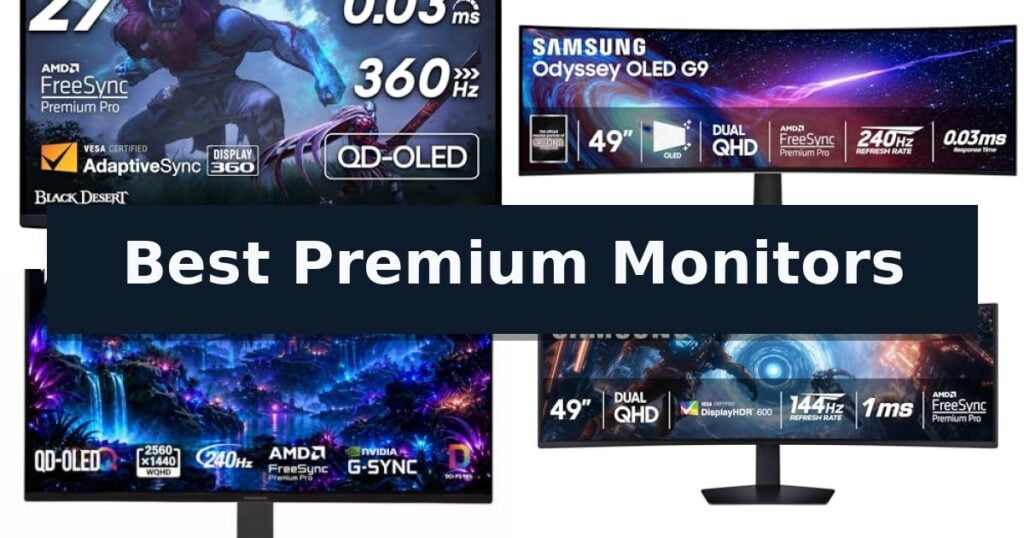
Alienware AW2725DF OLED Gaming Monitor earns our recommendation for the Best Premium Monitors thanks to its combination of a 360Hz refresh rate and QD-OLED panel technology, which provides exceptional motion clarity and color depth for competitive gaming.
For those prioritizing expansive screen real estate, the Samsung Odyssey G93SC offers an immersive ultrawide experience, while the Dell S2725QC provides a sharp 4K resolution tailored for productivity and color-critical tasks.
Selecting a high-end display requires balancing technical specifications like panel type, resolution, and connectivity against your specific workspace needs. While OLED panels excel in contrast and response times, IPS alternatives often provide greater versatility for mixed-use environments.
To complete your high-end setup, pairing your display with the Best Premium Computer Keyboards ensures a consistent, high-performance experience across your entire workstation.
10 Best Premium Monitors in 2026 Reviews
Quick Comparison
| Product | Best For | Key Strength | Score |
|---|---|---|---|
| Alienware AW2725DF OLED Gaming Monitor | Best Overall | 360Hz refresh rate for ultra-smooth motion. | 4.9 |
| Samsung Odyssey G93SC Gaming Monitor | Expansive Ultrawide QD-OLED Immersion | QD-OLED technology provides superior color accuracy and intense contrast. | 4.6 |
| Acer Predator X27U W1 Gaming Monitor | Competitive Esports OLED Speed | 0.03ms response time for minimal ghosting. | 4.4 |
| Samsung Odyssey G9 G91F Gaming Monitor | Panoramic 1000R Curved Workspace | Ultra-wide 32:9 aspect ratio provides a seamless, bezel-free panoramic view. | 4.8 |
| MSI MAG 272URDFA E16 Gaming Monitor | Versatile Dual-Mode Resolution | Dual Mode resolution and refresh rate switching | 4.6 |
| Dell S2725QC 4K Monitor | Vibrant 4K Productivity Essential | 120Hz refresh rate with AMD FreeSync Premium for smooth motion. | 4.8 |
| LG UltraGear 27G610A-B Gaming Monitor | Fluid 200Hz IPS Performance | 200Hz native refresh rate for fluid motion | 4.7 |
| LG UltraGear 34G600A-B Gaming Monitor | Immersive Ultrawide Curved Display | 160Hz refresh rate for fluid motion | 4.6 |
| Acer Nitro KG271U Z2 Gaming Monitor | Ultra-Fast 275Hz Refresh Rate | Ultra-fast 275Hz refresh rate for smooth motion | 4.4 |
| ASUS TUF Gaming VG259QMR5A Monitor | Pro-Level 310Hz Motion Clarity | 310Hz overclocked refresh rate for ultra-smooth motion. | 4.5 |
How We Chose
Evaluating the best premium monitors requires a focus on how display technology impacts real-world usage. We prioritize panels that offer high refresh rates for fluid motion alongside precise color reproduction for professional tasks. By analyzing connectivity options and ergonomic stand designs, we identify which models provide the most reliable performance for demanding users.
- Panel Technology (OLED vs. IPS)
- Refresh Rate and Response Time
- Color Gamut Coverage and Delta E Accuracy
- Resolution and Pixel Density
- Connectivity and Ergonomic Adjustability
1 Alienware AW2725DF OLED Gaming Monitor — Stunning QD-OLED Color Clarity
The Alienware AW2725DF OLED Gaming Monitor leverages advanced QD-OLED technology to achieve exceptional color depth and visual clarity. By combining this panel tech with a sharp QHD (2560×1440) resolution, the display produces vibrant, highly detailed imagery that is well-suited for high-end gaming environments where visual fidelity is a priority.
Engineered for high-speed performance, the monitor features a 360Hz refresh rate that provides fluid motion, allowing players to track fast-moving objects with precision. This speed is complemented by a 0.03 ms gray-to-gray response time, which is designed to virtually eliminate ghosting and blurring during intense, rapid-motion sequences, ensuring that the display keeps pace with competitive gameplay demands.
The integration of AMD FreeSync Premium Pro and VESA AdaptiveSync helps maintain tear-free and stutter-free visuals by synchronizing the monitor's refresh rate with the graphics card output. Furthermore, the infinite contrast ratio and VESA DisplayHDR True Black 400 certification allow for deep, true-to-life black levels and bright highlights, while the DCI-P3 99.3% color coverage ensures accurate, rich color reproduction for immersive gaming.
Designed for long-term usability, the unit offers comprehensive height, tilt, swivel, and pivot adjustability to accommodate various ergonomic setups. Users are also supported by a 3-Year Advanced Exchange Service that explicitly includes coverage for OLED burn-in, providing a significant layer of protection for the display's longevity.
While the monitor excels in speed and color, potential buyers should consider the trade-off regarding resolution. The QHD resolution provides a balance between performance and detail, but users who specifically require a 4K display for professional productivity or high-resolution media editing may find the pixel density lower than their requirements.
Best for: Competitive gamers who prioritize ultra-high refresh rates and superior color accuracy.
Skip if: Users who require a 4K resolution display for professional productivity or high-resolution media editing.
- 360Hz refresh rate for ultra-smooth motion.
- 0.03 ms response time virtually eliminates ghosting.
- QD-OLED technology provides infinite contrast and rich colors.
- 3-year warranty includes coverage for OLED burn-in.
- QHD resolution may be lower than desired for users seeking 4K detail.
2 Samsung Odyssey G93SC Gaming Monitor — Expansive Ultrawide QD-OLED Immersion
The Samsung Odyssey G93SC Gaming Monitor centers on a 49-inch QD-OLED panel, delivering a 1800R curvature that wraps around the field of vision to provide an immersive, ultrawide viewing experience. This display is engineered for high-performance gaming, featuring a 240Hz refresh rate and a 0.03ms response time to maintain visual clarity during rapid motion.
Equipped with DisplayHDR True Black 400, the monitor achieves deep contrast and true blacks by eliminating pixel light bleed. The integration of G-Sync compatibility and FreeSync Premium Pro ensures that the GPU and panel remain synchronized, effectively reducing screen-lag and image tearing during intense sequences.
Connectivity is handled through HDMI 2.1 and DisplayPort inputs, supported by an integrated USB hub for peripheral management. The Auto Source Switch plus feature automates the detection of active devices, allowing for seamless transitions between inputs without manual menu navigation.
Designed for multitasking, the monitor includes a Picture-by-Picture mode that splits the screen to display two separate inputs at their native resolution. The unit features a modern metal finish with a slim 4.5mm profile at its thinnest point, supported by an adjustable stand.
Best for: Gamers and power users requiring an expansive, high-refresh-rate ultrawide display for immersive gaming and side-by-side multitasking.
Skip if: Users with limited desk space or those who prefer a traditional 16:9 aspect ratio for standard productivity tasks.
- QD-OLED technology provides superior color accuracy and intense contrast.
- 240Hz refresh rate and 0.03ms response time support competitive gaming speeds.
- Ultrawide 49-inch display with 1800R curvature enhances field of view.
- Picture-by-Picture functionality allows for efficient dual-input multitasking.
- Large physical footprint requires significant desk space.
- Ultrawide aspect ratio may not be optimized for all software applications.
3 Acer Predator X27U W1 Gaming Monitor — Competitive Esports OLED Speed
Competitive gaming demands hardware that keeps pace with rapid movements, and the Acer Predator X27U W1 Gaming Monitor addresses this with a high-speed 240Hz refresh rate and a 0.03ms (G to G) response time. By pairing this speed with an OLED panel, the display minimizes motion blur and ghosting, ensuring fluid transitions during intense gameplay.
The monitor features a 26.5-inch WQHD (2560×1440) quantum dot OLED display, which utilizes true 10-bit color to provide high contrast and deep blacks. This visual performance is further supported by a DCI-P3 99% color gamut and HDR10 support, allowing for vibrant, accurate color reproduction that brings game environments to life.
Designed for competitive stability, the unit incorporates AMD FreeSync Premium and is NVIDIA G-Sync Compatible to synchronize frame rates with the graphics card, effectively reducing screen tearing. The ZeroFrame design removes thick bezels to maximize the active viewing area, while the included Ergo Stand allows for physical adjustments to suit different desk setups.
Connectivity is handled through 2x HDMI 2.1 and 2x DisplayPort inputs, providing versatile options for modern gaming rigs. To maintain display longevity, the monitor includes image retention-refresh technology, which works to prevent static elements from causing long-term screen artifacts.
Best for: Competitive gamers who prioritize ultra-fast response times and high-contrast OLED color accuracy for eSports titles.
Skip if: Users who require a larger screen size for productivity or those who primarily play non-competitive, static-heavy content where OLED burn-in concerns might outweigh the performance benefits.
- 0.03ms response time for minimal ghosting.
- 240Hz refresh rate for fluid motion.
- Quantum dot OLED technology for high contrast and color accuracy.
- AMD FreeSync Premium and G-Sync compatibility for tear-free gaming.
- 26.5-inch size may be too small for users seeking an immersive ultra-wide or large-format experience.
- OLED technology requires active image retention management.
4 Samsung Odyssey G9 G91F Gaming Monitor — Panoramic 1000R Curved Workspace
Achieving an expansive digital workspace often requires balancing screen real estate with desk ergonomics, a challenge addressed by the SAMSUNG 49-inch Odyssey G9 (G91F) Gaming Monitor. This display features a massive 1000R curved, ultra-wide 32:9 screen that effectively replaces a dual-monitor setup, allowing users to immerse themselves in panoramic visuals without the distraction of a center bezel.
Engineered for high-performance tasks and gaming, the monitor supports a 144Hz refresh rate and a 1ms response time to ensure smooth motion. Visual fidelity is enhanced by DisplayHDR 600, which provides high contrast ratios to distinguish details in shadows, while AMD FreeSync Premium Pro works to eliminate screen tearing and choppiness during fast-action sequences.
Productivity is streamlined through integrated multitasking features, including a split-screen mode and Picture-in-Picture functionality. These tools allow users to manage multiple content streams, such as chats or video feeds, directly on the primary display. The unit also includes Auto Source Switch+, which detects active devices and automatically shifts the input signal for a more efficient workflow.
The physical design prioritizes comfort, featuring an ergonomic stand that allows for tilt adjustments to maintain an optimal viewing angle. Despite its significant 45.18-inch width, the curved geometry is designed to keep the entire display within a comfortable field of view for the user.
Best for: Users requiring a massive, bezel-free panoramic workspace for intensive multitasking or immersive gaming.
Skip if: Users with limited desk space or those who prefer a traditional flat-panel multi-monitor configuration.
- Ultra-wide 32:9 aspect ratio provides a seamless, bezel-free panoramic view.
- 144Hz refresh rate and 1ms response time support fluid motion in fast-paced content.
- DisplayHDR 600 enhances contrast for better detail in dark and bright scenes.
- Integrated multitasking tools like Picture-in-Picture reduce the need for secondary monitors.
- Significant 45.18-inch width requires a large, dedicated desk footprint.
- 1000R curvature may not suit users who prefer flat displays for professional design work.
5 MSI MAG 272URDFA E16 Gaming Monitor — Versatile Dual-Mode Resolution
The MSI MAG 272URDFA E16 Gaming Monitor distinguishes itself with a versatile Dual Mode feature, allowing users to toggle between different resolutions and refresh rates to suit specific gaming requirements. This 27-inch display is built to handle high-speed action, leveraging a 0.5ms (GtG, Min.) response time to minimize screen tearing and motion blur during fast-paced sequences.
Engineered with Rapid IPS technology, the monitor maintains color intensity and purity, ensuring visual fidelity remains consistent even during intense gaming sessions. The integration of VESA DisplayHDR 400 certification provides enhanced contrast and shadow detail, which helps bring out subtle visual elements in high-dynamic-range content.
For those using multiple platforms, the Console Mode offers optimized compatibility with modern hardware like the PS5 and Xbox Series X|S. This ensures that the monitor adapts its output to match the performance profiles of these systems, providing a seamless transition between PC and console gaming setups.
The physical design includes a tilt-adjustable stand and VESA mount compatibility, offering flexibility for various desk configurations. With a high 320Hz refresh rate and AMD FreeSync Premium support, the monitor is designed to deliver fluid frame rates, making it a robust choice for competitive gaming environments.
Best for: Competitive gamers and console users who require high refresh rates and flexible resolution switching.
Skip if: Users who do not require ultra-high refresh rates or those who prioritize professional-grade color accuracy for print-ready graphic design work.
- Dual Mode resolution and refresh rate switching
- Fast 0.5ms (GtG, Min.) response time
- Optimized Console Mode for PS5 and Xbox Series X|S
- Rapid IPS panel for consistent color intensity
- High refresh rate may be underutilized in non-gaming office applications
6 Dell S2725QC 4K Monitor — Vibrant 4K Productivity Essential
The Dell 27 Monitor S2725QC distinguishes itself with a high-performance 120Hz refresh rate, providing fluid motion that is rarely found in standard productivity-focused displays. By integrating AMD FreeSync Premium, this monitor ensures a tear-free visual experience, making it a versatile choice for users who transition between demanding professional tasks and entertainment.
Engineered for visual clarity, the monitor features a 4K UHD resolution on an IPS panel, delivering sharp detail at 163 PPI. The inclusion of 99% sRGB color coverage and a 1500:1 contrast ratio provides the color accuracy and depth required for creative workflows. Furthermore, the display is HDR-ready, enhancing the dynamic range of on-screen content.
Usability is a core focus of the Dell 27 Monitor S2725QC, which includes ComfortView Plus technology to reduce harmful blue light emissions to 35% or less. This hardware-based solution maintains color integrity while promoting eye comfort during extended work sessions. The integrated LED Edgelight system and anti-glare coating further minimize distractions in varied lighting environments.
Connectivity and audio are streamlined through thoughtful hardware choices. A single USB-C cable provides up to 65W of power delivery, effectively reducing cable clutter on the desk. Additionally, the monitor features re-engineered, spacious audio with improved frequency response and decibel range, offering a more robust sound profile than typical integrated monitor speakers.
Best for: Professionals and home-office users who require 4K resolution, high-refresh-rate fluidity, and single-cable USB-C connectivity.
Skip if: Users who require specialized professional color grading monitors with wider color gamuts like Adobe RGB or DCI-P3.
- 120Hz refresh rate with AMD FreeSync Premium for smooth motion.
- Single-cable USB-C connectivity with 65W power delivery.
- ComfortView Plus reduces blue light without compromising color accuracy.
- 4K UHD IPS panel with 99% sRGB coverage for vibrant visuals.
- 65W power delivery may be insufficient for high-performance laptops requiring higher wattage.
7 LG UltraGear 27G610A-B Gaming Monitor — Fluid 200Hz IPS Performance
Achieving a competitive edge in fast-paced gaming requires hardware that minimizes latency and visual artifacts. The LG UltraGear 27G610A-B Gaming Monitor addresses this with a high-speed 200Hz native refresh rate and a 1ms GtG response time, ensuring fluid motion and reduced ghosting during intense gameplay.
This 27-inch IPS display provides a crisp QHD resolution of 2560 x 1440, supported by VESA DisplayHDR 400 for enhanced contrast and vibrant color reproduction. To maintain visual integrity, the monitor integrates AMD FreeSync Premium, which synchronizes the display with your hardware to eliminate screen tearing and stuttering.
Beyond raw display performance, the monitor includes specialized gaming enhancements such as a Black Stabilizer for improved visibility in dark scenes, an integrated FPS counter, and a customizable crosshair for precision. The included Switch app allows for efficient multitasking by enabling users to split the screen into up to six sections for streaming or productivity.
The physical design prioritizes ergonomic flexibility, featuring a stand that supports height, tilt, swivel, and pivot adjustments. With its narrow bezel and versatile connectivity options, including HDMI and DisplayPort, this unit is built to integrate into a variety of gaming setups while maintaining a clean, focused aesthetic.
Best for: Competitive gamers and multitaskers who require a high-refresh-rate QHD display with advanced ergonomic adjustments.
Skip if: Users who require 4K resolution for professional creative work or those with limited desk space who cannot accommodate a 27-inch display.
- 200Hz native refresh rate for fluid motion
- 1ms GtG response time to minimize ghosting
- VESA DisplayHDR 400 for enhanced contrast
- Fully adjustable stand with height, tilt, swivel, and pivot
- QHD resolution may not satisfy users seeking 4K clarity
- Requires DisplayPort or HDMI compatibility for full feature support
8 LG UltraGear 34G600A-B Gaming Monitor — Immersive Ultrawide Curved Display
The LG UltraGear 34G600A-B Gaming Monitor is built for users seeking a expansive visual workspace, featuring a 34-inch ultra-wide WQHD curved display with an 1800R curvature. This design choice is engineered to wrap around your field of view, which can help reduce peripheral distortion and increase immersion during intense gaming sessions or complex multitasking workflows.
Performance is driven by a 160Hz refresh rate paired with 1ms Motion Blur Reduction, a combination that works to keep fast-moving images sharp and fluid. By minimizing ghosting and blur, the display ensures that competitive players can track movement with greater clarity. Furthermore, the inclusion of AMD FreeSync Premium helps synchronize the monitor's refresh rate with your graphics card, effectively reducing screen tearing and stuttering for a more consistent visual experience.
Color accuracy and contrast are managed through HDR10 support and 99% sRGB color gamut coverage, ensuring that images appear vivid and detailed. For those who play competitive titles, the monitor includes specialized tools such as Dynamic Action Sync, which is designed to reduce input lag, and a Black Stabilizer that brightens dark areas of the screen to reveal hidden details. A built-in crosshair feature is also available to assist with aiming precision.
The ergonomic design includes a versatile stand that supports tilt, height, and swivel adjustments, allowing for a customized viewing angle. While the integrated stereo speakers with Waves MaxxAudio provide an all-in-one sound solution, the monitor's substantial 34-inch footprint requires a dedicated amount of desk space, which is a necessary trade-off for the immersive ultra-wide experience it provides.
Best for: Gamers and professionals who need an immersive, ultra-wide display with high refresh rates and precise color reproduction for multitasking.
Skip if: Users with limited desk space or those who prefer a flat display panel for their specific workstation setup.
- 160Hz refresh rate for fluid motion
- 1800R curvature for enhanced immersion
- AMD FreeSync Premium support
- 99% sRGB color coverage for vibrant visuals
- Large footprint requires significant desk space
9 Acer Nitro KG271U Z2 Gaming Monitor — Ultra-Fast 275Hz Refresh Rate
The Acer Nitro KG271U Z2 Gaming Monitor is built for users who prioritize fluid motion, featuring an impressive 275Hz refresh rate that significantly reduces frame rendering time for competitive gaming. This 27-inch WQHD display utilizes an IPS panel, which provides a balance between high-resolution detail and the rapid response speeds necessary for fast-paced titles. By minimizing input lag, this monitor ensures that every movement on screen remains crisp and responsive during intense sessions.
Engineered for visual clarity, the monitor includes a 0.5ms GTG response time to effectively mitigate ghosting and smearing during rapid transitions. To further enhance performance, the integration of AMD FreeSync Premium technology dynamically aligns the display's refresh rate with the graphics card output, preventing screen tearing and stuttering. This synchronization is essential for maintaining a seamless visual experience, especially when frame rates fluctuate during demanding gameplay.
Beyond its gaming capabilities, the monitor supports a 90% DCI-P3 color gamut and HDR 10, making it a functional tool for color-critical tasks such as photo editing and graphic design. The zero-frame design maximizes screen real estate, while the ergonomic tilt adjustment from -5° to 25° allows for personalized viewing angles. These features ensure that the display is as useful for professional creative work as it is for entertainment.
Connectivity is managed via DisplayPort 1.4 and dual HDMI 2.0 ports, providing flexibility for multiple devices. The unit is VESA mountable for users looking to clear desk space, and it includes integrated 2-watt speakers for basic audio output. While the 250 nits brightness is sufficient for standard indoor environments, users should note that the HDMI 2.0 limitations will cap the refresh rate compared to the full potential offered by the DisplayPort connection.
Best for: Competitive gamers and creative professionals who require a high refresh rate alongside accurate color reproduction.
Skip if: Users who require 4K resolution or those who primarily use consoles that do not benefit from the 275Hz refresh rate ceiling.
- Ultra-fast 275Hz refresh rate for smooth motion
- 0.5ms GTG response time to eliminate ghosting
- 90% DCI-P3 color gamut for accurate color work
- AMD FreeSync Premium for tear-free gaming
- 250 nits brightness may be limiting in brightly lit rooms
- HDMI 2.0 limitations cap refresh rates compared to DisplayPort
10 ASUS TUF Gaming VG259QMR5A Monitor — Pro-Level 310Hz Motion Clarity
The ASUS TUF Gaming VG259QMR5A Monitor distinguishes itself with an overclockable 310Hz refresh rate, providing a high-performance visual foundation for competitive gaming. This 24.5-inch Fast IPS display is engineered to minimize motion blur, ensuring that fast-paced action remains crisp during intense gameplay sessions.
Beyond its high refresh rate, the monitor utilizes ASUS Extreme Low Motion Blur Sync (ELMB SYNC) technology, which allows for the simultaneous use of motion blur reduction and variable refresh rate synchronization. This integration, paired with FreeSync Premium and G-Sync compatibility, works to eliminate screen tearing and ghosting for a fluid visual experience.
For color-critical tasks and immersive gaming, the panel offers 99% sRGB color gamut coverage, balancing performance with color accuracy. The inclusion of TUF Gaming A.I. technology and the DisplayWidget Center provides users with software-based control over OSD settings, allowing for adjustments directly through a mouse interface rather than physical buttons.
The unit includes a comprehensive accessory package featuring a DisplayPort cable and an L-shaped screwdriver for assembly. Backed by a 3-year manufacturer warranty, this monitor is designed for long-term reliability and includes a complimentary 3-month Adobe Creative Cloud subscription for added utility.
Best for: Competitive gamers requiring high-refresh-rate motion clarity and professional-grade response times.
Skip if: Users who prioritize 4K resolution or larger screen real estate for productivity over high-speed gaming performance.
- 310Hz overclocked refresh rate for ultra-smooth motion.
- 0.3ms (GTG) response time via Fast IPS technology.
- ELMB Sync enables blur reduction with variable refresh rates.
- 99% sRGB coverage for accurate color reproduction.
- 1080p resolution may appear less sharp on larger displays compared to higher pixel densities.
- Gaming-focused feature set may be excessive for general office or non-gaming use cases.
Best Premium Monitors Buying Guide
Prioritizing Panel Technology
QD-OLED technology represents the current peak for contrast and response times, offering near-instant pixel transitions that eliminate ghosting. These panels are ideal for fast-paced gaming where every millisecond of latency reduction provides a competitive advantage.
IPS panels remain a strong alternative for users who prioritize longevity and brightness consistency. While they may not reach the infinite contrast levels of OLED, modern fast-IPS variants offer excellent color accuracy and are less susceptible to long-term image retention concerns.
Resolution and Refresh Rate Balance
The choice between 1440p and 4K resolution depends on your primary use case. 1440p at high refresh rates like 360Hz is the gold standard for competitive esports, where frame rate stability is more critical than raw pixel count.
For creative professionals or those who enjoy cinematic single-player experiences, 4K resolution provides the necessary pixel density for sharp text and detailed textures. Balancing this resolution with a high refresh rate requires significant GPU overhead, which should be considered before upgrading.
Color Accuracy and HDR Performance
Premium monitors should offer high DCI-P3 color coverage to ensure vibrant, true-to-life visuals. Look for Delta E values under 2, which indicate professional-grade color accuracy suitable for photo and video editing.
HDR performance is heavily dependent on the monitor's peak brightness and local dimming capabilities. OLED displays generally offer superior HDR experiences due to per-pixel lighting, allowing for deep blacks and bright highlights to coexist without blooming.
Connectivity and Multitasking
Modern premium monitors should include versatile connectivity options, such as HDMI 2.1 and DisplayPort, to support high bandwidth requirements. USB-C with power delivery is an essential feature for users who want to connect laptops with a single cable.
Ultrawide monitors offer unique multitasking benefits, such as picture-by-picture modes that allow you to view two separate inputs simultaneously. This functionality replaces the need for dual-monitor setups, creating a cleaner and more streamlined workspace.
Ergonomics and Build Quality
A premium monitor should feature a highly adjustable stand that supports tilt, swivel, pivot, and height adjustments. These features are vital for maintaining proper posture during long sessions and ensuring the screen is positioned at eye level.
Build quality extends to the chassis and bezel design. Slim, zero-frame designs not only look modern but also facilitate seamless multi-monitor configurations, reducing the visual gap between screens for a more immersive experience.
Frequently Asked Questions
Is OLED better than IPS for a premium monitor?
OLED offers superior contrast and response times, making it ideal for gaming. IPS is generally better for productivity due to higher brightness and immunity to burn-in.
Do I need 360Hz for gaming?
360Hz is primarily beneficial for competitive esports players who need the lowest possible latency. For casual gaming, 144Hz to 240Hz is typically sufficient.
What is the benefit of an ultrawide monitor?
Ultrawide monitors provide a wider field of view for immersion in games and increased screen space for multitasking without the bezel break of two separate monitors.
How do I ensure color accuracy?
Look for monitors with high DCI-P3 or sRGB coverage and a Delta E rating of less than 2, which signifies professional-grade color reproduction.
Does resolution affect gaming performance?
Yes, higher resolutions like 4K require more powerful graphics cards to maintain high frame rates compared to 1440p or 1080p.
Conclusion: Our Top Pick
Our top pick is Alienware AW2725DF OLED Gaming Monitor. Choosing the right premium monitor depends on whether your priority is competitive speed, cinematic immersion, or professional color work. The Alienware AW2725DF stands out for high-speed gaming, while ultrawide and 4K options offer distinct advantages for productivity.
Assess your current hardware and primary activities to determine which panel technology and resolution best fit your needs. Investing in a high-quality display provides a significant upgrade to both your gaming performance and daily workflow.