Razer BlackWidow V4 X Mechanical Keyboard is our top choice for the Best Quiet Mechanical Gaming Keyboards, offering a refined typing experience through integrated sound-dampening foam and lubricated stabilizers that minimize acoustic output during intense sessions.
For those prioritizing a compact footprint, the SOLAKAKA KI99 Pro Mechanical Keyboard utilizes a gasket-mounted structure to achieve a hushed, creamy sound profile. Alternatively, the Corsair K70 CORE Mechanical Keyboard provides a robust, full-size alternative with dual-layer sound dampening specifically engineered to reduce switch noise without sacrificing tactile feedback.
Selecting a quiet mechanical board requires balancing switch actuation force with internal chassis dampening. While linear switches are inherently quieter than tactile or clicky variants, the integration of sound-absorbing materials like silicone pads or specialized foam is what truly separates premium silent models from standard mechanical hardware.
For those interested in exploring broader options, our guide to Best Quiet Mechanical Keyboards covers additional models that prioritize silent operation for both work and play.
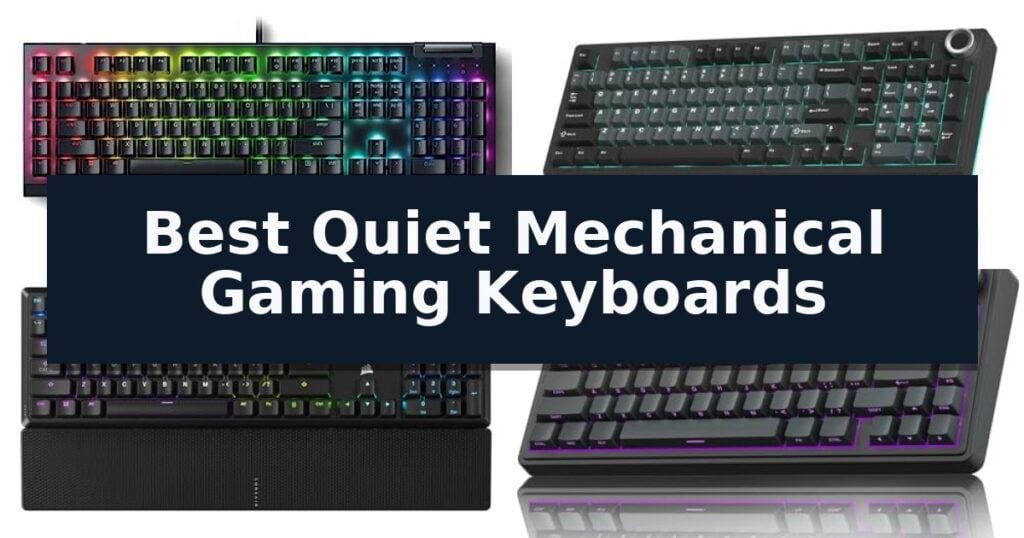
10 Best Quiet Mechanical Gaming Keyboards in 2026 Reviews
Quick Comparison
| Product | Best For | Key Strength | Score |
|---|---|---|---|
| Razer BlackWidow V4 X Mechanical Keyboard | Best Overall | Yellow Mechanical Linear Switches with integrated sound dampeners for quiet operation. | 4.9 |
| SOLAKAKA KI99 Pro Mechanical Keyboard | Gasket structure for hushed typing | Gasket structure with five noise-reducing layers for quiet operation | 4.7 |
| Corsair K70 CORE Mechanical Keyboard | Dual-layer sound dampening design | Pre-lubricated MLX Red linear switches provide a smooth, quiet typing experience. | 4.4 |
| AULA F75 Pro Mechanical Keyboard | Creamy sound with silicone padding | Advanced sound dampening with five layers of internal silencer filling. | 4.7 |
| Logitech MX Mechanical Wireless Keyboard | Tactile feel without the noise | Tactile quiet switches provide satisfying feedback with reduced noise. | 4.3 |
| Womier SK80 Mechanical Keyboard | Gasket mount for creamy acoustics | Integrated multimedia display for real-time system monitoring and customization. | 4.3 |
| Redragon K671 Mechanical Keyboard | Smooth linear switches for gaming | Hot-swappable switches allow for easy maintenance and customization. | 4.6 |
| Logitech G413 SE Mechanical Keyboard | Durable build with tactile switches | Brushed aluminum-magnesium alloy top case for minimal flex. | 4.3 |
| SteelSeries Apex 3 Gaming Keyboard | Whisper quiet membrane gaming switches | Whisper quiet gaming switches for near-silent operation. | 4.9 |
| Redragon K521 Mechanical Feeling Keyboard | Fast tapping responsive keys | 19-key anti-ghosting ensures accurate input during complex gaming maneuvers. | 4.7 |
How We Chose
To identify the best quiet mechanical gaming keyboards, we analyze how manufacturers integrate acoustic dampening technologies into their designs. An experienced reviewer focuses on the interaction between switch type, lubrication, and internal chassis construction, ensuring that noise reduction does not compromise the rapid response times or precision required for competitive gaming.
- Switch Acoustics: Evaluation of noise-dampening materials and switch lubrication to minimize bottom-out and return sounds.
- Build Integrity: Assessment of chassis materials, such as aluminum plates or gasket mounting, to reduce hollow resonance.
- Gaming Utility: Presence of programmable macro keys, N-key rollover, and responsive polling rates for competitive play.
- Ergonomic Features: Inclusion of wrist rests, adjustable height, or low-profile designs that improve long-term comfort.
- Connectivity and Customization: Versatility in connection modes and software support for remapping keys or adjusting lighting.
1 Razer BlackWidow V4 X Mechanical Keyboard — Rapid inputs with silent dampeners
The Razer BlackWidow V4 X Mechanical Gaming Keyboard is built for users who prioritize rapid response times and a quieter typing environment. At its core, the device utilizes Yellow Mechanical Linear Switches, which feature a 1.2mm actuation distance and a 45g force requirement. This design allows for nearly instant input registration, making it a strong candidate for fast-paced gaming where every millisecond counts. To maintain a quieter profile, the switches incorporate built-in sound dampeners that soften the bottom-out impact.
Beyond the switches, the keyboard is engineered to manage noise through improved internal acoustics. A layer of special foam is positioned beneath the circuit board to absorb hollow sounds, while lubricated stabilizers ensure that larger keys move smoothly without the rattling often found in standard mechanical boards. This focus on sound management provides a consistent, dampened feedback loop that remains satisfying during long sessions without becoming disruptive to others in the room.
Functionality is expanded through 6 dedicated macro keys, allowing players to map complex commands or custom shortcuts directly to the board. For media management, the inclusion of a multi-function roller and secondary media keys provides tactile control over system volume, playback, and brightness. These hardware controls streamline adjustments, enabling users to modify settings on the fly without needing to minimize their game or navigate through software menus.
Durability and aesthetics are addressed through doubleshot ABS keycaps and Chroma RGB per-key lighting. The keycaps are molded with extra-thick walls to withstand heavy use, and the doubleshot process ensures that labels remain legible over time. The switch construction is specifically designed to promote brighter, more even illumination across the 16.8 million color spectrum, offering deep customization for those who want to integrate their lighting with specific game profiles.
Best for: Gamers who require rapid, quiet linear switches and dedicated macro controls for complex command execution.
Skip if: Users who prefer the distinct tactile bump and audible click of blue-style mechanical switches will find the linear, dampened nature of these switches too muted.
- Yellow Mechanical Linear Switches with integrated sound dampeners for quiet operation.
- 6 dedicated macro keys for expanded command mapping.
- Multi-function roller and media keys for convenient control.
- Doubleshot ABS keycaps with extra-thick walls for long-term durability.
- Linear switch profile may lack the tactile feedback preferred by some typists.
2 SOLAKAKA KI99 Pro Mechanical Keyboard — Gasket structure for hushed typing
Achieving a quiet workspace often requires minimizing the acoustic footprint of your peripherals, and the SOLAKAKA KI99 Pro Mechanical Keyboard addresses this through an advanced gasket structure combined with five dedicated noise-reducing layers. This design choice, paired with pre-lubed silent switches, creates a dampened, consistent typing experience that significantly lowers the audible click associated with traditional mechanical boards.
The SOLAKAKA KI99 Pro Mechanical Keyboard utilizes a compact 96% layout, which preserves essential navigation keys while reclaiming valuable desk real estate. A versatile control knob is integrated into the chassis, providing immediate adjustments for volume, media playback, and lighting brightness, streamlining your workflow during both intensive gaming sessions and daily productivity tasks.
Connectivity and customization are central to its utility. The board supports triple-mode connectivity—Bluetooth 5.0, 2.4G wireless, and Type-C wired—ensuring compatibility across Windows, macOS, and mobile devices. A substantial 10,000mAh battery supports extended use, while the hot-swappable PCB allows for tool-free replacement of 3-pin or 5-pin switches, offering long-term flexibility for users who prefer to tailor their tactile feedback.
Aesthetic and functional details round out the package, including PBT keycaps that resist wear and shine over time. The integrated RGB lighting system features full-key illumination and side light bars, all of which can be synchronized or customized via dedicated software. This driver support also enables macro programming, allowing users to map complex commands to specific keys without disrupting standard input functionality.
Best for: Users seeking a compact, quiet typing experience with extensive wireless connectivity and customizable macro support.
Skip if: Users who require a full-sized layout with a dedicated number pad or those who prefer the high-pitched, tactile click of non-silent mechanical switches.
- Gasket structure with five noise-reducing layers for quiet operation
- 10,000mAh battery for long-lasting wireless performance
- Hot-swappable PCB for easy switch customization
- Triple-mode connectivity including Bluetooth, 2.4G, and Type-C
- 96% layout may require an adjustment period for users accustomed to full-sized keyboards
3 Corsair K70 CORE Mechanical Keyboard — Dual-layer sound dampening design
Achieving a quieter typing experience often requires specific sound-dampening engineering, and the Corsair K70 CORE RGB Mechanical Wired Gaming Keyboard addresses this with a dual-layer sound dampening design. By integrating pre-lubricated MLX Red linear mechanical switches, this keyboard prioritizes smooth, consistent keystrokes that minimize the acoustic profile typically associated with mechanical boards.
Beyond its focus on quiet operation, the keyboard features a robust aluminum top plate that provides structural stability during intense gaming sessions. The inclusion of a magnetic detachable soft-touch palm rest offers ergonomic support, while the ABS double-shot keycaps are engineered to withstand heavy use without showing signs of wear.
Functionality is centralized through a multi-function rotary dial and a programmable media button. These controls allow for quick adjustments to volume and other system settings, which can be further customized via the iCUE software interface. The keyboard also incorporates SOCD Flashtap technology, catering to specific input requirements for competitive gaming.
This full-size layout balances performance-oriented features with a design intended for both gaming and daily productivity. The combination of pre-lubed switches and internal sound dampening makes it a practical choice for environments where minimizing noise is a priority without sacrificing the tactile response of a mechanical interface.
Best for: Gamers and typists who require a quieter mechanical keyboard experience without sacrificing build quality or media control functionality.
Skip if: Users who prefer the distinct tactile bump and audible click of tactile or clicky switches will find the linear feel of this model too smooth and quiet.
- Pre-lubricated MLX Red linear switches provide a smooth, quiet typing experience.
- Dual-layer sound dampening effectively reduces typing noise.
- Multi-function rotary dial allows for convenient, customizable media control.
- Magnetic detachable palm rest enhances ergonomic comfort during extended use.
- Full-size footprint may occupy significant desk space compared to tenkeyless or compact layouts.
4 AULA F75 Pro Mechanical Keyboard — Creamy sound with silicone padding
Achieving a satisfying typing experience while maintaining a low noise profile is a priority for many desktop setups. The AULA F75 Pro Wireless Mechanical Keyboard addresses this by utilizing an advanced structural design that incorporates an extended integrated silicone pad and PCB single key slotting to minimize cavity noise.
This 75% layout keyboard features pre-lubricated stabilizers and LEOBOG reaper switches, which are engineered to deliver a smooth, creamy sound profile during operation. The internal construction includes five layers of silencer filling between the PCB, positioning plate, and shaft to effectively dampen the impact of keystrokes.
For connectivity, the device supports tri-mode operation, allowing users to switch between Bluetooth 5.0, 2.4GHz wireless, and USB-C wired connections. It is equipped with a 4000mAh rechargeable battery and offers hot-swappable support for 3-pin or 5-pin switches, enabling customization without the need for soldering.
The keyboard includes a multi-function knob that allows for quick adjustments to volume or lighting effects, depending on whether the user is in office or gaming mode. Additionally, the side-printed PBT keycaps are designed for durability and resistance to fading, while the 16.8 million RGB lighting system provides customizable visual feedback.
Best for: Users seeking a compact, customizable mechanical keyboard that prioritizes a dampened, quiet sound profile for both gaming and office environments.
Skip if: Users who require a full-sized layout with a dedicated number pad will find the 75% compact design of this model insufficient for their workflow.
- Advanced sound dampening with five layers of internal silencer filling.
- Tri-mode connectivity supporting up to five simultaneous device connections.
- Hot-swappable PCB compatible with 3-pin and 5-pin switches for easy customization.
- Multi-function knob for intuitive control over media and lighting settings.
- Compact 75% layout lacks a dedicated number pad, which may limit productivity for some users.
5 Logitech MX Mechanical Wireless Keyboard — Tactile feel without the noise
The Logitech MX Mechanical Wireless Keyboard is engineered for professionals who require a precise, tactile typing experience without the disruptive noise often associated with high-profile mechanical boards. By utilizing specialized low-profile mechanical switches, this full-size peripheral delivers a distinct tactile bump that provides reactive feedback, ensuring accuracy during intensive typing sessions while maintaining a quiet acoustic profile that is suitable for shared workspaces.
Ergonomics and efficiency are central to the design, with the low-profile key architecture facilitating a more natural hand position. To enhance usability, the keyboard features smart illumination that detects hand proximity, automatically adjusting backlighting intensity based on ambient light levels. This feature ensures visibility in various environments while actively preserving battery life. The construction also reflects a commitment to sustainability, as the Graphite model incorporates 45% post-consumer recycled plastic in its components.
Connectivity is robust and versatile, supporting up to three devices simultaneously via Bluetooth Low Energy or the included Logi Bolt receiver. This multi-device capability allows for seamless transitions across different operating systems. Users can further refine their workflow through the Logi Options+ software, which enables advanced customization of function keys and backlighting configurations to match specific professional requirements.
Power management is optimized for long-term use through USB-C quick charging. The internal battery is capable of providing up to 15 days of operation with backlighting enabled, or an impressive 10 months of use when the lighting is turned off. This balance of high-performance mechanical feedback and wireless convenience makes the keyboard a practical solution for users who need a reliable, high-end input device that minimizes desk clutter.
Best for: Professionals and typists who require a quiet, tactile mechanical feel in a multi-device, wireless workspace.
Skip if: Users who prefer a high-profile key travel distance or those who require a wired-only connection for specific low-latency gaming environments.
- Tactile quiet switches provide satisfying feedback with reduced noise.
- Multi-device pairing supports up to three devices via Bluetooth or Logi Bolt.
- Smart backlighting adjusts automatically to ambient conditions.
- USB-C rechargeable battery offers extended life up to 10 months without backlighting.
- Low-profile design may not suit users accustomed to traditional high-travel mechanical switches.
6 Womier SK80 Mechanical Keyboard — Gasket mount for creamy acoustics
The Womier SK80 Mechanical Keyboard integrates a vibrant, 11-degree oblique angle multimedia display screen, allowing users to monitor system settings, RGB modes, and custom GIF images directly from the chassis. This 75% layout board utilizes a gasket-mounted design paired with an EVA positioning plate and bottom filling to provide a soft, responsive typing feel while effectively dampening noise for a quieter gaming environment.
Designed for versatility, the board features pre-lubed linear switches and a hot-swappable PCB that supports both 3-pin and 5-pin switches, offering significant flexibility for customization. The south-facing transparent light diffusers enhance the 19 built-in RGB lighting effects, which can be further synchronized with music through the dedicated driver software.
Connectivity is managed via a detachable Type-C cable, ensuring compatibility across both Mac and Windows operating systems. The inclusion of cherry profile art theme keycaps adds a distinct aesthetic, while the pro-level software allows for granular control over macros, lighting flow rates, and display content, catering to users who prioritize both functional customization and a clean, consistent acoustic profile.
The gasket-mounted structure is a primary driver of the board's acoustic performance, as it isolates the plate from the case to minimize vibrations. This design choice, combined with the pre-lubed switches, creates a clean sound profile that is well-suited for environments where excessive noise might be distracting. While the wired-only connection limits desk placement compared to wireless alternatives, it ensures a stable, latency-free connection for gaming.
Best for: Users seeking a compact 75% layout that combines a customizable multimedia display with a gasket-mounted structure for improved acoustics.
Skip if: Users who require a full-sized keyboard with a dedicated number pad or those who prefer a wireless connection over the provided wired Type-C interface.
- Integrated multimedia display for real-time system monitoring and customization.
- Gasket-mounted design provides a soft, dampened typing experience.
- Hot-swappable PCB supports 3-pin and 5-pin switches for easy customization.
- Pre-lubed linear switches deliver a consistent, clean sound out of the box.
- Wired-only connection limits desk placement flexibility compared to wireless models.
- 75% compact layout lacks a dedicated numeric keypad.
7 Redragon K671 Mechanical Keyboard — Smooth linear switches for gaming
The Redragon K671 Mechanical Gaming Keyboard centers its design around hot-swappable linear red switches, which provide a smooth, low-force typing experience favored for fast-paced gaming sessions. This wired peripheral is built to handle complex inputs with full-key anti-ghosting, ensuring that every command registers simultaneously without conflict.
Beyond its core mechanical performance, the keyboard offers extensive customization through 11 unique backlighting modes. Users can adjust both the speed and brightness of the illumination across five distinct levels to suit their environment. The inclusion of double-shot PBT keycaps further enhances durability and backlight clarity, maintaining a professional aesthetic during extended use.
Functionality is expanded via macro editing support, allowing users to remap keys, create custom shortcuts, or combine multiple functions into a single keystroke for increased efficiency. The board also features 12 dedicated multimedia shortcuts, providing quick access to volume, media playback, and system tools without interrupting gameplay.
To ensure longevity and ease of maintenance, the package includes four spare switches and two replacement keycaps. The Redragon K671 Mechanical Gaming Keyboard is designed for users who prioritize responsive, linear switch performance and software-driven customization in a reliable, wired form factor.
Best for: Gamers who prioritize smooth, linear keystrokes and need software-based macro customization for MMO or RPG titles.
Skip if: Users who require a wireless connection or prefer the tactile, audible feedback of clicky or tactile mechanical switches.
- Hot-swappable switches allow for easy maintenance and customization.
- Full-key anti-ghosting ensures reliable input during complex gaming maneuvers.
- Macro editing support enables efficient key remapping and shortcut creation.
- Double-shot PBT keycaps provide long-lasting durability and clear backlighting.
- Wired-only connectivity limits desk placement options compared to wireless models.
- Fixed color backlighting prevents users from changing the LED color scheme via software.
8 Logitech G413 SE Mechanical Keyboard — Durable build with tactile switches
The Logitech G413 SE Mechanical Keyboard provides a robust foundation for gaming through its brushed aluminum-magnesium alloy top case, which minimizes flex during intense use. This full-size keyboard prioritizes structural integrity and consistent input, making it a reliable tool for those who value a sturdy, minimalist aesthetic in their setup.
Equipped with tactile mechanical switches, the keyboard offers a distinct physical response for every keystroke. To ensure durability, the keys feature PBT keycaps, a material selected for its high resistance to heat and wear over time. This combination of materials is engineered to withstand the rigors of competitive gaming sessions.
Functionality is enhanced by 6-key rollover anti-ghosting performance, which ensures that multiple simultaneous key presses are registered accurately. For added convenience, the board includes twelve FN media keys, allowing users to manage volume, playback, and lighting toggles directly from the keyboard without interrupting their workflow.
The Logitech G413 SE Mechanical Keyboard integrates a clean, professional look with its white LED backlighting and black-brushed finish. While it is a full-size unit, those seeking a more compact footprint can also opt for the TKL version of this model, providing flexibility based on desk space requirements.
Best for: Gamers who prioritize a durable, aluminum-reinforced build and tactile switch feedback in a full-size layout.
Skip if: Users who require dedicated macro keys, wireless connectivity, or a compact tenkeyless form factor should consider alternatives.
- Brushed aluminum-magnesium alloy top case for minimal flex.
- PBT keycaps provide superior heat and wear resistance.
- 6-key rollover ensures reliable input during gaming.
- Integrated FN media controls for quick system adjustments.
- Full-size layout may be too large for users with limited desk space.
- Wired-only connection limits placement flexibility.
9 SteelSeries Apex 3 Gaming Keyboard — Whisper quiet membrane gaming switches
The SteelSeries Apex 3 Gaming Keyboard prioritizes a distraction-free environment through its specialized whisper quiet gaming switches, engineered to deliver nearly silent operation for up to 20 million low-friction keypresses. This design choice makes it a practical solution for shared living spaces or late-night sessions where noise reduction is a priority.
Beyond its quiet operation, the keyboard features IP32 water resistance, providing a layer of protection against accidental liquid spills. The inclusion of a premium magnetic wrist rest offers full palm support, aimed at reducing fatigue during extended use. These physical design elements are complemented by 10-zone RGB illumination, which allows for customized color schemes and reactive lighting effects.
Functionality is further enhanced by dedicated multimedia controls, enabling users to adjust volume and playback settings directly from the keyboard without exiting their game or application. The device is built for broad utility, maintaining compatibility across Windows, Mac OS X, and modern gaming consoles including the Xbox Series S, Xbox Series X, PS4, and PS5.
Measuring 17.52 inches in width and 1.57 inches in height, the keyboard maintains a standard footprint suitable for most desk setups. Its construction balances essential gaming features with spill-resistant durability, offering a straightforward interface for users who prefer a membrane-based typing experience over mechanical alternatives.
Best for: Gamers and typists who prioritize silent operation and spill resistance in a full-sized keyboard layout.
Skip if: Users who specifically require the tactile feedback and actuation characteristics of traditional mechanical switches.
- Whisper quiet gaming switches for near-silent operation.
- IP32 water resistance to protect against accidental spills.
- Premium magnetic wrist rest for improved palm support.
- Dedicated multimedia controls for convenient on-the-fly adjustments.
- Membrane switch technology may not satisfy users seeking mechanical tactile feedback.
10 Redragon K521 Mechanical Feeling Keyboard — Fast tapping responsive keys
The Redragon K521 Mechanical Feeling Keyboard utilizes an upgraded LED backlight design that enhances light penetration, providing a more vibrant and distinct visual aesthetic compared to standard lighting configurations. This wired keyboard is engineered to deliver a tactile, mechanical-like response, which allows for rapid key triggering during fast-paced gaming sessions or intensive typing tasks. By simulating the feel of mechanical switches, it offers a consistent input experience that supports competitive play without the complexity of traditional mechanical hardware.
Efficiency and convenience are central to the design of the Redragon K521 Mechanical Feeling Keyboard, which incorporates 12 dedicated multimedia combination keys to streamline navigation and control for both gaming and office applications. Users can manage lighting environments through a convenient one-touch on/off button, complemented by three-position adjustable breathing modes and four-position brightness settings. This level of customization allows for quick adjustments to suit different lighting conditions or personal preferences without interrupting the workflow.
To maintain reliability during high-intensity gaming, the device features 19-key anti-ghosting technology. This specification ensures that complex key combinations are registered accurately, helping players execute precise maneuvers and minimize input errors during rapid sequences. This technical capability is particularly useful for users who rely on simultaneous key presses to trigger specific in-game skills or commands.
The keyboard is built for broad, plug-and-play compatibility, functioning seamlessly with Windows, macOS, PS4, PS5, and Xbox systems. Because it requires no additional drivers, the setup process is simplified, making it a versatile choice for users who switch between multiple gaming and computing platforms. A notable trade-off for this wired-only design is the lack of wireless mobility, which may limit desk placement flexibility for users who prefer a cable-free environment.
Best for: Gamers and office users who require a responsive, backlit keyboard with broad cross-platform compatibility.
Skip if: Users who prefer the specific actuation points of genuine mechanical switches or those who require a wireless connection for their setup.
- 19-key anti-ghosting ensures accurate input during complex gaming maneuvers.
- Upgraded LED backlight design provides enhanced visual clarity and aesthetic appeal.
- Broad compatibility with PC, Mac, and major gaming consoles.
- 12 multimedia keys for improved productivity and control.
- Wired-only connection limits desk placement flexibility.
- Mechanical-feeling keys do not offer the same tactile feedback as true mechanical switches.
Best Quiet Mechanical Gaming Keyboards Buying Guide
The Role of Linear Switches
Linear mechanical switches are the foundation of a quiet gaming setup because they lack the physical bump or audible click found in other variants. By providing a smooth, consistent keystroke from top to bottom, these switches eliminate the secondary noise generated by tactile mechanisms.
When selecting a keyboard, look for switches described as pre-lubricated. Factory lubrication significantly reduces the friction between internal components, which not only makes the keystroke feel smoother but also prevents the metallic pinging sounds common in dry, unlubricated switches.
Chassis Dampening and Gasket Mounting
The keyboard case acts as a resonance chamber that can amplify the sound of every keystroke. High-end models often include layers of sound-absorbing foam or silicone between the circuit board and the base to absorb vibrations and deaden the acoustic output.
Gasket-mounted designs take this a step further by isolating the plate and PCB from the outer case using soft gaskets. This construction prevents the rigid connection between parts, resulting in a softer, more muted sound profile that is significantly quieter than traditional tray-mounted boards.
Keycap Material and Profile
The thickness and material of keycaps influence the final sound of your keyboard. PBT (polybutylene terephthalate) keycaps are generally denser and thicker than standard ABS plastic, which helps to produce a deeper, lower-pitched sound rather than a high-pitched, thin clatter.
Profile also plays a role in acoustics. Lower-profile keycaps often result in a shorter travel distance and a more muted sound, while taller profiles can create a more hollow resonance. Choosing a set that fits your typing style while maintaining a solid, thick construction is key to noise management.
Stabilizer Maintenance
Larger keys like the Spacebar, Enter, and Shift keys often produce the most noise due to the stabilizers required to keep them level. Properly lubricated stabilizers are essential for preventing rattling and metallic ticking during rapid gaming movements.
If you choose a hot-swappable keyboard, you have the advantage of being able to manually apply lubricant to the stabilizers if they become noisy over time. This maintenance step is one of the most effective ways to keep a mechanical keyboard quiet throughout its lifespan.
Connectivity and Layout Considerations
The layout of your keyboard affects your desk space and ergonomics, which can indirectly influence your typing habits and noise levels. Compact layouts like 75% or 96% save space for your mouse, while full-size boards offer dedicated media controls that allow for volume adjustments without needing to tab out of a game.
Wireless connectivity is increasingly common, but for competitive gaming, wired connections remain the standard for zero-latency input. If you opt for a wireless model, ensure it supports a 2.4GHz dongle connection, which provides the stability and speed necessary for gaming without the potential interference of Bluetooth.
Frequently Asked Questions
Are all linear switches quiet?
While linear switches are generally quieter than tactile or clicky switches, they are not silent by default. The overall noise level depends heavily on the keyboard's internal dampening, keycap thickness, and whether the switches are pre-lubricated.
Does a gasket mount make a keyboard quieter?
Yes, a gasket-mounted structure isolates the internal components from the outer case, which reduces vibration and resonance. This design typically results in a more muted, pleasant sound compared to rigid tray-mounted keyboards.
Can I make my current mechanical keyboard quieter?
You can reduce noise by adding sound-dampening foam inside the case, lubricating your switches and stabilizers, and switching to thicker PBT keycaps. These modifications can significantly lower the acoustic output of most mechanical boards.
Is there a trade-off between quiet switches and gaming performance?
Modern quiet switches are designed to maintain the same actuation speed and responsiveness as louder variants. As long as you choose a high-quality linear switch, you will not experience a loss in performance.
Why do some keyboards have a multi-function roller?
A multi-function roller or dial allows for quick, tactile adjustments to volume, lighting brightness, or media playback. It is a convenient feature for gamers who need to make rapid adjustments without interrupting their gameplay.
Conclusion: Our Top Pick
Our top pick is Razer BlackWidow V4 X Mechanical Keyboard. Choosing the right quiet mechanical keyboard involves looking beyond the switch type to the internal construction. Models that prioritize sound-dampening foam, gasket mounting, and factory-lubricated switches offer the best balance between a satisfying feel and a noise-free environment.
Whether you prefer a full-size layout for macro control or a compact 75% design for more desk space, focusing on these acoustic-focused features will ensure your setup remains quiet during even the most intense gaming sessions.