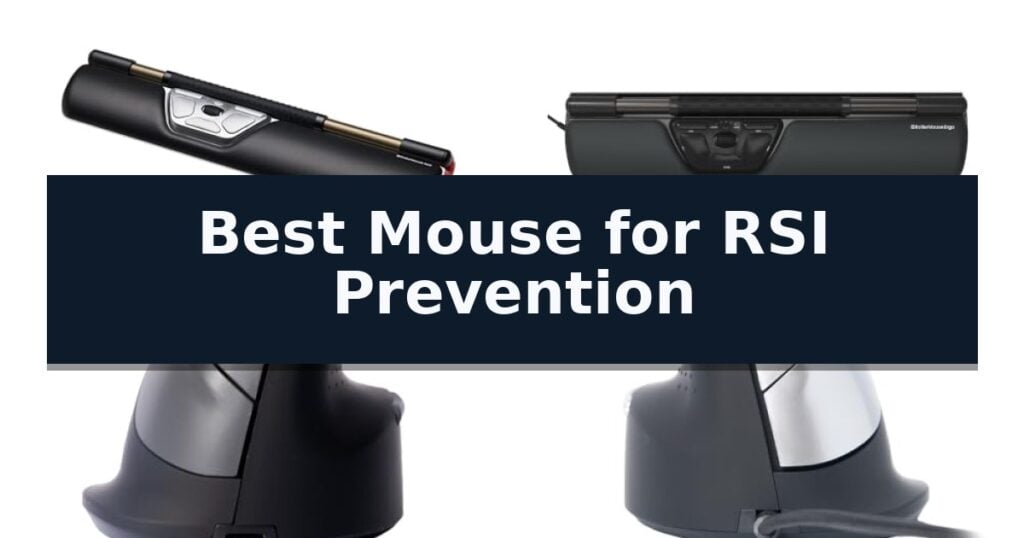
Contour RollerMouse Red is our top choice for the Best Mouse for RSI Prevention because its centralized design allows for cursor control without the need to reach or grip, effectively minimizing tension in the neck, shoulders, and wrists.
For users who prefer a traditional vertical orientation, the R-Go Tools HE Vertical Ergonomic Mouse offers a natural handshake position to reduce forearm twisting. Alternatively, the R-Go Tools Twister Ambidextrous Mouse provides a versatile, foldable solution for those needing ergonomic support while traveling.
Selecting the right input device requires balancing your specific physical needs with your workspace layout. While centralized designs eliminate the reach associated with standard mice, vertical models focus on correcting wrist alignment through a tilted posture.
For those who spend their day coding, finding the Best Mouse for Programming can significantly reduce fatigue during complex tasks.
10 Best Mouse for RSI Prevention in 2026 Reviews
Quick Comparison
| Product | Best For | Key Strength | Score |
|---|---|---|---|
| Contour RollerMouse Red | Best Overall | Centralized design eliminates reaching and reduces shoulder strain. | 4.9 |
| Contour RollerMouse Ergo | Reduces neck and shoulder tension | Centralized design eliminates reaching and reduces shoulder strain. | 4.7 |
| R-Go Tools HE Vertical Mouse | Promotes natural handshake posture | AGR certified vertical design promotes a natural, strain-reducing handshake position. | 4.5 |
| R-Go Tools HE Left-Handed Mouse | Ergonomic comfort for lefties | Vertical ergonomic design promotes a more natural, relaxed wrist and hand position. | 4.9 |
| R-Go Tools HE Wireless Vertical Mouse | Large size for better support | AGR-certified vertical design for improved wrist posture. | 4.6 |
| R-Go Tools Twister Ambidextrous Mouse | Foldable for ergonomic travel | Patented Switch & Fold mechanism for ambidextrous use | 4.8 |
| Trust Verto Vertical Mouse | Natural 60-degree tilt angle | 60-degree vertical angle promotes a more natural wrist posture. | 4.7 |
| Perixx PERIMICE-513W Vertical Mouse | Prevents forearm twisting | Vertical ergonomic design promotes a natural handshake position to reduce forearm twisting. | 4.5 |
| Hippus HandShoe Mouse | Contoured fit like a glove | Contoured ergonomic design supports the palm, thumb, and fingers to promote a relaxed hand position. | 4.5 |
| SANWA Left Handed Vertical Mouse | Relieves wrist and shoulder pain | 54° ergonomic tilt promotes a neutral wrist position. | 4.7 |
How We Chose
To identify the most effective tools for RSI prevention, we evaluate how each device addresses the root causes of repetitive strain. We prioritize designs that neutralize forearm pronation and minimize reaching, assessing how well each model integrates into a standard workstation to promote long-term comfort and productivity.
- Ergonomic alignment and posture support
- Customization options for workflow efficiency
- Connectivity and compatibility with existing hardware
- Build quality and wrist support materials
- Adjustability for different hand sizes
1 Contour RollerMouse Red — Centralized design eliminates reaching
The Contour RollerMouse Red utilizes a centralized, low-profile design that sits directly beneath your keyboard to eliminate the need for reaching. This layout keeps your hands within shoulder width, which is intended to reduce tension in the neck, shoulders, forearms, and wrists during extended computer use.
At the heart of the device is a patented Rollerbar that allows for cursor control using only your fingers. By sliding the bar left or right and rolling it up or down, you can navigate the screen without gripping or moving a traditional mouse. This approach is specifically engineered to minimize repetitive motions for users seeking relief from conditions like carpal tunnel or general strain.
The unit features 6 customizable buttons pre-programmed for common tasks such as copy, paste, and double-click, with the ability to adjust settings via the Contour driver. It also includes 10 speed settings (DPI) to match your workflow requirements. A smooth scroll wheel is integrated for precision tasks, while the detachable memory foam wrist support provides ergonomic positioning for smaller to average hand sizes.
Designed for versatility, this wireless peripheral is compatible with both Mac and PC systems. Its construction focuses on durability and ease of maintenance, featuring an easily disinfected surface that supports long-term use in compact workstations or on keyboard trays.
Best for: Users with limited desk space or those experiencing repetitive strain who require a centralized, low-reach input device.
Skip if: Users who prefer the tactile feedback of a traditional vertical or standard mouse, or those with very large hands who may find the compact wrist support insufficient.
- Centralized design eliminates reaching and reduces shoulder strain.
- Patented Rollerbar enables cursor control without gripping.
- 6 customizable buttons and 10 speed settings for workflow optimization.
- Detachable memory foam wrist support for comfortable, ergonomic posture.
- Compact wrist support may not be ideal for users with large hands.
- Requires driver installation for full button customization.
2 Contour RollerMouse Ergo — Reduces neck and shoulder tension
The Contour RollerMouse Ergo utilizes a unique, centralized design that sits directly beneath your keyboard, effectively eliminating the need to reach for a traditional mouse. By keeping your hands within shoulder width, this device helps minimize repetitive strain on your neck, shoulders, forearms, and wrists, making it a specialized tool for those seeking the Best Mouse for RSI Prevention.
At the heart of the system is a patented Rollerbar that allows for fluid cursor control using only your fingers. This mechanism enables you to slide, roll, and tap for clicks without the tension associated with gripping or moving a standard mouse. The device is specifically engineered to reduce repetitive movements, providing a more ergonomic alternative for users managing conditions like carpal tunnel or tennis elbow.
Workflow efficiency is supported by 6 customizable buttons that come pre-programmed for common tasks such as copy, paste, and double-click. Users can further tailor these inputs using the Contour driver to match specific project requirements. Additionally, the unit includes a smooth scroll wheel designed for precision tasks, such as data management, ensuring that accuracy is not sacrificed for comfort.
Physical comfort is further enhanced by an integrated, detachable wrist support constructed from durable memory foam. This support is designed to maintain an optimal posture during extended periods of use and is easily disinfected. With a compact footprint, the Contour RollerMouse Ergo is well-suited for users with average to small hand sizes or those working within limited desk space.
Best for: Users with limited desk space or those experiencing repetitive strain who require a centralized, low-effort cursor control interface.
Skip if: Users who prefer the tactile feedback of a traditional vertical mouse or those who require high-speed, long-distance cursor travel across multiple large monitors.
- Centralized design eliminates reaching and reduces shoulder strain.
- Patented Rollerbar enables cursor control without gripping.
- 6 customizable buttons for personalized workflow efficiency.
- Memory foam wrist support promotes ergonomic posture.
- Wired connection may not suit users seeking a cable-free workspace.
- Size constraints may be less comfortable for users with very large hands.
3 R-Go Tools HE Vertical Mouse — Promotes natural handshake posture
Maintaining a neutral handshake position is essential for reducing strain during long hours at a desk, and the R-Go Tools HE Vertical Mouse is specifically engineered to address this by promoting a more natural wrist and hand alignment. This vertical design is tailored for users with larger hands, providing a supportive, rounded shape that aims to mitigate the repetitive stress often associated with standard computer mice.
Beyond its ergonomic form, the device integrates proactive wellness features, most notably the patented R-Go Break software. This system uses LED color signals to alert users when it is time to take a break, helping to establish a healthier work routine. The mouse is also designed for shared or quiet environments, featuring silent buttons that minimize disruptive clicking noises during use.
Versatility is a core component of this model, offering a 3-in-1 connection capability that includes Bluetooth, a wireless dongle, and a wired option. The included cable serves a dual purpose, functioning as both a charging lead and a direct data connection. Users can further customize their experience through adjustable buttons and DPI settings, ensuring the device adapts to specific workflow requirements.
Compatibility is broad, supporting both Windows and MacOS systems. With its focus on comfort and integrated software reminders, the R-Go Tools HE Vertical Mouse serves as a specialized tool for those looking to adjust their workstation ergonomics.
Best for: Users with larger hands seeking an ergonomic vertical mouse with integrated software reminders to encourage regular breaks.
Skip if: Users with smaller hands or those who prefer a traditional low-profile mouse design may find the vertical, large-frame construction of this model uncomfortable.
- AGR certified vertical design promotes a natural, strain-reducing handshake position.
- Patented R-Go Break software provides visual cues to encourage necessary rest intervals.
- Flexible 3-in-1 connectivity supports Bluetooth, wireless dongle, and wired modes.
- Silent click buttons allow for quiet operation in shared office spaces.
- Large-hand specific ergonomics may not be suitable for all users.
- Requires software installation to utilize the break-reminder functionality.
4 R-Go Tools HE Left-Handed Mouse — Ergonomic comfort for lefties
Maintaining a neutral wrist position is essential for long-term comfort, and the R-Go HE Vertical Ergonomic Mouse is engineered specifically to address this through its unique vertical orientation. By shifting the hand into a more natural, handshake-like posture, this device aims to minimize the repetitive, stressful movements that often contribute to forearm strain and RSI-related discomfort.
Beyond its physical shape, the R-Go HE Vertical Ergonomic Mouse integrates proactive wellness technology with its patented R-Go Break software. This system uses LED color signals to remind users to take necessary breaks, helping to enforce a healthier work routine throughout the day. The mouse features silent buttons to ensure a quiet environment, making it a practical choice for shared offices or open-plan workspaces.
The device is designed for versatility, offering adjustable DPI settings and customizable buttons to suit individual workflow preferences. It is compatible with both Windows and Mac operating systems and connects via a USB-C/A wired interface, ensuring reliable performance without the need for battery management. Available in sizes tailored for both left-handed and right-handed users, it provides a customizable fit for various hand dimensions.
While the vertical design is intended to enhance blood circulation and reduce muscle tension, users should note that transitioning to a vertical mouse may require a brief period of adaptation. The unit's dimensions and specialized shape are focused on ergonomic support, making it a dedicated tool for those prioritizing injury prevention in their daily computing tasks.
Best for: Left-handed users seeking an ergonomic vertical mouse to help manage or prevent RSI-related discomfort during extended computer use.
Skip if: Users who prefer a traditional low-profile mouse or those who require a wireless connection for their workspace setup.
- Vertical ergonomic design promotes a more natural, relaxed wrist and hand position.
- Integrated R-Go Break software provides visual cues to encourage healthy work habits.
- Silent click buttons reduce noise in shared or quiet office environments.
- Adjustable DPI settings allow for personalized cursor control and sensitivity.
- Wired-only connectivity may limit cable management options compared to wireless models.
- The specialized vertical shape requires a learning curve for those accustomed to standard mice.
5 R-Go Tools HE Wireless Vertical Mouse — Large size for better support
Maintaining a neutral wrist posture is critical for long-term comfort, and the R-Go Tools HE Wireless Vertical Mouse addresses this through its AGR-certified vertical design. By orienting the hand in a natural, upright position, it aims to reduce the strain often associated with traditional flat mice, making it a specialized tool for those managing RSI symptoms.
Beyond its physical shape, this device integrates the R-Go Break software, which provides LED color signals to prompt users to take necessary breaks throughout the workday. This proactive approach to office ergonomics is complemented by a 3-in-1 connection system, allowing for flexibility via Bluetooth, a wireless dongle, or a direct cable connection.
Designed specifically for larger hands, the mouse features a rounded support surface to enhance comfort during extended use. It also prioritizes a quiet environment with silent buttons, ensuring that clicking noises do not disrupt shared workspaces or office settings.
Users can customize their experience through adjustable buttons and variable DPI settings, ensuring the cursor speed matches individual preferences. The device is compatible with Windows and Mac operating systems, providing a versatile solution for various computing environments.
Best for: Users with larger hands seeking a vertical ergonomic form factor to promote a more natural wrist position during extended computer use.
Skip if: Users with smaller hands or those who prefer a traditional, low-profile mouse design may find the vertical, large-frame construction of this model uncomfortable or difficult to navigate.
- AGR-certified vertical design for improved wrist posture.
- R-Go Break software to encourage healthy work habits.
- Silent buttons for a quiet office environment.
- 3-in-1 connection options including Bluetooth, wireless, and wired.
- Large form factor may not be suitable for all hand sizes.
- Specific ergonomic shape requires an adjustment period for users accustomed to standard mice.
6 R-Go Tools Twister Ambidextrous Mouse — Foldable for ergonomic travel
Maintaining a healthy workflow while minimizing wrist strain is a common challenge for professionals, and the R-Go Tools Twister Ambidextrous Mouse addresses this through its unique vertical design. By positioning the hand in a natural, relaxed posture, this device encourages users to utilize their arm for movement rather than relying on the wrist, which is a critical factor for those seeking the Best Mouse for RSI Prevention.
The R-Go Tools Twister Ambidextrous Mouse features a patented Switch & Fold mechanism, allowing it to transition between left- and right-handed use with a single move. Its foldable design makes it highly portable for travel, while the silent click functionality ensures quiet operation in shared workspaces. The mouse is designed to fit medium hands, with included attachable pads to accommodate smaller hand sizes.
Connectivity is versatile, offering both Bluetooth and wired USB-C options. The device is rechargeable and provides up to 2 months of battery life with average use. A notable feature is the integrated break reminder software, which uses LED color signals to prompt users to take necessary breaks, helping to prevent repetitive strain during long work sessions.
While the mouse offers significant ergonomic benefits, users should note that the attachable pads for smaller hands are designed to be permanent once applied, making them difficult to remove. The device is compatible with both Windows and Mac systems, serving as a comprehensive tool for maintaining a healthier, more ergonomic desk setup.
Best for: Users seeking a portable, ambidextrous vertical mouse with integrated software to manage break intervals and reduce repetitive strain.
Skip if: Users who prefer a traditional horizontal mouse shape or those who require a device that does not require software for break reminders.
- Patented Switch & Fold mechanism for ambidextrous use
- Integrated break reminder software with LED indicators
- Versatile connectivity via Bluetooth or USB-C
- Foldable design for enhanced portability
- Difficult to remove attachable pads once installed
- Specific size accommodation primarily for medium and small hands
7 Trust Verto Vertical Mouse — Natural 60-degree tilt angle
The Trust Verto Wired Vertical Ergonomic Mouse addresses wrist and forearm strain by utilizing a unique 60-degree vertical orientation. This design encourages a more natural, neutral posture, which can be a significant factor when managing repetitive strain during long sessions at a computer.
Beyond its shape, the device features a 1000/1600 DPI optical sensor that allows for adjustable tracking precision. The inclusion of two thumb buttons provides additional control options, while the rubber coating and integrated thumb rest are designed to improve grip and overall comfort for various hand sizes.
Setting up the mouse is straightforward thanks to its plug-and-play functionality via a 1.5m USB cable. The unit also incorporates a subtle blue LED light on the side, adding a functional aesthetic touch to the workspace without being overly distracting.
Built for longevity, the mouse is backed by a 5-year warranty, reflecting a commitment to durability. It serves as a practical, wired solution for users seeking to adjust their hand position to mitigate discomfort, though users who prefer a wireless setup will need to consider the constraints of the tethered connection.
Best for: Right-handed users seeking a neutral wrist position to alleviate strain during extended computer use.
Skip if: Users who require a wireless connection or a traditional horizontal mouse form factor for their workflow.
- 60-degree vertical angle promotes a more natural wrist posture.
- Adjustable 1000/1600 DPI optical sensor for varied control needs.
- 5-year warranty provides long-term peace of mind.
- Ergonomic rubber coating and thumb rest enhance grip comfort.
- Wired-only connection limits desk mobility compared to wireless alternatives.
8 Perixx PERIMICE-513W Vertical Mouse — Prevents forearm twisting
Maintaining a neutral wrist posture is essential for long-term comfort during extended computer use, and the Perixx PERIMICE-513W Wired Ergonomic USB Mouse addresses this by utilizing a vertical orientation. This design encourages a natural handshake position, which prevents the forearm from twisting and helps reduce the muscular strain often associated with standard, flat mouse shapes.
Equipped with a high-precision optical sensor, the device offers adjustable tracking DPI settings of 1000 and 1600. This flexibility allows users to toggle between different levels of cursor sensitivity to suit their specific task requirements, whether for general navigation or more detailed work. The sensor provides consistent tracking, ensuring that the mouse responds accurately to your movements.
The mouse features a durable rubber-coating surface designed to provide a secure, comfortable grip during long hours of operation. Measuring 4.92 x 2.44 x 3.03 inches and weighing 0.35 lb, it offers a substantial feel without being overly bulky for standard desk setups. The ergonomic contour is specifically engineered for right-handed users to ensure the hand rests naturally on the device.
Connectivity is handled through a simple plug-and-play USB interface, requiring no additional drivers for installation on Windows 7, 8, 10, 11, and later versions. The included 6-ft (1.8m) cord provides ample length for flexible placement, even when the computer tower is located under a desk. This wired connection ensures a consistent, latency-free link to your computer, eliminating the need to manage batteries or wireless signal interference.
Best for: Users seeking a wired, vertical-orientation mouse to promote a neutral forearm position and reduce strain during daily computer tasks.
Skip if: Users who prefer wireless connectivity or require a compact, travel-sized mouse, as this model is a wired, full-sized unit.
- Vertical ergonomic design promotes a natural handshake position to reduce forearm twisting.
- Adjustable DPI settings (1000/1600) allow for customized cursor precision.
- Plug-and-play functionality ensures easy setup without the need for external drivers.
- 6-foot cord provides generous reach for various desk configurations.
- Wired connection limits portability and desk cable management compared to wireless alternatives.
- Right-handed specific design is not suitable for left-handed users.
9 Hippus HandShoe Mouse — Contoured fit like a glove
The Hippus M2WB-LC Wired Light Click HandShoe Mouse is engineered with a distinct, contoured shape specifically designed to support the entire hand, including the palm, thumb, and fingers. By providing a resting surface that maintains the hand in a relaxed position, it aims to minimize the strain often associated with prolonged computer use.
This right-handed device features a Light Click button mechanism, which requires minimal force to actuate, potentially reducing the effort needed for repetitive clicking tasks. It utilizes a BlueRay track laser sensor with a 1500 DPI resolution, providing precise tracking across various surfaces. The mouse is a two-button design equipped with a standard scroll wheel for navigation.
Designed for users with hand sizes ranging from 6.9 inches to 7.7 inches, the Hippus M2WB-LC offers a specific fit intended to prevent the hand from hovering or gripping tightly. The unit connects via a wired USB 1.1 interface, ensuring compatibility with USB 1.1 and 2.0 ports. It functions as a Plug and Play device, requiring no additional software installation for use with Windows, Mac OS, Unix, or Linux systems.
While the ergonomic contour provides a stable platform for the hand, the wired nature of the device means users must manage the cable during operation. Its dimensions of 7.6 inches in length and 5.6 inches in width create a larger footprint than standard mice, which is a consideration for those with limited desk space.
Best for: Users with hand sizes between 6.9 and 7.7 inches looking for a contoured, wired mouse that supports the full hand to reduce strain.
Skip if: Users who require a wireless connection, have hand sizes outside the specified range, or have limited desk space for a larger ergonomic mouse footprint.
- Contoured ergonomic design supports the palm, thumb, and fingers to promote a relaxed hand position.
- Light Click buttons reduce the physical effort required for repetitive clicking.
- Plug and Play functionality with broad OS compatibility requires no software setup.
- BlueRay track laser sensor provides consistent 1500 DPI tracking.
- Wired USB connection limits mobility and requires cable management.
- Larger physical footprint may not be suitable for compact workspaces.
10 SANWA Left Handed Vertical Mouse — Relieves wrist and shoulder pain
Repetitive strain injuries often stem from prolonged use of standard peripherals that force the forearm into an unnatural, pronated position. The SANWA Left Handed Vertical Mouse addresses this by utilizing a 54° tilt angle, which encourages a more neutral, handshake-like posture to help alleviate wrist and shoulder stiffness during extended work sessions.
Designed specifically for left-handed users with small to medium-sized hands, this device features an egg-shaped, ergonomic chassis with a dedicated thumb rest. It connects via a stable 2.4G wireless link using a plug-and-play USB-A receiver, which can be conveniently stored in the base of the mouse when not in use. The advanced Blue LED sensor is engineered to track effectively across a wide variety of surfaces.
Users can toggle between three sensitivity levels—800, 1200, and 1600 DPI—to match their preferred cursor speed for different tasks. The mouse also includes side-mounted forward and back buttons for easier web navigation, though these specific buttons are not supported on Mac systems. For power management, the unit includes a physical on/off switch and runs on a single AA battery, offering up to 210 hours of operation.
The SANWA Left Handed Vertical Mouse is compatible with a broad range of operating systems, including Windows 11, 10, 8.1, 8, 7, XP, Vista, and various macOS versions. It provides a practical, specialized solution for lefties seeking to reduce strain without the complexity of software installation or cumbersome wired connections.
Best for: Left-handed users with small to medium hands looking to adopt a more neutral wrist posture to mitigate RSI symptoms.
Skip if: Users who require full functionality on Mac systems or those with larger hands may find the button limitations and physical dimensions unsuitable.
- 54° ergonomic tilt promotes a neutral wrist position.
- Adjustable DPI settings (800/1200/1600) for varied cursor control.
- Plug-and-play wireless connectivity with integrated receiver storage.
- Power-saving switch extends battery life up to 210 hours.
- Forward/backward buttons are not functional on Mac systems.
- Battery not included in the package.
Best Mouse for RSI Prevention Buying Guide
Centralized vs. Vertical Designs
Centralized mice, such as the rollerbar style, sit directly in front of the keyboard. This layout keeps your hands within shoulder width, which significantly reduces the need to reach out to the side, a common cause of shoulder and neck fatigue.
Vertical mice, conversely, are designed to place the hand in a neutral handshake position. By rotating the wrist to a more natural angle, these devices reduce the pressure on the carpal tunnel and prevent the forearm twisting that often occurs with flat, standard mice.
The Importance of Customization
Programmable buttons allow you to offload repetitive tasks from your fingers to more ergonomic controls. Being able to map clicks, copy, and paste functions to easily accessible buttons reduces the total number of physical movements required during a workday.
Adjustable DPI settings are equally critical, as they allow you to fine-tune cursor speed. High-precision sensors mean you can cover more screen area with smaller, less strenuous movements, which is essential for maintaining a relaxed posture.
Connectivity and Workspace Integration
Wireless connectivity provides a clutter-free desk, which is vital for maintaining an optimal ergonomic setup. Without cables pulling on the device, you can position your mouse exactly where it feels most comfortable for your specific arm length.
Wired options remain a reliable choice for users who do not want to manage battery life or potential signal interference. Many wired ergonomic mice offer consistent performance and are often lighter, which can be a benefit for those who prefer a minimal physical footprint.
Material Quality and Support
The inclusion of high-quality wrist supports is a hallmark of effective RSI-prevention tools. Memory foam or padded surfaces help distribute pressure evenly, preventing the development of pressure points during extended periods of use.
Durability is also a factor, as an ergonomic mouse is an investment in your long-term health. Look for models with easy-to-clean surfaces and robust construction that can withstand daily use without losing their shape or support characteristics.
Compatibility and Setup
Before choosing a device, ensure it is compatible with your operating system and current software environment. Some advanced ergonomic features, such as custom button mapping, may require specific drivers to function correctly on your computer.
Consider the physical size of the mouse relative to your hand. An ergonomic device that is too large or too small can negate the benefits of its shape, so checking dimensions against your hand size is a necessary step for ensuring proper support.
Frequently Asked Questions
How does a centralized mouse differ from a vertical one?
A centralized mouse sits in front of the keyboard to keep hands close to the body, while a vertical mouse tilts the hand to a handshake position to reduce forearm rotation.
Are these mice compatible with both Mac and PC?
Most modern ergonomic mice are compatible with both platforms, though some advanced features like button customization may require specific software drivers.
Do I need special software to use the programmable buttons?
Many models offer plug-and-play functionality, but you typically need to install the manufacturer's driver software to customize button assignments.
Can a vertical mouse help with tennis elbow?
By promoting a more natural forearm position, vertical mice are often recommended to help reduce the strain on the muscles and tendons associated with tennis elbow.
How do I know which size mouse is right for me?
Check the product dimensions against your hand size. Many manufacturers provide guidelines or offer different sizes to ensure the mouse fits comfortably in your palm.
Conclusion: Our Top Pick
Our top pick is Contour RollerMouse Red. Choosing the right mouse for RSI prevention is a personal process that depends on your specific discomforts and workspace configuration. Whether you opt for the centralized control of a rollerbar or the natural alignment of a vertical mouse, the goal is to minimize repetitive strain through better posture.
Prioritize devices that offer the specific ergonomic support you need, such as adjustable DPI or wrist padding. By investing in a tool that encourages healthy movement, you can create a more comfortable and sustainable work environment.