The ASUS ROG Fast IPS Gaming Monitor is our top choice for the Best Non-OLED 1440p Gaming Monitors, offering an exceptionally high 255Hz refresh rate and rapid 0.3ms response times for fluid, competitive performance. The ASUS TUF Gaming Fast IPS Monitor serves as a reliable alternative for those prioritizing motion blur reduction, while the Alienware IPS Gaming Monitor provides a balanced, high-speed option for players seeking consistent color accuracy.
Selecting a display in this category requires balancing raw speed against visual fidelity. While OLED technology often dominates conversations about contrast, these high-performance IPS panels deliver impressive clarity and color depth without the risk of burn-in, making them ideal for long-term reliability in both gaming and productivity setups.
Beyond raw refresh rates, modern gaming monitors must integrate seamless connectivity and motion-handling technologies. Features like ELMB Sync and variable refresh rate support are essential for eliminating screen tearing, ensuring that your hardware investment translates directly into a smoother, more immersive experience during fast-paced gameplay.
If you are interested in higher resolutions for cinematic titles, our guide on Best Non-OLED 4K Gaming Monitors provides a detailed look at larger, high-density display options.
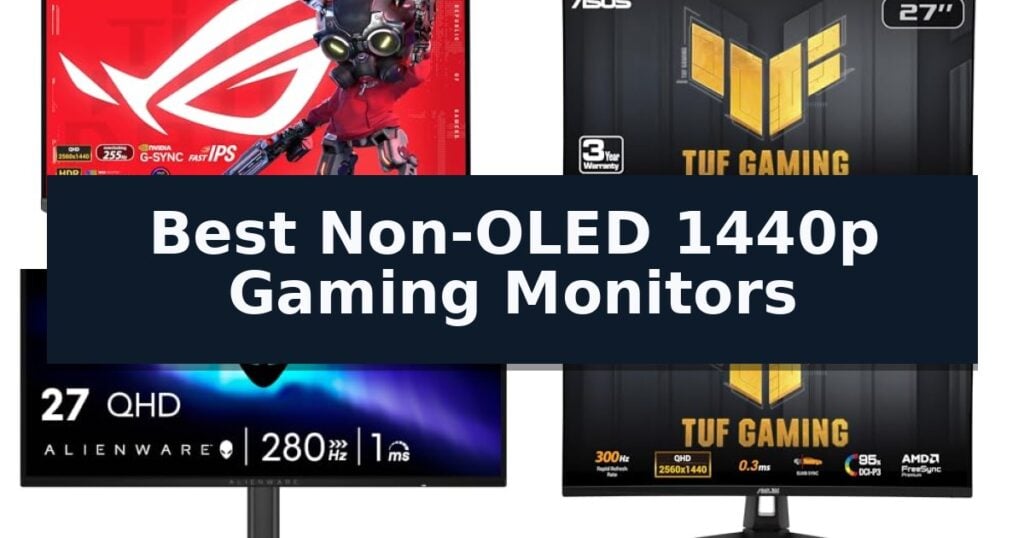
6 Best Non-OLED 1440p Gaming Monitors in 2026 Reviews
Quick Comparison
| Product | Best For | Key Strength | Score |
|---|---|---|---|
| ASUS ROG Fast IPS Gaming Monitor | Best Overall | Ultrafast 255Hz refresh rate for competitive gaming. | 4.9 |
| ASUS TUF Gaming Fast IPS Monitor | Reliable motion blur reduction | 180Hz refresh rate for fluid motion in competitive titles. | 4.4 |
| Alienware IPS Gaming Monitor | Fluid motion for competitive play | High 280Hz refresh rate for fluid motion | 4.3 |
| ASUS TUF Gaming VG27AQM5A 27 Inch 1440p 300Hz G-SYNC Gaming Monitor | Ultra-fast refresh rate | 300Hz refresh rate for ultra-smooth motion. | 4.5 |
| Sceptre Prime Gaming Monitor | Budget-friendly high refresh | 180Hz refresh rate for smooth motion | 4.3 |
| Sceptre 2K QHD Gaming Monitor | Large screen immersion | Ultra-smooth 210Hz refresh rate for responsive gaming. | 4.3 |
How We Chose
Evaluating 1440p gaming monitors requires a rigorous look at how panel technology influences motion clarity and color reproduction. We prioritize models that combine high refresh rates with effective blur reduction, ensuring that the display keeps pace with modern GPU output while maintaining the visual accuracy necessary for both competitive play and daily tasks.
- Panel technology and response time consistency
- Refresh rate capabilities and motion blur reduction features
- Color gamut coverage and visual depth
- Connectivity options including USB-C and DisplayPort versatility
- Ergonomic adjustments and build quality
1 ASUS ROG Fast IPS Gaming Monitor — High-speed competitive performance
Competitive gaming demands hardware that keeps pace with rapid frame rates, and the ASUS ROG XG27ACMES 27 Inch 1440p 255Hz Fast IPS G-SYNC HDR Gaming Monitor is built specifically for this high-speed environment. Featuring an overclockable 255Hz refresh rate and a 0.3ms response time, this display is engineered to minimize latency and provide fluid motion for professional-grade gaming sessions.
The monitor utilizes Fast IPS technology to ensure color accuracy and wide viewing angles without sacrificing the speed required for fast-paced titles. To further enhance visual clarity, ASUS Extreme Low Motion Blur Sync (ELMB SYNC) works in tandem with variable refresh rates to eliminate ghosting and screen tearing, ensuring that your gameplay remains sharp even during intense action sequences.
Beyond raw performance, the display includes ROG Gaming A.I technology to optimize the user experience and provides convenient control through the DisplayWidget Center, allowing for quick settings adjustments via mouse. Connectivity is streamlined with a USB Type-C port supporting DP Alt mode, which facilitates a clutter-free setup by handling both data and power delivery up to 90W.
This monitor is designed for longevity and ease of use, featuring OLED Care Pro features and a robust 3-year warranty that includes advanced replacement and repair services. The package includes essential accessories such as a DisplayPort cable and a ROG pouch, providing a comprehensive solution for users looking to upgrade their desktop setup.
Best for: Competitive gamers who require ultra-high refresh rates and fast response times for fluid, tear-free gameplay.
Skip if: Users who prioritize a 4K resolution or larger screen real estate over the highest possible refresh rate performance.
- Ultrafast 255Hz refresh rate for competitive gaming.
- 0.3ms response time using Fast IPS technology.
- USB-C 90W connectivity for simplified cable management.
- ELMB SYNC for effective motion blur reduction.
- 1440p resolution may not satisfy users seeking 4K clarity.
- High-performance features are optimized for gaming rather than professional color-critical creative work.
2 ASUS TUF Gaming Fast IPS Monitor — Reliable motion blur reduction
Achieving fluid motion in high-intensity gaming requires a display capable of keeping pace with rapid frame rates. The ASUS TUF Gaming VG27AQ3A 27 Inch 1440p 180Hz G-SYNC Gaming Monitor addresses this by pairing a high-resolution QHD panel with a 180Hz refresh rate, ensuring clarity during fast-paced sequences.
Central to its performance is the integration of ASUS Extreme Low Motion Blur Sync (ELMB Sync) technology. This feature allows users to enable variable-refresh-rate technologies alongside motion blur reduction simultaneously, effectively mitigating ghosting and tearing. The monitor utilizes a Fast IPS panel that supports a 1ms response time, which is engineered to maintain visual fidelity across wide viewing angles.
For color and contrast, the display is rated for a 130% sRGB color gamut and includes HDR10 support to enhance depth in both bright and dark environments. Compatibility is broad, featuring FreeSync Premium and G-Sync compatibility to provide a tear-free experience for both PC and console users. The inclusion of built-in speakers offers a convenient audio solution for those looking to minimize desk clutter.
The physical design includes a 27-inch footprint and comes with essential accessories such as a DisplayPort cable and an L-shaped screwdriver for assembly. With a 3-year warranty and a complimentary 3-month Adobe Creative Cloud subscription, this monitor is positioned as a comprehensive tool for competitive gaming environments.
Best for: Competitive gamers seeking a high-refresh-rate 1440p display with integrated motion blur reduction technology.
Skip if: Users requiring professional-grade color grading or those who prefer a monitor with an adjustable height stand, as this model's ergonomic features are limited.
- 180Hz refresh rate for fluid motion in competitive titles.
- ELMB Sync allows for simultaneous VRR and motion blur reduction.
- Fast IPS panel provides a 1ms response time and wide color gamut.
- Broad compatibility with G-Sync and FreeSync Premium.
- Integrated speakers may lack the fidelity of dedicated audio solutions.
- Limited ergonomic adjustments compared to premium-tier stands.
3 Alienware IPS Gaming Monitor — Fluid motion for competitive play
Competitive gaming demands a balance of high-speed responsiveness and visual clarity, which is exactly what the Alienware 27 Gaming Monitor AW2726DL targets. With a 280Hz refresh rate and a 1ms gray-to-gray response time, this display is engineered to minimize motion blur and ghosting during intense, fast-paced sequences.
The monitor utilizes a 27-inch QHD IPS panel with a resolution of 2560×1440, ensuring that fine details remain sharp while maintaining consistent color reproduction. With 93% DCI-P3 color coverage, it provides vivid imagery that holds up across wide viewing angles, making it suitable for both high-stakes gaming and media consumption.
To ensure fluid performance across various hardware configurations, the unit includes AMD FreeSync Premium and VESA AdaptiveSync technology. These features work to eliminate screen tearing and stuttering by synchronizing the display's refresh rate with the GPU output, resulting in a more stable visual experience.
Designed for versatility, the Alienware 27 Gaming Monitor AW2726DL features a VESA 100×100 mountable chassis, allowing for flexible ergonomic setups. It offers a peak brightness of 400 cd/m2 and a 1000:1 contrast ratio, providing a bright and clear picture in most indoor lighting conditions.
Best for: Competitive gamers who prioritize high refresh rates and color accuracy on a 1440p IPS display.
Skip if: Users who require deep blacks and infinite contrast ratios found in OLED panels will find this IPS model's contrast performance limiting.
- High 280Hz refresh rate for fluid motion
- Fast 1ms gray-to-gray response time to reduce ghosting
- Vivid 93% DCI-P3 color coverage
- Support for AMD FreeSync Premium and VESA AdaptiveSync
- Standard 1000:1 contrast ratio typical of IPS technology
4 ASUS TUF Gaming VG27AQM5A 27 Inch 1440p 300Hz G-SYNC Gaming Monitor — Ultra-fast refresh rate
Achieving fluid motion in competitive gaming requires hardware that can keep pace with high frame rates, and the ASUS TUF Gaming VG27AQM5A 27 Inch 1440p 300Hz G-SYNC Gaming Monitor is built specifically for that purpose. This 27-inch QHD display utilizes Fast IPS technology to reach a 0.3ms (GTG) response time, minimizing ghosting during fast-paced sequences.
The monitor integrates ASUS Extreme Low Motion Blur Sync (ELMB Sync), which allows variable-refresh-rate technologies to function alongside motion blur reduction. This combination helps maintain visual clarity during intense gameplay, ensuring that tearing and stuttering are kept to a minimum while maintaining a high 300Hz refresh rate.
For visual fidelity, the display covers 95% of the DCI-P3 color gamut, providing vibrant color reproduction suitable for both gaming and content creation. Users can manage settings through the DisplayWidget Center using a mouse, while the Shadow Boost feature improves visibility in dark game environments by brightening shadows without overexposing the rest of the image.
Designed for versatility, the unit includes built-in speakers for audio output and comes with a 3-year manufacturer warranty. It also includes a complimentary 3-month Adobe Creative Cloud subscription, adding value for creative users who require color-accurate displays.
Best for: Competitive gamers who require a high 300Hz refresh rate and rapid response times for fluid, tear-free motion in fast-paced titles.
Skip if: Users who prioritize deep contrast ratios and true blacks, as this IPS panel does not offer the infinite contrast provided by OLED technology.
- 300Hz refresh rate for ultra-smooth motion.
- 0.3ms (GTG) response time via Fast IPS technology.
- ELMB Sync enables blur reduction with variable refresh rates.
- 95% DCI-P3 color gamut for accurate color reproduction.
- IPS panel technology lacks the deep black levels found in OLED alternatives.
5 Sceptre Prime Gaming Monitor — Budget-friendly high refresh
Achieving a fluid visual experience in competitive gaming often hinges on high refresh rates and responsive connectivity. The Sceptre Prime Gaming Monitor addresses this by offering a 180Hz refresh rate across its dual HDMI and dual DisplayPort inputs, ensuring that frame transitions remain smooth during fast-paced sequences.
Designed with a sleek minimal bezel, this 27-inch display is built to facilitate multi-monitor setups, providing an expansive, nearly unobstructed field of view. The inclusion of Blue-Light Shift technology serves to mitigate eye strain during extended sessions by reducing harmful light emissions, a practical consideration for those who spend significant time at their desks.
Functionality extends beyond pure visuals with the integration of built-in speakers, which help maintain a tidy workspace by eliminating the need for external audio hardware. Users can further tailor their experience through custom gaming modes, specifically optimized for First Person Shooters (FPS) and Real-Time Strategy (RTS) genres to enhance performance in varied gameplay scenarios.
While the monitor provides versatile connectivity and a high-refresh panel, it remains a straightforward, dedicated display solution. Its 27-inch form factor and 180Hz capability make it a focused tool for gamers prioritizing speed and desk space efficiency over more complex, multi-functional hardware.
Best for: Gamers seeking a high-refresh-rate display for competitive play who also value a clean, bezel-free aesthetic for multi-monitor configurations.
Skip if: Users requiring specialized color-accurate panels for professional design work or those who prefer integrated high-fidelity audio systems over basic built-in speakers.
- 180Hz refresh rate for smooth motion
- Versatile connectivity with dual HDMI and dual DisplayPort
- Sleek minimal bezel design ideal for dual-monitor setups
- Blue-Light Shift technology to reduce eye strain
- Basic built-in speakers may not replace dedicated audio systems
- Limited to standard gaming-focused features rather than professional-grade color accuracy
6 Sceptre 2K QHD Gaming Monitor — Large screen immersion
Achieving a high-refresh-rate experience without the premium cost of OLED technology is a priority for many competitive gamers. The Sceptre 2K QHD Gaming Monitor delivers a substantial 210Hz refresh rate, providing fluid motion that is essential for fast-paced titles.
This 32-inch display utilizes a 2K QHD resolution to balance pixel density and screen real estate. With a 1ms Blur Reduction (BR) response time, the monitor is engineered to minimize ghosting during intense movement. The integration of AMD FreeSync Premium technology further assists in maintaining a tear-free and flicker-free visual output.
For creative tasks and multimedia consumption, the panel offers 115% sRGB color gamut performance, ensuring vibrant color reproduction. The design features a nearly bezel-free aesthetic, which is particularly useful for users looking to set up a seamless dual-monitor arrangement without distracting gaps.
Connectivity is handled through two HDMI ports, one DisplayPort, and one USB Type-C input. The monitor also includes built-in speakers and a Blue-Light Shift feature, which is designed to reduce eye strain during extended sessions. For those with limited desk space, the VESA wall mount compatibility allows for flexible installation options.
Best for: Gamers seeking a large 32-inch high-refresh-rate display with versatile connectivity for both competitive play and creative work.
Skip if: Users who require a smaller footprint or specific color-critical professional calibration beyond the sRGB gamut.
- Ultra-smooth 210Hz refresh rate for responsive gaming.
- 115% sRGB color gamut for vibrant and accurate visuals.
- AMD FreeSync Premium support for tear-free gameplay.
- Versatile connectivity including USB Type-C and DisplayPort.
- Large 32-inch size may be too expansive for compact desk setups.
- HDMI ports limited to 144Hz compared to the 210Hz potential of DisplayPort/USB-C.
Best Non-OLED 1440p Gaming Monitors Buying Guide
Understanding Panel Technology
Fast IPS technology has become the standard for high-performance gaming, bridging the gap between the speed of older TN panels and the color accuracy of traditional IPS displays. These panels are specifically engineered to reduce gray-to-gray response times, which is critical for minimizing ghosting in fast-moving scenes.
Unlike standard IPS panels, the 'Fast' variants prioritize pixel transition speeds. This allows for higher refresh rates without sacrificing the wide viewing angles or vibrant color reproduction that users expect from a high-quality monitor.
The Importance of Refresh Rates
A high refresh rate is the foundation of a responsive gaming experience. Moving from 144Hz to 255Hz or 300Hz significantly reduces the time between frames, providing a more fluid visual experience that can offer a tangible advantage in fast-paced shooters.
However, a high refresh rate is only effective if the monitor can handle the motion without blurring. Technologies like ELMB Sync allow the monitor to maintain variable refresh rates while simultaneously engaging motion blur reduction, keeping the image sharp even during intense action.
Connectivity and Integration
Modern gaming setups often require more than just a single DisplayPort connection. Monitors featuring USB-C with Power Delivery offer a cleaner desk aesthetic by allowing users to connect peripherals or even charge devices directly through the monitor.
DisplayWidget software and similar utilities further enhance the user experience by allowing for on-the-fly adjustments to brightness, contrast, and color profiles without needing to navigate cumbersome physical button menus.
Color Accuracy and HDR
While gaming is the primary focus, color gamut coverage remains vital for visual immersion. Monitors covering 95% or more of the DCI-P3 color space provide richer, more accurate colors that make games look more vibrant and true to life.
HDR support in this segment is generally aimed at enhancing contrast in bright and dark scenes. While not as impactful as the infinite contrast of OLED, a well-implemented HDR10 feature can still improve depth in high-fidelity titles.
Ergonomics and Long-Term Use
The physical design of a monitor significantly impacts long-term comfort. Adjustable stands that allow for height, tilt, and swivel adjustments are essential for maintaining proper posture during extended gaming sessions.
Additionally, features like blue-light reduction and flicker-free backlighting help mitigate eye strain, ensuring that the monitor remains comfortable to use during both marathon gaming sessions and standard productivity work.
Frequently Asked Questions
Why choose a Fast IPS monitor over an OLED?
Fast IPS monitors offer high refresh rates and excellent color accuracy without the risk of permanent image retention or burn-in, making them a more durable choice for mixed-use setups.
What is the benefit of ELMB Sync?
ELMB Sync allows you to use motion blur reduction technology simultaneously with variable refresh rate features, ensuring smooth, tear-free, and sharp visuals.
Does 1440p resolution make a difference for 27-inch monitors?
Yes, 1440p (QHD) at 27 inches provides a higher pixel density than 1080p, resulting in sharper text and more detailed game environments.
Can I use these monitors with a console?
Most modern 1440p gaming monitors are compatible with consoles like the PS5 and Xbox, though you should verify that the monitor supports the specific resolution and refresh rate output of your console.
What does the response time measurement mean?
Response time, typically measured in gray-to-gray (GTG), indicates how quickly a pixel can change colors. Lower numbers, such as 0.3ms, indicate faster transitions, which significantly reduce ghosting.
Conclusion: Our Top Pick
Our top pick is ASUS ROG Fast IPS Gaming Monitor. Choosing the right monitor comes down to balancing your specific performance needs with your desk setup. For competitive players, prioritizing high refresh rates and low response times is essential, while those who split time between gaming and creative work should focus on color gamut coverage and connectivity features like USB-C.
By selecting a high-quality Fast IPS panel, you gain a versatile display that excels in speed and visual clarity. These monitors provide a reliable, long-term solution for any enthusiast looking to elevate their gaming experience without the specific trade-offs associated with OLED technology.