Logitech C920x HD Pro Webcam is our top choice for the Best PC Webcams for Video Conferencing because it provides a reliable, high-definition visual standard that integrates seamlessly with all major meeting platforms.
Selecting a camera for professional communication requires balancing image resolution with practical features like light correction and audio quality. While many options promise high-end performance, the most effective tools prioritize consistent, clear video output and simple plug-and-play connectivity to ensure you remain focused on your meeting rather than troubleshooting hardware.
When choosing between models, consider how your specific environment—such as lighting conditions or the need for privacy—influences your requirements. Features like integrated privacy shutters, wide-angle lenses, and noise-canceling microphones serve as essential differentiators for users who need a dependable setup for daily remote collaboration.
If you are looking for more specialized hardware, our guide to the Best PC Webcam Under $100 helps identify budget-friendly options that do not compromise on essential video quality.
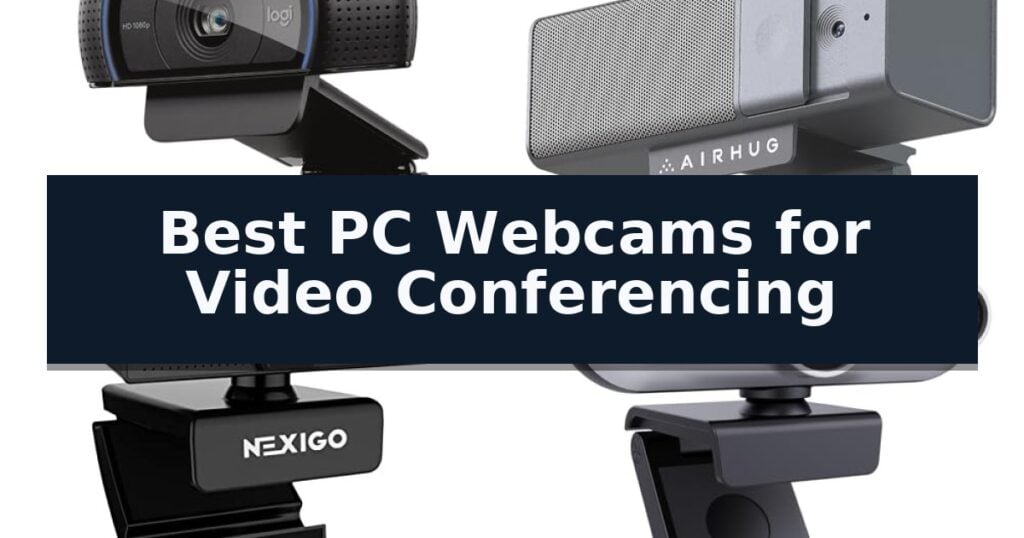
10 Best PC Webcams for Video Conferencing in 2026 Reviews
Quick Comparison
| Product | Best For | Key Strength | Score |
|---|---|---|---|
| Logitech C920x HD Pro Webcam | Best Overall | HD lighting adjustment ensures clear video in various lighting conditions. | 4.9 |
| AIRHUG 3-in-1 Conference Webcam | Integrated Speaker for Small Groups | Integrated 5W speaker and microphone eliminate the need for external audio hardware. | 4.5 |
| NexiGo N60 1080P Webcam | Budget-Friendly Plug-and-Play Choice | Plug-and-play setup with no drivers required | 4.4 |
| MOERTEK 2K Windows Hello Webcam | Fast Secure Facial Login | Integrated Windows Hello infrared facial recognition for secure, rapid login. | 4.7 |
| Philips 4K Ultra HD Webcam | Professional High-Resolution Clarity | 4K Ultra HD resolution for professional-grade visual clarity. | 4.7 |
| EMEET C960 1080P Webcam | Wide-Angle View for Teams | 90-degree wide-angle lens captures more participants in the frame. | 4.9 |
| RichEast Full HD 1080P Webcam | Essential Features for Simple Calls | Full HD 1080p resolution for clear video quality | 4.6 |
| Logitech C920S HD Pro Webcam | Classic Choice with Privacy Shutter | Full HD 1080p resolution for sharp video clarity. | 4.6 |
| NIVEOLI 1080P HD Webcam | Balanced Performance in Low Light | Full HD 1080p resolution for sharp video output. | 4.7 |
| TOALLIN Wireless 1080P Webcam | Flexible Placement Without Cables | 2.4G wireless connectivity allows for flexible camera placement without cables. | 4.3 |
How We Chose
To identify the most effective PC webcams for video conferencing, we evaluate each model based on its ability to deliver clear, stable video and intelligible audio in standard office environments. We prioritize devices that offer reliable light adjustment and secure privacy options, ensuring that hardware remains a seamless, unobtrusive part of your professional workflow.
- Video resolution and frame rate stability
- Microphone sensitivity and background noise reduction
- Low-light performance and automatic light correction
- Physical privacy protection features
- Driverless plug-and-play compatibility
1 Logitech C920x HD Pro Webcam — Reliable Standard for Daily Meetings
The Logitech C920x HD Pro Webcam distinguishes itself with HD lighting adjustment and autofocus, which automatically fine-tunes image quality to maintain sharpness even in challenging low-light environments. This capability makes it a reliable tool for professional video conferencing and streaming, ensuring that users consistently present a clear, vibrant image.
Engineered for high-definition communication, this device supports Full HD 1080p video calling and recording at 30 fps. It integrates stereo audio with dual microphones to capture natural sound, which is essential for clear audio during virtual meetings. The hardware is designed for versatility, functioning effectively as a desktop camera or a monitor-mounted solution.
Usability is enhanced through advanced capture software and a bundled 3-month XSplit VCam license. This software allows users to remove, replace, or blur backgrounds without requiring a physical green screen. The camera is built for broad compatibility, offering plug-and-play functionality across Windows 11, macOS, and major platforms like Zoom, Microsoft Teams, and Google Meet.
While the unit provides robust performance for daily tasks, it is worth noting that it does not include a physical privacy shutter. Its compact dimensions of 3.7 inches in height and 2.8 inches in length ensure it occupies minimal space on a monitor or desk setup, maintaining a clean workspace while providing consistent 1080p output.
Best for: Professionals and remote workers requiring a reliable, high-definition 1080p camera for daily video conferencing and virtual meetings.
Skip if: Users who prioritize a built-in physical privacy shutter or those who require 4K resolution for professional-grade video production.
- HD lighting adjustment ensures clear video in various lighting conditions.
- Full HD 1080p resolution provides crisp and detailed video quality.
- Dual stereo microphones capture natural audio for improved call clarity.
- Broad compatibility with major operating systems and conferencing software.
- No physical privacy shutter included for lens coverage.
- Software-dependent background removal requires the use of the included XSplit VCam license.
2 AIRHUG 3-in-1 Conference Webcam — Integrated Speaker for Small Groups
The AIRHUG 3-in-1 Conference Webcam simplifies small-group communication by integrating a high-definition camera, a microphone, and a 5W speaker into a single, compact chassis. Designed for versatility, this device eliminates the need for peripheral audio equipment during video calls, making it a streamlined solution for remote meetings or online classes.
Equipped with a 2.07MP sensor, the camera captures 1080p/30fps video with a 76-degree field of view. The integrated audio system is engineered for clarity, featuring a speaker capable of reaching ≥90dB and a microphone with 65dB noise reduction and auto volume adjustment. These specifications allow the unit to effectively pick up voices from up to 6 feet away, supporting clear communication for 3-5 participants.
Portability and ease of use are central to its design. Weighing only 5.9 ounces, the AIRHUG 3-in-1 Conference Webcam features a universal clip that attaches to laptops, desktops, and even curved monitors. It is a plug-and-play USB device that requires no additional drivers, ensuring compatibility with major operating systems like Windows and Mac OS. For added security, the unit includes a built-in privacy cover.
While the device offers significant convenience for small-scale conferencing, its fixed-focus lens and 76-degree field of view are optimized for individual or small group settings rather than expansive boardrooms. The inclusion of a 2-year manufacturer warranty provides long-term support for its all-in-one functionality.
Best for: Small groups of 3-5 people needing an all-in-one audio and video solution for remote meetings.
Skip if: Users requiring wide-angle coverage for large conference rooms or advanced optical zoom capabilities.
- Integrated 5W speaker and microphone eliminate the need for external audio hardware.
- Plug-and-play USB connectivity ensures quick setup without driver installation.
- Compact, portable design with a universal mounting clip for various screen types.
- Built-in privacy cover provides physical security when the camera is not in use.
- Fixed-focus lens limits the ability to adjust depth of field manually.
- 76-degree field of view may be restrictive for larger groups or wider room settings.
3 NexiGo N60 1080P Webcam — Budget-Friendly Plug-and-Play Choice
The NexiGo N60 1080P Webcam simplifies high-definition video conferencing through its plug-and-play design, requiring no additional drivers for immediate use. Equipped with a 1080p FHD two-MP CMOS sensor, this camera captures sharp video at 30fps, utilizing a 3.6mm glass lens optimized for clear focus at distances between 19.6 inches and 13 feet.
Designed for versatility in professional and educational settings, the device features a built-in noise-canceling microphone to reduce ambient interference during calls. Its compatibility spans across Windows, Mac OS, Android, Linux, and Chrome OS, ensuring it integrates into most standard desktop and laptop setups via USB 2.0 or 3.0 connectivity.
Security is integrated directly into the hardware with an included privacy cover, allowing users to physically block the lens when the camera is not in use. The compact unit measures approximately 3.22 by 2.08 by 1.96 inches, making it a low-profile addition to any monitor or workstation setup.
While the camera is highly compatible with major conferencing platforms like Zoom, Skype, and Teams, users should note that it is not compatible with gaming consoles such as the Xbox, PS4, or PS5. For optimal performance, the manufacturer recommends contacting support for firmware updates if audio latency is detected.
Best for: Individuals and professionals seeking a simple, plug-and-play 1080p camera for standard video conferencing and remote learning.
Skip if: Users requiring a webcam for gaming consoles like Xbox or PlayStation, or those needing advanced features like autofocus or wide-angle zoom.
- Plug-and-play setup with no drivers required
- Built-in noise-canceling microphone for clearer audio
- Integrated privacy cover for enhanced security
- Wide compatibility across major operating systems
- Not compatible with gaming consoles
- Fixed focus lens limits adjustment for varied distances
4 MOERTEK 2K Windows Hello Webcam — Fast Secure Facial Login
Streamlining your workspace for professional video calls requires hardware that balances image fidelity with user convenience. The MOERTEK 2K Windows Hello Webcam integrates a specialized infrared sensor, allowing for secure, password-free login on Windows 10 and above, which simplifies the start of every meeting.
Equipped with a 5MP sensor, this camera delivers QHD 2K resolution at a smooth 30fps. The optical system is paired with a high-speed autofocus mechanism that automatically manages brightness levels, ensuring consistent image quality even in challenging, low-light environments. Its 84° wide-angle field of view provides sufficient coverage for individual use, while the 360° horizontal rotation allows for precise framing adjustments.
Audio clarity is managed by an integrated noise-reduction microphone designed to capture clear sound within a 3-meter range. The device is built for immediate deployment, utilizing a plug-and-play USB connection that eliminates the need for manual driver installation. For added privacy, the unit includes a physical privacy cover that can be toggled without interrupting your active video session.
Versatility is a core design element, as the webcam supports multiple mounting options, including laptop displays, flat surfaces, or standard tripods. It is compatible with major video conferencing platforms like Zoom, Teams, and Skype, making it a functional addition to both professional and educational setups.
Best for: Users who require secure, biometric Windows Hello login and high-resolution video for professional conferencing.
Skip if: Users who require a 4K resolution sensor or a wider field of view beyond 84 degrees for large group settings.
- Integrated Windows Hello infrared facial recognition for secure, rapid login.
- High-definition QHD 2K resolution with a 5MP sensor.
- Physical privacy cover for immediate visual security.
- Flexible 360-degree rotation and versatile mounting options.
- Tripod not included in the package.
- Fixed 84-degree field of view may be narrow for large group shots.
5 Philips 4K Ultra HD Webcam — Professional High-Resolution Clarity
Maintaining a professional visual presence during virtual meetings often hinges on the clarity of your video feed. The Philips 4K Ultra HD Webcam provides a high-resolution 4K output, ensuring that your image remains sharp and vivid during business presentations or collaborative sessions. This level of detail is particularly useful for users who need to convey clear visual information, such as educators or remote professionals, where image fidelity directly impacts the quality of communication.
Ease of use is a core component of this device, featuring a plug and play USB connection. This design choice removes the friction of complex driver installations or specialized software configurations, allowing the camera to function immediately upon connection to a laptop or desktop. This makes it a practical solution for fast-paced work environments where switching between different computer setups is common.
Security and audio integration are handled directly through the hardware. The unit includes a physical privacy shutter that allows you to mechanically block the lens when not in use, providing a tangible sense of security for home office users. Furthermore, the integrated microphone captures voice audio for daily communication, offering an all-in-one solution that reduces the need for additional peripheral equipment.
Engineered for broad utility, the camera maintains universal compatibility with major communication platforms, including Microsoft Teams, Skype, and Google Meet. Whether you are conducting telehealth appointments, teaching online, or participating in standard video conferencing, this device provides a consistent, high-definition solution. A notable trade-off for this all-in-one simplicity is the fixed-focus lens, which lacks the mechanical zoom or autofocus capabilities found in more specialized, higher-end streaming hardware.
Best for: Remote professionals and educators who require high-resolution 4K video quality and a simple, driver-free setup for frequent video conferencing.
Skip if: Users who require advanced features like optical zoom, autofocus tracking, or high-fidelity external microphone inputs will find the fixed-focus, all-in-one design too limiting.
- 4K Ultra HD resolution for professional-grade visual clarity.
- Physical privacy shutter for enhanced security when the camera is not in use.
- Plug and play USB connectivity requiring no additional driver software.
- Integrated microphone provides an all-in-one solution for audio and video.
- Fixed-focus lens lacks the versatility of mechanical zoom or autofocus found in higher-end specialized streaming cameras.
6 EMEET C960 1080P Webcam — Wide-Angle View for Teams
Clear communication during remote meetings requires reliable hardware that handles both visual and audio demands seamlessly. The EMEET C960 1080P Webcam addresses this with a 90-degree wide-angle lens, allowing for a broader field of view that is particularly useful when multiple participants need to be captured in a single frame.
Engineered for professional video streaming, the device utilizes a 5-layer anti-glare lens to produce Full HD 1080P resolution. To maintain image quality in varying environments, it features automatic low-light correction, which adjusts exposure and color balance when working in dim or harsh lighting conditions, such as near a bright window.
Audio clarity is managed by two built-in omnidirectional noise reduction microphones. These are designed to isolate the speaker's voice while filtering out ambient background noise, ensuring that audio remains intelligible during calls. For privacy, the unit includes a removable cover that can be placed over the lens when the camera is not in use.
Setup is straightforward due to its plug-and-play USB connectivity, which eliminates the need for manual driver installation. The webcam is compatible with major platforms including Zoom, Teams, and Google Meet, and its tripod-ready universal clip allows for flexible mounting on laptops or desktop monitors. It is backed by a 36-month warranty covering parts and labor.
Best for: Users who need a wide-angle field of view and integrated noise-canceling microphones for group video conferencing in varied lighting conditions.
Skip if: Users who require Windows Hello facial recognition authentication, as this model does not support that specific function.
- 90-degree wide-angle lens captures more participants in the frame.
- Automatic low-light correction maintains image quality in dim environments.
- Dual noise-reduction microphones improve voice clarity by filtering background sound.
- Plug-and-play USB design ensures simple setup across multiple operating systems.
- Incompatible with Windows Hello facial recognition features.
7 RichEast Full HD 1080P Webcam — Essential Features for Simple Calls
Maintaining visual clarity during professional calls is simplified by the RichEast Full HD 1080P Webcam, which captures video at a sharp 1080p resolution. This device is engineered to provide a straightforward, plug-and-play experience that bypasses the need for complex driver installations, making it a functional choice for users who require immediate compatibility with platforms like Zoom, Microsoft Teams, and Google Meet.
The hardware includes a wide-angle lens designed to capture a broader field of view, complemented by auto light correction that adjusts to varying ambient lighting conditions to maintain consistent image quality. For audio, the integrated noise-cancellation microphone works to filter out background interference, helping to keep the focus on the speaker's voice during conferencing sessions.
Privacy and ease of use are prioritized through the inclusion of an integrated privacy cover, which allows users to physically block the lens when the camera is not in use. With its compact dimensions of 3.5 inches in width and 1.5 inches in height, the unit is designed for a low-profile setup on most monitors or laptop screens.
This webcam connects via a standard USB interface, ensuring broad compatibility across PCs, laptops, and Macs. It is a practical solution for those seeking a dedicated video input device that balances essential conferencing features with a simple, tool-free setup process.
Best for: Users needing a simple, plug-and-play 1080p webcam with a physical privacy cover for daily video conferencing.
Skip if: Users who require advanced features like optical zoom, high-frame-rate recording for gaming, or professional-grade studio lighting adjustments.
- Full HD 1080p resolution for clear video quality
- Integrated privacy cover for enhanced security
- Plug & Play USB setup requires no drivers
- Noise-cancellation microphone reduces background audio interference
- Fixed-focus lens lacks manual or advanced autofocus adjustments
- Limited to 30fps, which may not suit high-motion streaming needs
8 Logitech C920S HD Pro Webcam — Classic Choice with Privacy Shutter
Achieving professional-grade clarity during remote meetings often hinges on the quality of your hardware. The Logitech C920S HD Pro Webcam addresses this by integrating a full HD five-element glass lens that provides sharp, consistent image quality for video conferencing. Designed to simplify the setup process, this camera ensures you remain the focal point of your digital workspace.
Performance in varied lighting is managed by Logitech RightLight 2 technology, which automatically balances contrast and brightness to maintain a clear picture even in dim environments. The device offers a diagonal, fixed 78° field of view, providing a stable frame that captures your upper body and immediate surroundings without unnecessary distortion. For those who prioritize security, the included privacy shutter provides a physical barrier over the lens when the camera is not in use.
Audio quality is supported by a dual-microphone system designed to capture sound from multiple angles, aiming for a more natural voice reproduction during calls. Users can further refine their output using the Capture app, which allows for customization of stream settings and recording parameters. The unit is compatible with common communication platforms and supports 1080p at 30fps or 720p at 30fps resolutions to suit different bandwidth requirements.
Installation is straightforward, with the camera designed to mount securely to various displays. While it offers robust features for standard conferencing, the fixed focus and field of view mean it is best suited for individual users rather than large group settings. The combination of high-definition optics and integrated privacy features makes it a reliable tool for daily professional communication.
Best for: Individual professionals who require a reliable, high-definition camera with integrated privacy features for daily video conferencing.
Skip if: Users who need a wide-angle lens for group meetings or advanced features like AI-driven auto-framing and background replacement.
- Full HD 1080p resolution for sharp video clarity.
- Integrated privacy shutter for enhanced security.
- RightLight 2 technology for automatic lighting adjustment.
- Dual-microphone system for clear stereo audio.
- Fixed 78° field of view limits use in large group settings.
- Lacks advanced AI-powered tracking or auto-framing capabilities.
9 NIVEOLI 1080P HD Webcam — Balanced Performance in Low Light
Maintaining clear communication during remote work or virtual meetings requires reliable hardware, and the NIVEOLI 1080P HD Webcam offers a straightforward solution for high-definition video. This device captures Full HD 1080p video at 30 frames per second, ensuring that your image remains sharp and professional during video calls or live streams.
Equipped with enhanced high dynamic range (HDR), the camera is engineered to maintain visibility even in challenging lighting conditions, such as backlit environments or dim rooms. The automatic light correction feature further assists in balancing the image, allowing for consistent video quality without requiring manual adjustments or complex software configurations.
Audio clarity is managed by dual noise-reducing digital microphones paired with an advanced audio processor. This setup is designed to capture stereo sound while filtering out ambient background noise, which is essential for maintaining focus during online meetings in busy home or office spaces.
Physical privacy is addressed through a built-in privacy cover that slides over the lens when the camera is not in use. The unit is designed for versatility, featuring a 360-degree rotating head and an adjustable clip that secures to monitors or stands independently. As a plug-and-play device, it requires no drivers and connects via a standard USB 2.0 interface, ensuring compatibility across Windows, Mac, Linux, and Android platforms.
Best for: Users needing a simple, plug-and-play 1080p camera with integrated privacy protection for daily video conferencing.
Skip if: Users requiring advanced features like autofocus, high-frame-rate 60fps recording, or specialized software-based background replacement.
- Full HD 1080p resolution for sharp video output.
- Built-in privacy shutter for physical security.
- Dual noise-reducing microphones for clearer audio capture.
- Plug-and-play USB 2.0 connectivity with no driver installation required.
- Fixed focus lens may lack the precision of autofocus models.
- USB 2.0 interface may limit data transfer speeds compared to USB 3.0 alternatives.
10 TOALLIN Wireless 1080P Webcam — Flexible Placement Without Cables
The TOALLIN Wireless 1080P Webcam eliminates the constraints of fixed-position hardware by utilizing a 2.4G wireless transmission system, allowing for flexible placement up to 50 meters in open sight areas. This design choice addresses the need for adaptable camera positioning in varied conference room layouts without the limitation of physical USB cables.
Equipped with a 1080p 1/2.9" CMOS sensor, the camera captures video at 1920 x 1080 resolution at 30fps. The 70-degree wide-angle lens is engineered to ensure visibility across meeting spaces, while the integrated noise-canceling microphone features a far-field voice pick-up range of up to 5 meters, utilizing an algorithm to reduce background noise during calls.
Usability is centered on a wireless plug-and-play setup, utilizing a pre-paired USB receiver. The device is powered by a 1500mA rechargeable lithium battery, which provides a maximum of 3 hours of operation on a full charge. A 2.5-hour charging cycle is required when the device is in a shutdown state.
Maintenance and configuration are straightforward, with a dedicated pairing button on both the camera and receiver for re-connection. Users can also toggle horizontal image mirroring by long-pressing the wireless pairing button on the camera, providing additional control over the video output orientation.
Best for: Users who require a portable, cable-free camera setup for flexible placement in diverse conference room environments.
Skip if: Users who require continuous, all-day operation without the need for battery recharging or those who prefer a wired connection for absolute signal stability.
- 2.4G wireless connectivity allows for flexible camera placement without cables.
- Built-in noise-canceling microphone with 5m far-field pick-up.
- 1080p HD resolution with a 70-degree wide-angle view.
- Pre-paired USB receiver for simple plug-and-play installation.
- Limited 3-hour battery life requires recharging during extended use.
- Manual power management is necessary to preserve battery when not in use.
Best PC Webcams for Video Conferencing Buying Guide
Resolution and Image Quality
Most modern video conferencing platforms default to 1080p resolution, making this the baseline for a professional appearance. While 4K options exist, they often require significant bandwidth and processing power that may not be fully utilized by standard meeting software.
A high-quality sensor paired with effective autofocus ensures your image remains sharp even if you move during a call. Look for cameras that maintain consistent color accuracy and sharpness, as these factors contribute more to a professional look than raw pixel count alone.
Audio Performance
The quality of your voice is just as important as your visual presence. Webcams with dual microphones or noise-reduction technology help filter out ambient sounds, such as keyboard clicks or household background noise.
If you frequently participate in meetings with multiple attendees in one room, consider a model with an integrated speaker or a wider microphone pickup range. This ensures that voices remain clear and audible without requiring external audio equipment.
Lighting and Environmental Adaptation
Video conferencing often takes place in rooms with uneven lighting. Cameras featuring automatic light correction can adjust exposure levels in real-time, preventing your face from appearing washed out or overly dark when sitting in front of a window or in a dimly lit office.
Fixed-focus lenses are often sufficient for single-user setups, but autofocus is a valuable feature if you tend to lean in or stand up during presentations. These adjustments happen automatically, allowing you to maintain a polished look without manual intervention.
Privacy and Security
Physical privacy is a critical consideration for any home office setup. A built-in privacy shutter provides a mechanical way to block the lens when the camera is not in use, offering peace of mind that software-based controls cannot match.
If your chosen model does not include a physical cover, consider whether you are comfortable with the camera remaining exposed. Many modern webcams now include these covers as standard, making them a preferred choice for security-conscious professionals.
Compatibility and Setup
The best conferencing hardware should work immediately upon connection. Plug-and-play USB support ensures that your camera is recognized by Windows, macOS, and Linux systems without the need to hunt for proprietary drivers or complex software.
Check that your preferred conferencing software, such as Zoom, Teams, or Google Meet, is explicitly supported. Most USB-based webcams are universally compatible, but verifying this ensures a smooth experience during your first call.
Frequently Asked Questions
Do I need a 4K webcam for Zoom or Teams?
Most video conferencing platforms compress video streams, meaning a 1080p camera is usually sufficient. A 4K camera may offer better clarity if you record high-resolution content, but it is rarely necessary for standard live meetings.
How do I ensure my webcam microphone is being used?
In your video conferencing application's audio settings, manually select the webcam's microphone from the input device list. This ensures the software uses the camera's noise-canceling hardware instead of your computer's built-in mic.
What is the benefit of a privacy shutter?
A privacy shutter is a physical cover that slides over the lens. It provides a visual guarantee that the camera cannot capture any video, which is more secure than relying on software-based mute buttons.
Can I use a webcam without installing drivers?
Yes, most modern USB webcams are UVC (USB Video Class) compliant, meaning they are plug-and-play and do not require separate driver installations on Windows or macOS.
Does light correction really work?
Yes, auto-light correction adjusts the camera's exposure and white balance to compensate for dim or harsh lighting. While it cannot replace proper lighting, it significantly improves image quality in less-than-ideal environments.
Conclusion: Our Top Pick
Our top pick is Logitech C920x HD Pro Webcam. Choosing the right webcam depends on balancing your specific environment with the need for reliable, clear communication. Models that prioritize essential features like light correction and physical privacy shutters offer the best long-term value for daily professional use.
By focusing on these core performance criteria, you can ensure your video setup remains a dependable tool for your meetings. Whether you need a simple plug-and-play solution or a more specialized camera for group calls, the right choice will enhance your presence in every virtual interaction.