Logitech Wave Keys Wireless Keyboard is our top choice for the Best Professional Typing Keyboards, offering an ergo-certified wavy design that promotes a more natural hand and wrist posture during extended work sessions.
For those prioritizing multi-device productivity, the Logitech Signature Slim K950 provides seamless switching between computers and mobile devices. Alternatively, the Perixx PERIBOARD-512B serves users who prefer a traditional split-key layout to minimize strain through a wired, tactile typing experience.
Selecting a keyboard for professional use requires balancing physical comfort with functional requirements like connectivity and noise levels. While ergonomic shapes support long-term health, they often necessitate a brief adjustment period for users accustomed to standard flat layouts.
For a broader look at hardware options, our guide to the Best Professional Computer Keyboards provides additional insights into selecting the right input device for your desk.
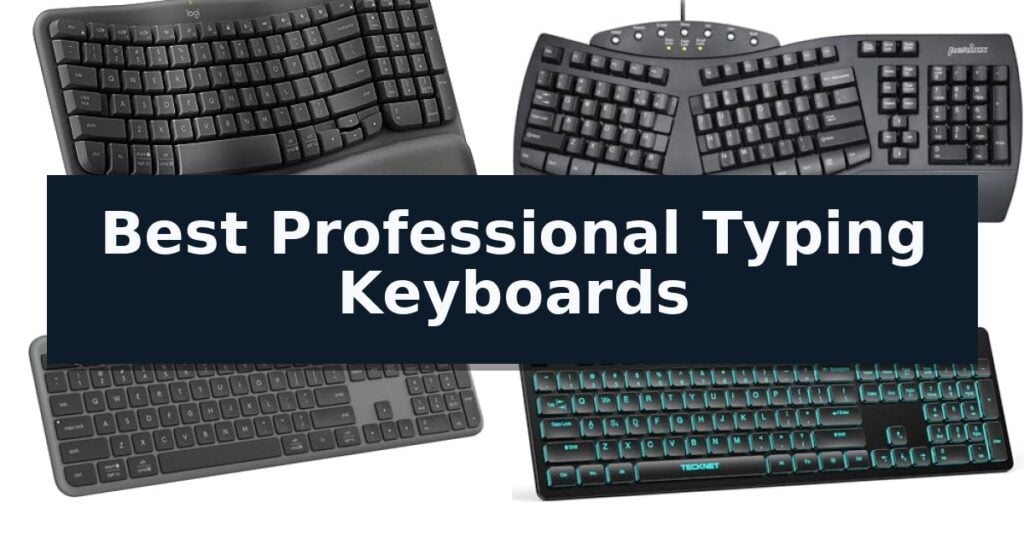
10 Best Professional Typing Keyboards in 2026 Reviews
Quick Comparison
| Product | Best For | Key Strength | Score |
|---|---|---|---|
| Logitech Wave Keys Wireless Keyboard | Best Overall | Ergo-certified design that promotes a natural hand and wrist position. | 4.9 |
| Perixx PERIBOARD-512B Ergonomic Keyboard | Split Design Reduces Wrist Strain | Split-key ergonomic design promotes a natural hand position and reduces wrist bending. | 4.3 |
| Logitech Signature Slim K950 Keyboard | Multi-Device Productivity Switching | Multi-device switching allows for seamless transitions between three connected platforms. | 4.8 |
| TECKNET Wired Silent Keyboard | Quiet Keys for Shared Workspaces | Low-profile membrane keys significantly reduce typing noise. | 4.7 |
| SABLUTE Ergonomic Wireless Keyboard Combo | Ultra-Quiet Wave Design | Ergonomic wave design with adjustable tilt for improved posture. | 4.9 |
| Frixalox Wired Ergonomic Split Keyboard | Adjustable Angles for Custom Comfort | Ergonomic split-frame design with integrated wrist rest. | 4.7 |
| X9 Performance Wired Ergonomic Keyboard | Integrated Palm Support | Integrated wrist rest for enhanced typing comfort | 4.3 |
| Logitech K270 Wireless Keyboard | Reliable Long-Range Wireless | 24-month battery life reduces maintenance frequency. | 4.9 |
| Logitech MK295 Silent Wireless Keyboard | Reduced Noise Typing Technology | SilentTouch technology significantly reduces typing and clicking noise. | 4.9 |
| BOOGIIO Large Print Wired Keyboard | High Contrast for Better Visibility | High-contrast yellow and black color scheme for superior visibility. | 4.6 |
How We Chose
Evaluating the best professional typing keyboards requires a focus on how hardware interfaces with daily office demands. We analyze build ergonomics, connection stability, and input responsiveness to identify tools that reduce fatigue while maintaining high efficiency across diverse computing environments.
- Ergonomic design and wrist support
- Connectivity options and multi-device switching
- Key switch feel and typing noise levels
- Build quality and spill resistance
- Compatibility with major operating systems
1 Logitech Wave Keys Wireless Keyboard — Ergonomist-Approved Natural Posture
The Logitech Wave Keys Wireless Keyboard is engineered with a distinctive wavy layout designed to position hands, wrists, and forearms in a more natural alignment during extended typing sessions. This ergonomic configuration is supported by an integrated, cushioned palm rest featuring memory foam, which provides continuous support to reduce wrist pressure throughout the workday.
Beyond its physical form, this keyboard offers versatile connectivity options, allowing users to pair up to three devices simultaneously via Bluetooth or the included Logi Bolt Receiver. The Easy-Switch functionality enables seamless transitions between different operating systems, including Windows, macOS, iPadOS, and ChromeOS, ensuring consistent performance across a multi-device workspace.
Customization is managed through the Logi Options+ App, which allows for the assignment of time-saving shortcuts to streamline professional workflows. The device is also built with sustainability in mind, incorporating certified post-consumer recycled plastic in its construction, with the Graphite and Sand models containing 61% recycled content.
Designed for long-term reliability, the unit is ergo-certified by United States Ergonomics, reflecting its development against rigorous professional criteria. It is powered by a battery system rated for up to 3 years of life, minimizing the need for frequent maintenance in a busy office environment.
Best for: Professionals seeking an ergo-certified, compact keyboard that supports natural wrist posture and multi-device connectivity.
Skip if: Users who require a mechanical key switch feel or a full-sized layout with a dedicated number pad will find this compact, membrane-style design less suitable for their specific input preferences.
- Ergo-certified design that promotes a natural hand and wrist position.
- Cushioned memory foam palm rest for enhanced comfort during long typing sessions.
- Multi-device connectivity via Bluetooth and Logi Bolt with easy switching.
- Long battery life rated for up to 3 years of usage.
- Compact layout lacks a dedicated number pad, which may impact data entry efficiency.
- Membrane key switches may not provide the tactile feedback preferred by some professional typists.
2 Perixx PERIBOARD-512B Ergonomic Keyboard — Split Design Reduces Wrist Strain
The Perixx PERIBOARD-512B Wired Ergonomic Keyboard utilizes a distinct one-piece split-key layout designed to separate keys into left and right zones. This configuration encourages a more natural hand position, which helps reduce wrist bending and minimizes strain during extended typing sessions. By angling the key zones, the design aims to align the wrists more comfortably with the forearms, a common requirement for those seeking the Best Professional Typing Keyboards to maintain long-term comfort.
Built for consistent use, this keyboard features long key travel of 4.2 mm, which provides tactile feedback with audible confirmation, mimicking the feel of brown mechanical switches. The internal membrane switches are rated for a durability of up to 20 million keystrokes, ensuring long-term reliability for professional environments. This mechanical-like responsiveness is intended to provide a clear physical signal for each press, which can help reduce typing errors during high-volume tasks.
The design incorporates an old-school curved row profile, where the keys are stepped to promote a natural posture and reduce fatigue. These ergonomic curved keycaps feature flatter tops and back edges, specifically shaped to fit the contours of your fingertips for improved control and comfort while typing. The keyboard is constructed from high-quality ABS material, providing a stable foundation for the keys.
While the ergonomic shape is intended to improve comfort and reduce wrist pressure, it does involve a natural learning curve. Most users typically adapt to the split layout within one to two weeks of consistent use, eventually finding the setup more comfortable than traditional flat keyboards. A notable trade-off is the larger footprint, measuring 18.92 inches in length and 9.2 inches in width, which requires more desk space than standard compact keyboards.
Best for: Professionals seeking a split-key ergonomic layout to reduce wrist strain and improve typing posture during long work sessions.
Skip if: Users who prefer a compact, low-profile keyboard or those unwilling to commit to the one-to-two-week adjustment period required for a split-key layout.
- Split-key ergonomic design promotes a natural hand position and reduces wrist bending.
- Tactile feedback with 4.2 mm key travel provides a responsive typing experience.
- Durable construction rated for up to 20 million keystrokes.
- Curved keycaps designed to fit fingertip contours for better control.
- Natural learning curve requires an adjustment period of one to two weeks.
- Larger footprint compared to standard compact keyboards.
3 Logitech Signature Slim K950 Keyboard — Multi-Device Productivity Switching
The Logitech Signature Slim K950 Keyboard is engineered for users who need to transition between multiple devices throughout their workday. This full-size wireless keyboard features a dedicated number pad and a low-profile design that mimics familiar laptop-style typing, providing a consistent feel for high-volume data entry or document creation.
Productivity is centered on the ability to switch typing between three devices—such as a computer, tablet, or phone—with a single tap. The keyboard supports a wide range of operating systems, including Windows, macOS, Chrome OS, Linux, iPadOS, iOS, and Android. Connectivity is handled via Bluetooth or the included Logi Bolt USB receiver, ensuring a stable wireless connection across various hardware environments.
Customization is managed through the Logi Options+ App, which allows users to assign specific functions to customizable keys for faster access to common tasks. The keyboard also includes out-of-the-box shortcuts for media control, volume adjustment, and screen tools. Designed with a focus on a quiet workspace, the keys are built to minimize noise, making it a practical choice for shared office settings or home environments where silence is preferred.
Sustainability and build quality are integrated into the design, with the device constructed using a minimum of 48% certified post-consumer recycled plastic. The Logitech Signature Slim K950 Keyboard is fully compatible with Windows 11 and offers a sleek, solid form factor that complements modern desk setups while maintaining a professional aesthetic.
Best for: Users who frequently switch between multiple computing devices and mobile platforms throughout the workday.
Skip if: Users who require mechanical switches or a high-travel tactile typing experience for gaming or heavy-duty typing tasks.
- Multi-device switching allows for seamless transitions between three connected platforms.
- Quiet typing design reduces noise for professional or shared workspaces.
- Customizable keys via the Logi Options+ App enhance workflow efficiency.
- Broad OS compatibility ensures functionality across Windows, Mac, Chrome, and mobile systems.
- Laptop-style keys may not provide the tactile feedback preferred by mechanical keyboard enthusiasts.
- Software-dependent features like key customization require the Logi Options+ App for full functionality.
4 TECKNET Wired Silent Keyboard — Quiet Keys for Shared Workspaces
The TECKNET Wired Silent Keyboard prioritizes a distraction-free workspace by utilizing low-profile membrane keys that significantly reduce typing noise compared to traditional mechanical alternatives. This design choice makes it a practical selection for shared office environments, libraries, or late-night work sessions where minimizing ambient sound is a priority.
Beyond its acoustic performance, the keyboard features a full-size 104-key layout with a 3-zone configuration to support efficient data entry. Users can customize their physical typing angle using the integrated adjustable tilt feet, while the inclusion of anti-slip pads helps maintain stability during extended use. The frame is engineered with spill-resistant conductive film to provide protection against accidental liquid exposure.
Functionality is enhanced through 12 FN+F multimedia shortcut keys, providing direct access to volume control, media playback, and system tools like the calculator. The device also incorporates 7-color RGB backlighting with two distinct modes—static and breathing—and four adjustable brightness levels, allowing for visibility in low-light conditions.
Setup is straightforward via a plug-and-play USB connection, which removes the need for batteries or charging. The keyboard is compatible with Windows, Mac OS, and Raspberry Pi systems, though multimedia key functionality may vary on Mac platforms. Each key is rated for a lifespan of up to 80 million keystrokes, supporting long-term reliability in professional settings.
Best for: Office professionals and students who require a quiet, full-sized keyboard for shared or noise-sensitive environments.
Skip if: Users who prefer the tactile feedback and distinct click of mechanical switches will likely find the membrane-based typing experience too soft or unresponsive.
- Low-profile membrane keys significantly reduce typing noise.
- Spill-resistant design protects internal components from accidental splashes.
- Full-size 104-key layout includes dedicated multimedia shortcuts for improved workflow.
- Plug-and-play USB connectivity eliminates the need for batteries or charging.
- Limited multimedia key functionality when used with Mac OS systems.
- Wired-only connection may restrict desk cable management options.
5 SABLUTE Ergonomic Wireless Keyboard Combo — Ultra-Quiet Wave Design
Maintaining a comfortable and productive workspace often begins with the hardware you touch for hours every day. The SABLUTE Ergonomic Wireless Keyboard Combo prioritizes physical well-being through its specialized wave design, which features two adjustable tilt angles to encourage a more natural wrist and hand posture during extended typing sessions.
Beyond its ergonomic shape, the keyboard is built for a distraction-free environment, utilizing technology that reduces typing and mouse click noise by up to 90%. This 30dB ultra-quiet operation is complemented by a cushioned leather wrist rest, which offers a soft, supportive alternative to standard hard plastic surfaces, effectively reducing pressure during repetitive tasks.
Functionality is further enhanced by 12 dedicated productivity shortcuts, allowing for quick access to media controls, AI tools, and system utilities. The hardware is designed for longevity, with laser-etched keys tested for up to 10 million keystrokes, ensuring consistent performance over time. The unit also includes spill-resistant protection to guard against minor office accidents.
Connectivity is streamlined through a single 2.4GHz receiver that pairs both the keyboard and mouse, saving USB ports. The combo is compatible with Windows, macOS, ChromeOS, Linux, and Android, and includes a USB-C adapter for modern device integration. With auto-sleep technology to preserve battery life, this setup provides a reliable, low-maintenance solution for professional workflows.
Best for: Office professionals seeking a quiet, ergonomic typing experience with integrated wrist support and multi-device compatibility.
Skip if: Users who require a mechanical switch feel or specific macOS-only media and AI shortcut functionality.
- Ergonomic wave design with adjustable tilt for improved posture.
- Cushioned leather wrist rest for enhanced comfort.
- 90% noise reduction for quiet office environments.
- Universal compatibility with a single 2.4GHz receiver.
- Limited shortcut functionality on macOS for specific apps.
- Batteries not included in the package.
6 Frixalox Wired Ergonomic Split Keyboard — Adjustable Angles for Custom Comfort
The Frixalox Wired Ergonomic Split Keyboard addresses the physical demands of high-volume typing through a specialized split-frame layout that encourages a more natural hand position. By integrating a firm, hard-plastic wrist rest, the design provides consistent support that helps mitigate strain during extended work sessions. This ergonomic foundation is further enhanced by two pairs of adjustable kickstands, which allow users to toggle between three distinct typing angles to find a setup that aligns with their specific desk height and posture requirements.
Beyond its ergonomic structure, this full-size keyboard serves as a comprehensive workstation tool. It features a dedicated number pad and 17 multimedia shortcut keys, providing one-tap access to essential functions like volume control, playback, and system navigation. The inclusion of these shortcuts streamlines common tasks such as managing spreadsheets or handling email, effectively reducing the need to reach for a mouse during repetitive workflows.
Visual and environmental adaptability are central to the user experience, supported by an RGB backlight system that offers 17 dynamic lighting effects. With 10 rainbow modes and 7 solid color options, users can tailor the aesthetic to their preference, while five brightness levels ensure characters remain legible in environments ranging from bright offices to low-light home setups. This lighting system is purely functional, ensuring that key visibility is maintained regardless of the ambient light.
Connectivity is streamlined through a 5.6-foot USB-A cable, which ensures a reliable, plug-and-play experience without the latency or maintenance associated with wireless peripherals. Because it does not rely on batteries or charging, the keyboard is always ready for use. For modern users, the package includes a USB-C adapter, ensuring broad compatibility across Windows, macOS, Chrome OS, and Linux systems. While the wired-only connection provides a stable link, it does necessitate a permanent cable run on the desk, which is a trade-off for the convenience of never needing to manage power levels.
Best for: Office workers and typists seeking a full-size, ergonomic wired keyboard with adjustable angles and integrated wrist support.
Skip if: Users who require wireless connectivity or compatibility with gaming consoles like the PS5 or Xbox.
- Ergonomic split-frame design with integrated wrist rest.
- Three adjustable typing angles via dual-pair kickstands.
- Stable wired connection with no input lag or battery requirements.
- 17 customizable RGB lighting effects with five brightness levels.
- Wired-only connection limits desk cable management options.
- Not compatible with gaming consoles such as PS5 or Xbox.
7 X9 Performance Wired Ergonomic Keyboard — Integrated Palm Support
Maintaining a consistent, efficient workflow requires a reliable input device, and the X9 Performance Wired Ergonomic Keyboard addresses this by integrating a built-in wrist rest designed to support extended typing sessions. This full-size peripheral is engineered to minimize physical strain during long hours of data entry, providing the necessary layout for professional tasks while ensuring the user remains comfortable throughout the workday.
The keyboard features 114 quiet keys, including a dedicated number pad for efficient numerical entry, which is essential for accounting or data-heavy applications. To further streamline professional tasks, it includes 10 multimedia keys and 14 shortcut keys, allowing users to manage audio playback, volume, and system functions directly from the keyboard without needing to navigate through software menus or minimize active windows.
Usability is prioritized through a straightforward plug and play connection via a 5ft USB-A cable. This wired interface eliminates the need for driver installations, complex software configurations, or the battery management typically associated with wireless alternatives. The inclusion of an adjustable kickstand allows users to modify the typing angle to suit their specific ergonomic preferences, ensuring the device fits naturally into various desktop setups.
Built for office environments where noise reduction and a functional layout are paramount, this unit serves as a robust external solution for both desktop and laptop users. By combining a full-size key set with integrated palm support, the X9 Performance Wired Ergonomic Keyboard provides a stable, consistent typing experience for professionals who prioritize reliability over portability.
Best for: Office professionals and data entry specialists who require a full-size, wired keyboard with integrated wrist support for long-term comfort.
Skip if: Users who prefer a wireless or compact, tenkeyless design will find the wired connection and full-size footprint of this model unnecessary for their workspace.
- Integrated wrist rest for enhanced typing comfort
- Plug and play connectivity via USB-A
- 114 keys including dedicated multimedia and shortcut controls
- Adjustable kickstand for customizable typing angles
- Wired-only connection limits portability and cable-free desk setups
8 Logitech K270 Wireless Keyboard — Reliable Long-Range Wireless
The Logitech K270 Full Size Wireless Keyboard simplifies workspace management by utilizing a single, tiny Logitech Unifying receiver that allows for a reliable, plug-and-play connection across your desktop or laptop. Designed for efficiency, this keyboard eliminates the need for software installation, letting you start typing immediately upon plugging in the USB-A receiver.
Built for consistent daily use, the Logitech K270 features a spill-proof design and durable print characters that withstand common office mishaps. Its full-size layout includes a dedicated number pad, arrow keys, and a full set of F-keys, providing a familiar experience that supports long-term productivity.
Efficiency extends to power management, as the device boasts an impressive 24-month battery life, significantly reducing the frequency of maintenance. The keyboard also incorporates 8 multimedia hotkeys, offering instant access to essential functions like volume control, email, and internet navigation, keeping your most-used tools within reach.
The wireless connection is engineered for stability, maintaining a strong signal at a range of up to 33 feet to prevent drop-outs. Furthermore, the construction demonstrates a commitment to sustainability, as the plastic components include 38% certified post-consumer recycled plastic.
Best for: Users seeking a reliable, full-sized wireless keyboard with long battery life for standard office or home productivity tasks.
Skip if: Users who require a compact, tenkeyless design or those who prefer mechanical switches for tactile feedback.
- 24-month battery life reduces maintenance frequency.
- Spill-proof design enhances durability against accidental liquid exposure.
- Plug-and-play setup via the included USB-A receiver.
- 8 multimedia hotkeys for quick access to common functions.
- Full-size layout may be too large for users with limited desk space.
- Membrane key switches lack the tactile response preferred by some professional typists.
9 Logitech MK295 Silent Wireless Keyboard — Reduced Noise Typing Technology
Maintaining a quiet workspace is essential for focus, and the Logitech MK295 Full Size Silent Wireless Keyboard Mouse Combo addresses this with its proprietary SilentTouch technology. This feature is engineered to provide the tactile feedback of traditional typing and clicking while reducing noise output by 90%, making it a practical choice for shared office environments or home setups where silence is a priority.
The keyboard features a full-size layout complete with a numeric keypad and eight dedicated shortcuts, providing one-touch access to media controls and internet navigation for improved workflow efficiency. Its spill-resistant design and durable keys are supported by sturdy tilt legs, allowing for adjustable height to suit different typing preferences. The included ambidextrous mouse is contoured for comfort and maintains the same silent-click performance as the keyboard.
Connectivity is handled via a tiny 2.4 GHz USB receiver that offers a reliable wireless range of up to 10 meters. The system is designed for plug-and-play simplicity and is fully compatible with Windows and Chrome OS, including Windows 11. Setup is rapid, with a connection time of approximately three seconds.
Longevity is a key design focus, with the keyboard offering a 36-month battery life and the mouse providing 18 months of usage. Both components include physical on/off switches to preserve power. Furthermore, the construction incorporates sustainability, with the Graphite model utilizing 49% post-consumer recycled plastic for the mouse and 71% for the keyboard.
Best for: Professionals working in shared or quiet environments who require a reliable, full-size wireless input solution with long battery life.
Skip if: Users who prefer mechanical switches for tactile feedback or those who require a compact, tenkeyless layout for limited desk space.
- SilentTouch technology significantly reduces typing and clicking noise.
- Extended battery life of up to 36 months for the keyboard.
- Full-size layout with dedicated media and internet shortcuts.
- Spill-resistant construction for increased durability.
- Non-mechanical switches may not satisfy users seeking specific tactile or clicky feedback.
- USB receiver connectivity requires an available USB-A port, which may necessitate adapters for some modern laptops.
10 BOOGIIO Large Print Wired Keyboard — High Contrast for Better Visibility
The BOOGIIO Large Print Wired Keyboard is engineered specifically to enhance legibility through its high-contrast yellow keycaps paired with oversized, bold black lettering. This design choice directly addresses visibility challenges for individuals with low vision, while maintaining a standard 104-key QWERTY layout that requires no adjustment to established typing habits.
Beyond its visual aids, the unit features a spill-resistant design intended to protect internal electronic components from accidental liquid exposure. The membrane key switches are rated for a life cycle of 5 million keystrokes, providing a tactile response that is notably quieter than traditional mechanical alternatives, making it suitable for shared office or library environments.
Ergonomics are addressed via fold-out rear feet, which allow users to adjust the typing angle to help reduce hand fatigue during extended use. The keyboard utilizes a plug-and-play USB connection, ensuring compatibility across a wide range of operating systems including Windows and macOS without the need for additional driver software.
While the device is optimized for typing, users should note that certain hotkey functionality is exclusive to Windows environments. The keyboard measures 17.5 inches in length and 5.7 inches in width, providing a full-sized footprint that includes a dedicated numeric keypad for efficient data entry.
Best for: Individuals with low vision or those requiring high-contrast visual cues for improved typing accuracy.
Skip if: Users who require advanced programmable macro keys or a compact, tenkeyless form factor for limited desk space.
- High-contrast yellow and black color scheme for superior visibility.
- Oversized, bold print on all keys to assist users with visual impairments.
- Spill-resistant construction to protect internal components.
- Plug-and-play USB connectivity for immediate setup.
- Limited hotkey compatibility on non-Windows operating systems.
Best Professional Typing Keyboards Buying Guide
Ergonomic Form Factors
Professional keyboards often utilize contoured or split layouts to align the wrists and forearms more naturally than standard rectangular boards. These designs aim to reduce the repetitive strain associated with long hours of data entry or document creation.
Buyers should consider whether they prefer a fixed wave design, which is generally easier to learn, or a fully split layout. Split keyboards offer greater customization for arm placement but typically require a longer adaptation period for touch typists.
Connectivity and Multi-Device Support
Modern professional workflows frequently involve switching between a primary workstation, a tablet, and a mobile phone. Keyboards featuring Bluetooth or dedicated USB receivers with multi-device switching allow users to transition between these platforms with a single keystroke.
Wired keyboards remain a reliable choice for those who prioritize a permanent, lag-free connection without the need for batteries. However, wireless models offer a cleaner desk space and greater flexibility for users who frequently adjust their seating position.
Typing Feel and Noise Management
The tactile feedback of a keyboard influences both typing speed and comfort. Membrane switches, often found in office-focused boards, provide a softer, quieter experience that is ideal for shared workspaces or open-plan offices.
Some users prefer the audible click and distinct resistance of mechanical-style switches, which can provide clearer confirmation of each keystroke. When choosing, consider the environment where the keyboard will be used to ensure the noise level remains appropriate for your colleagues.
Durability and Maintenance
Professional tools must withstand daily use, making build quality a critical factor. Look for spill-resistant designs and durable keycap printing, which prevent common office accidents and long-term wear from affecting performance.
Maintenance is generally straightforward for membrane keyboards, which are often sealed against debris. For high-traffic environments, selecting a model with a proven track record for key longevity ensures the investment remains functional over several years.
Operating System Compatibility
While most keyboards are plug-and-play, professional users should verify that their chosen model supports the specific shortcuts and function keys required by their operating system. Some keyboards offer dedicated layouts for Windows or macOS to streamline common tasks.
Software customization, such as the ability to remap keys or create macros, can significantly enhance productivity. Check if the manufacturer provides software that allows you to tailor the keyboard's behavior to your specific professional applications.
Frequently Asked Questions
Do ergonomic keyboards require a learning curve?
Yes, most ergonomic keyboards, especially split-key designs, require a short adjustment period. Most users adapt within one to two weeks of consistent use.
Can I use a wireless keyboard with multiple devices?
Many modern wireless keyboards feature multi-device switching, allowing you to pair with and toggle between up to three devices like laptops, tablets, and phones.
Are membrane keyboards better for office environments?
Membrane keyboards are generally quieter than mechanical alternatives, making them a popular choice for shared offices where minimizing typing noise is a priority.
What is the benefit of a built-in wrist rest?
A wrist rest helps maintain a neutral wrist position while typing, which can reduce pressure and fatigue during long work sessions.
Do I need special software for my keyboard to work?
Most keyboards function immediately via plug-and-play. However, manufacturer software is often required to customize shortcuts, remap keys, or update firmware.
Conclusion: Our Top Pick
Our top pick is Logitech Wave Keys Wireless Keyboard. Choosing the right professional keyboard depends on your specific workspace needs, whether that involves prioritizing ergonomic health, quiet operation, or the ability to switch between multiple devices. Assessing your daily typing volume and desk setup will help narrow down the most effective tool for your workflow.
By focusing on build quality and the specific layout that best suits your posture, you can improve both comfort and productivity. Investing in a keyboard that aligns with your professional habits ensures a more sustainable and efficient computing experience.