PlayStation Move Motion Controllers are our top choice for the Best PSVR Controller because they provide essential motion sensing and light tracking technology that serves as the foundation for most virtual reality experiences on the platform. For those seeking specialized precision in shooter games, the PlayStation VR Aim Controller offers a dedicated two-handed form factor, while the PlayStation VR2 Sense Charging Station provides a streamlined power solution for newer hardware.
Selecting the right controller depends on the specific requirements of your VR library and your preferred gaming style. While standard motion controllers are versatile enough for a wide range of titles, dedicated peripherals like the Aim Controller are engineered to enhance immersion in specific genres by mimicking the feel of a firearm.
Experienced users should prioritize tracking compatibility and ergonomic comfort when building their collection. Understanding the distinction between general-purpose motion controllers and genre-specific accessories ensures that you invest in hardware that directly supports the games you play most frequently.
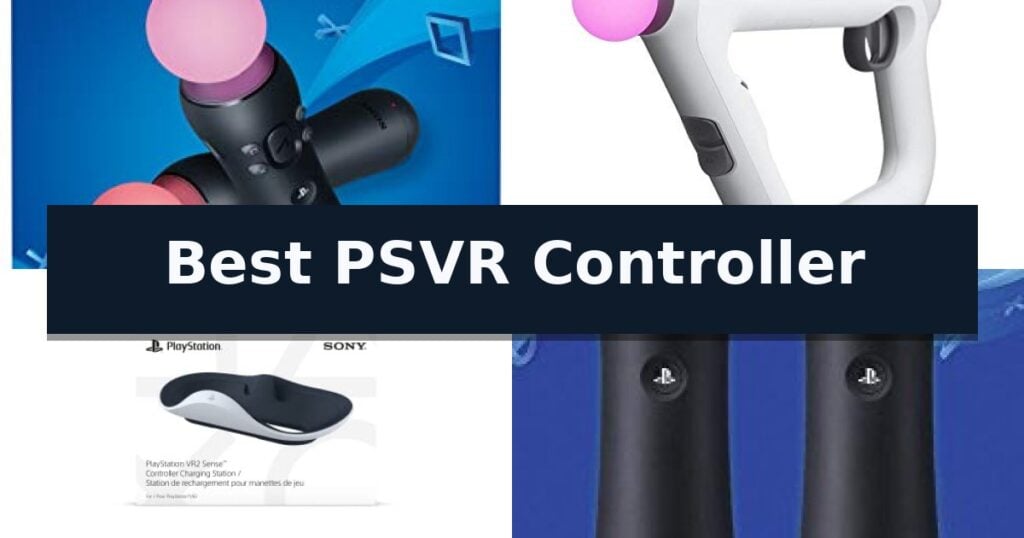
7 Best PSVR Controller in 2026 Reviews
Quick Comparison
| Product | Best For | Key Strength | Score |
|---|---|---|---|
| PlayStation Move Motion Controllers | Best Overall | Advanced motion sensing for accurate tracking | 4.9 |
| PlayStation VR Aim Controller | Precision for virtual shooter games | Integrated motion sensor for high-precision tracking | 4.9 |
| PlayStation VR2 Sense Charging Station | Fast power for next-gen controllers | Simultaneous charging for both controllers. | 4.6 |
| PlayStation Move Twin Pack | Dual-handed control for VR interaction | Ergonomic lightweight design for reduced hand fatigue. | 4.8 |
| PSVR Aim Controller | Ergonomic two-handed shooter support | Ergonomic two-handed design for improved comfort and stability. | 4.6 |
| PlayStation 4 Move Motion Controller | Reliable single-unit motion tracking | Automatic pairing via USB cable simplifies initial setup. | 4.5 |
| PlayStation Move Navigation Controller | Enhanced character movement control | Wireless connectivity provides freedom of movement during gameplay. | 4.5 |
How We Chose
Evaluating the best PSVR controller options requires a focus on how hardware integrates with the console's tracking environment. An experienced reviewer analyzes the physical interface, button layout, and motion-sensing reliability of each device to determine which controllers offer the most intuitive and stable experience for immersive virtual reality gameplay.
- Tracking precision and sensor responsiveness
- Ergonomic design for extended play sessions
- Compatibility with specific VR game libraries
- Battery life and charging convenience
- Build quality and button accessibility
1 PlayStation Move Motion Controllers — Essential for immersive motion tracking
Achieving precise interaction within virtual environments requires hardware that translates physical movement into digital action with high fidelity. The PlayStation Move Motion Controllers – Two Pack utilize advanced motion sensing and light tracking technology to bridge this gap, ensuring that hand gestures and weapon aiming are captured accurately during gameplay.
Designed specifically for the PSVR ecosystem, these controllers feature an ergonomic layout with easily accessible trigger and face buttons that allow for intuitive navigation without breaking immersion. The inclusion of immersive vibration feedback provides tactile confirmation for in-game events, adding a layer of physical response to the visual experience.
Power management is handled through integrated rechargeable batteries, which are rated to provide long hours of play, reducing the need for frequent interruptions. The controllers are built with a compact form factor, measuring approximately 7.3 inches in height and 2.6 inches in width, ensuring they remain comfortable to hold during extended sessions.
While these controllers are essential for many titles, users should note that they rely on the console's camera-based tracking system. Maintaining a clear line of sight between the controller's light sphere and the camera is necessary for optimal performance, as obstructions can impact tracking consistency.
Best for: Players seeking to enhance immersion in PSVR titles that require precise motion tracking and tactile feedback.
Skip if: Users who prefer standard gamepad controls or those playing titles that do not support motion-based input.
- Advanced motion sensing for accurate tracking
- Immersive vibration feedback for tactile gameplay
- Rechargeable batteries for extended play sessions
- Ergonomic button placement for intuitive control
- Requires clear line-of-sight to the camera for tracking
2 PlayStation VR Aim Controller — Precision for virtual shooter games
The PlayStation VR Aim Controller (PS4) is engineered to elevate the virtual reality experience by providing a physical interface that mimics the feel of a firearm. At its core, the device utilizes an integrated motion sensor and a trackable sphere that work in tandem with the PlayStation Camera. This hardware combination is designed to deliver high-precision tracking, ensuring that your in-game movements are translated into lighting-fast and deadly accurate shots during fast-paced shooter gameplay.
Beyond its tracking capabilities, the controller features a specialized form factor that prioritizes intuitive interaction. By moving away from standard handheld controllers, this unit allows players to aim more naturally within the virtual environment. The layout is intentionally ergonomic, ensuring that all essential buttons remain easily accessible while you maintain focus on the action. Weighing approximately 1.1 pounds with dimensions of roughly 6.7 by 7.3 inches, the device provides a balanced profile that helps minimize fatigue during extended gaming sessions.
While the PlayStation VR Aim Controller offers a distinct advantage for immersion, it is a specialized tool. It is important for potential buyers to note that this controller is designed for use only with compatible virtual reality shooter titles. Because it serves a specific function rather than acting as a general-purpose navigation device, users should verify that their existing game library supports this hardware before making a purchase. This trade-off between specialized performance and broad compatibility is a key consideration for any VR enthusiast looking to upgrade their setup.
Best for: Gamers seeking heightened immersion and precision in compatible virtual reality shooter titles.
Skip if: Casual players or those primarily interested in non-shooter VR experiences where a standard controller is sufficient.
- Integrated motion sensor for high-precision tracking
- Trackable sphere ensures reliable camera synchronization
- Ergonomic design tailored for shooter gameplay
- Specific game compatibility required for use
3 PlayStation VR2 Sense Charging Station — Fast power for next-gen controllers
Maintaining power for your VR experience requires a reliable solution that minimizes cable clutter and ensures your hardware is ready for the next session. The PlayStation VR2 Sense™ Controller Charging Station provides a dedicated home for your controllers, utilizing a click-in design that eliminates the need to fumble with charging cables or occupy precious USB ports on your console.
This charging station is engineered for efficiency, supporting simultaneous charging for both controllers. By decoupling the charging process from the console, it offers a streamlined workflow that keeps your setup organized. The unit is designed to be fast and simple to use, allowing you to drop the controllers into the dock and walk away with the assurance that they will be powered up when you return.
With a compact footprint measuring approximately 10 inches in length and 2.75 inches in width, the station is sized to fit easily into most gaming entertainment centers. Its no console connection requirement means you can place it anywhere near a standard power outlet, providing flexibility in how you manage your gaming space.
While the device excels at its primary function, users should note that it is specifically tailored for the PlayStation VR2 Sense controllers. Its design prioritizes a clean, dedicated charging environment over multi-device versatility, making it a focused accessory for those who want to keep their VR gear ready for immediate use.
Best for: Owners of the PlayStation VR2 system who want a dedicated, clutter-free charging solution that keeps controllers ready for use without tying up console ports.
Skip if: Users who prefer a single-cable solution or those who do not own the specific PlayStation VR2 Sense controllers will find this device incompatible with their needs.
- Simultaneous charging for both controllers.
- Click-in design for effortless docking.
- No console connection required, freeing up USB ports.
- Fast and simple to use setup.
- Dedicated compatibility limited to PlayStation VR2 Sense controllers only.
4 PlayStation Move Twin Pack — Dual-handed control for VR interaction
The PlayStation Move Twin Pack provides a specialized approach to virtual reality interaction by utilizing a tracked sphere that allows the system to monitor movement in three-dimensional space. This design enables the controllers to act as extensions of the user's hands, facilitating intuitive engagement with virtual environments.
Engineered with a focus on ergonomics, the PlayStation Move Twin Pack features a lightweight construction that minimizes fatigue during extended sessions. Each controller incorporates a built-in vibration function, providing tactile feedback that corresponds to in-game actions, which enhances the overall sense of immersion.
The system relies on the PlayStation Camera to track the illuminated spheres, ensuring that physical gestures are translated into the game world. This dual-handed configuration is specifically intended for titles that require independent control of each hand, offering a level of precision that standard gamepads cannot replicate for specific VR tasks.
While these controllers are designed for seamless integration with the PlayStation VR ecosystem, users should note that they require a compatible camera setup for tracking. The units are compact, measuring approximately 9.13 inches in length, and are built to be held comfortably for various gameplay styles.
Best for: Users seeking dedicated motion-tracked input for immersive dual-handed virtual reality gameplay on PlayStation systems.
Skip if: Users who do not own a compatible PlayStation Camera or who primarily play games that do not require motion-tracked controllers.
- Ergonomic lightweight design for reduced hand fatigue.
- Built-in vibration function for enhanced tactile feedback.
- Intuitive motion tracking via the integrated sphere and camera system.
- Requires external camera hardware for tracking functionality.
5 PSVR Aim Controller — Ergonomic two-handed shooter support
The PSVR Aim Controller is a specialized peripheral engineered to elevate immersion in compatible virtual reality shooter titles. By adopting a dedicated two-handed form factor, it mimics the physical handling of a firearm, allowing for more natural positioning and stability than standard motion controllers. This design is intended to keep the user comfortable during extended play sessions, ensuring that the focus remains on the virtual environment rather than on adjusting grip or managing awkward inputs.
At the core of its functionality, the device utilizes advanced motion sensing and light tracking technology to translate physical movements into precise in-game aiming. This integration provides a direct, intuitive connection between the player's physical stance and their virtual perspective. Furthermore, the controller features immersive vibration feedback, which delivers tactile responses to in-game events, adding a layer of sensory realism that standard controllers often lack.
While the PSVR Aim Controller excels at providing a dedicated interface for shooters, it is a specialized piece of hardware. Its utility is tied directly to software compatibility, meaning users must verify that their library of VR titles supports this specific controller before acquisition. This focus on a specific genre ensures a refined experience for those games, though it limits the device's versatility compared to general-purpose motion controllers.
Best for: Players seeking a dedicated, two-handed peripheral to enhance immersion and aiming precision in compatible PlayStation VR shooter games.
Skip if: Users who primarily play non-shooter VR titles or those who prefer the versatility of standard motion controllers for a wider variety of game genres.
- Ergonomic two-handed design for improved comfort and stability.
- Advanced motion sensing and light tracking for precise aiming.
- Immersive vibration feedback adds tactile realism to gameplay.
- Limited software compatibility restricted to specific shooter titles.
6 PlayStation 4 Move Motion Controller — Reliable single-unit motion tracking
The PlayStation 4 Move Motion Controller provides a dedicated interface for users seeking precise motion-based input within virtual reality environments. By utilizing a single-unit design, this controller translates physical gestures into digital actions, offering an intuitive way to interact with compatible software titles. Its form factor is specifically engineered to be held comfortably during extended gaming sessions, measuring 7.3 inches in height and weighing approximately 0.25 pounds.
Integration with the PS4 system is designed for efficiency and ease of use. The hardware supports automatic pairing via a standard USB cable, which is included in the package. This connection method serves dual purposes: it facilitates the initial synchronization between the controller and the console while simultaneously allowing the user to charge the controller to ensure it remains powered for gameplay.
Because this device is a specialized tool, its utility is directly tied to the software library of the user. Prospective buyers should verify that their specific applications support this motion-tracking configuration before purchase. While the single-unit design is effective for individual input, users requiring multi-controller setups should account for the hardware requirements of their specific software, as this package includes one controller and one USB cable.
The inclusion of the necessary connectivity hardware out of the box minimizes technical setup hurdles. By focusing on a straightforward, tethered pairing process, the controller allows for a quick transition into virtual reality experiences. This focus on reliability and ease of integration makes it a practical choice for those who prioritize a dedicated motion-tracking solution over more generalized input methods.
Best for: Users looking for a dedicated, official motion-tracking controller for compatible PlayStation 4 virtual reality experiences.
Skip if: Users who require a modern controller with integrated analog sticks or those whose specific software does not support motion-based input.
- Automatic pairing via USB cable simplifies initial setup.
- Lightweight design promotes comfort during use.
- Includes necessary USB cable for charging and connectivity.
- Single-unit configuration may require additional hardware for specific multi-controller setups.
7 PlayStation Move Navigation Controller — Enhanced character movement control
The PlayStation Move Navigation Controller serves as a specialized interface designed to streamline character movement in compatible titles. By providing a dedicated, wireless input method, it functions as an essential companion to the primary motion controller, allowing for more ergonomic handling during extended gaming sessions. Its compact, 5.87-inch frame is engineered for comfort, ensuring that players can manage complex navigation tasks without the limitations of standard motion-based inputs.
Beyond its primary role in movement, the device incorporates vibration feedback that triggers during specific in-game events. This tactile response adds a layer of physical immersion, bridging the gap between the player and the virtual environment. The controller is built for straightforward operation, focusing on a clean, functional layout that prioritizes ease of use over unnecessary complexity.
Setup is designed to be efficient, utilizing a standard USB cable (Type A – Mini-B) for both charging and automatic pairing with the PS3 system. This direct connection process removes the need for tedious manual configuration, allowing users to integrate the hardware into their setup quickly. The unit is powered by an internal battery, ensuring it remains untethered and mobile during active play.
As a supplementary tool, the device is intended to work in tandem with existing motion hardware rather than serving as a standalone replacement. This design choice ensures that users maintain the precision of their primary motion controller while gaining the dedicated navigation support needed for movement-heavy applications. It is a functional addition for those looking to refine their control scheme in supported software.
Best for: Players seeking dedicated, ergonomic character movement control in compatible titles that utilize the PlayStation Move system.
Skip if: Users who do not own or intend to use a primary PlayStation Move motion controller, as this device is strictly a secondary input tool.
- Wireless connectivity provides freedom of movement during gameplay.
- Vibration feedback enhances immersion during specific in-game events.
- Automatic pairing via USB simplifies the initial setup process.
- Ergonomic design specifically tailored for character navigation.
- Supplementary device that requires a primary motion controller for full functionality.
- Limited compatibility restricted to specific games that support navigation controller inputs.
Best PSVR Controller Buying Guide
Understanding Motion Tracking Technology
The core of any PSVR experience is the ability of the console to track your movements in 3D space. Controllers that utilize light-tracking spheres allow the PlayStation Camera to accurately map your position, which is critical for maintaining immersion during fast-paced gameplay.
When choosing between controllers, consider how the hardware communicates with your existing camera setup. Reliable tracking is the primary factor in preventing input lag or spatial drift, which can otherwise disrupt the sense of presence in a virtual environment.
Ergonomics and Long-Term Comfort
Virtual reality sessions can often last for extended periods, making the weight and balance of your controller a significant factor. A well-balanced device reduces wrist strain and allows for more natural, fluid movements during gameplay.
Look for controllers that feature intuitive button placement, ensuring that you can reach triggers and face buttons without needing to look away from the headset. Ergonomic design is not just about comfort; it is about maintaining focus within the game.
Genre-Specific Controller Requirements
Not all VR games are designed for the same input method. While standard motion controllers are the industry standard for most titles, shooter games often benefit from specialized hardware that provides a more realistic grip and aiming interface.
Assess your library before purchasing to determine if you need a versatile, general-purpose controller or a specialized peripheral. Investing in a dedicated shooter controller can significantly improve your accuracy and enjoyment in compatible titles.
Battery Management and Charging
Power reliability is essential for uninterrupted gaming. Controllers with integrated rechargeable batteries offer convenience, but you must consider how they charge and whether you have the necessary cables or docks to keep them ready for use.
Charging stations can simplify your setup by providing a dedicated home for your controllers. This not only keeps your gaming area organized but also ensures that your hardware is always charged and ready for your next session.
Assessing Build Quality and Longevity
VR controllers are subject to frequent movement and occasional impact, making durable construction a priority. High-quality materials and robust internal components ensure that your controllers can withstand the rigors of active gaming.
Consider the warranty and support status of your chosen hardware, especially if you are purchasing renewed or bulk-packaged units. Reliable hardware is a long-term investment that protects your ability to enjoy your VR library.
Frequently Asked Questions
Can I use any PSVR controller with all VR games?
No, compatibility varies by title. Some games require standard motion controllers, while others are specifically designed for the Aim Controller or standard gamepads.
Do I need a charging station for my controllers?
While not strictly required, a charging station is a convenient way to manage battery levels and keep your controllers organized when not in use.
What is the benefit of the Aim Controller?
The Aim Controller provides a two-handed, rifle-like form factor that offers superior precision and immersion for compatible first-person shooter games.
Are renewed controllers reliable?
Renewed controllers are often tested to ensure they meet performance standards, but it is important to check the specific warranty terms provided by the seller.
How do I know if a controller is compatible with my PSVR setup?
Check the game's packaging or digital store page, which will explicitly list the supported controller types required for that specific experience.
Conclusion: Our Top Pick
Our top pick is PlayStation Move Motion Controllers. Choosing the right PSVR controller is essential for maximizing your immersion and performance in virtual reality. By focusing on tracking technology, ergonomic design, and your specific library of games, you can select the hardware that best enhances your play style.
Whether you opt for the versatile motion controllers or a specialized shooter peripheral, prioritize build quality and power management to ensure your setup remains reliable. With the right equipment, you can enjoy a seamless and responsive VR experience.