OBSBOT Tiny 3 4K Webcam is our top choice for the Best PTZ Webcams, offering a refined triple-mic array for superior spatial audio in a compact form factor. The OBSBOT Tiny 2 4K Webcam follows as a high-performance alternative for users prioritizing sensor size and light sensitivity, while the Insta360 Link 2 Pro serves as a specialized option for those seeking a natural, DSLR-like bokeh effect.
Selecting a PTZ webcam requires balancing automated movement capabilities with image fidelity and ease of control. An experienced reviewer focuses on how effectively the camera tracks subjects, the latency of its autofocus, and the integration of software tools that allow for remote adjustments during live sessions.
If you are looking for more options in this category, our guide to Best Motorized Webcams provides additional insights into hardware-driven framing solutions.
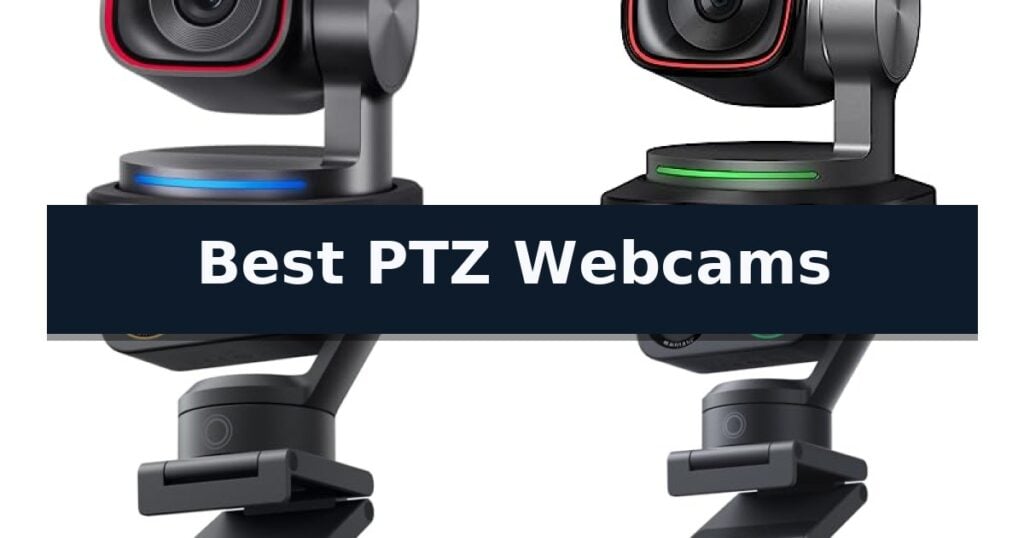
8 Best PTZ Webcams in 2026 Reviews
Quick Comparison
| Product | Best For | Key Strength | Score |
|---|---|---|---|
| OBSBOT Tiny 3 4K Webcam | Best Overall | AI Tracking 2.0 for precise, intelligent subject locking. | 4.9 |
| OBSBOT Tiny 2 4K Webcam | Top-Tier Sensor Performance | 1/1.5" CMOS sensor for enhanced image quality and low-light performance. | 4.7 |
| Insta360 Link 2 Pro 4K Webcam | Professional DSLR-Style Bokeh | Large 1/1.3” sensor for enhanced low-light performance and 4K detail. | 4.5 |
| Insta360 Link 2 4K Webcam | Superior AI Noise Cancellation | Large 1/2" sensor for superior image quality and low-light performance. | 4.5 |
| OBSBOT Tiny 2 Lite 4K Webcam | Streamlined Professional Business Tool | AI-powered tracking with customizable areas for precise subject focus. | 4.5 |
| NexiGo N990 Gen 2 4K Webcam | Best for Remote Control Users | Motorized PTZ functionality with programmable position presets. | 4.5 |
| OBSBOT Tiny SE 1080P Webcam | High Frame Rate Streaming | High frame rate support up to 100FPS at 1080P for smooth motion. | 4.7 |
| PTZOptics HC-EPTZ-NDI 4K Webcam | Ideal for IP-Based Workflows | NDI HX2 and IP connectivity for advanced network-based video production. | 4.3 |
How We Chose
Evaluating the best PTZ webcams involves analyzing how well these devices manage automated framing and subject tracking without sacrificing image clarity. We prioritize models that offer reliable, low-latency performance in diverse lighting conditions, ensuring that both video and audio components integrate seamlessly into professional streaming or conferencing workflows.
- Sensor size and resolution capabilities for low-light performance
- AI tracking speed, accuracy, and variety of motion modes
- Integration with streaming software and hardware control interfaces
- Audio pickup quality and noise-cancellation effectiveness
- Ease of remote control via gestures, voice, or dedicated apps
1 OBSBOT Tiny 3 4K Webcam — Best for Spatial Audio
Precision camera control and high-fidelity audio integration define the OBSBOT Tiny 3 4K Webcam, a compact device engineered for professional streaming and virtual meetings. By utilizing a 1/1.28-inch CMOS sensor, this unit achieves significant image clarity in both 4K at 30FPS and 1080P at 120FPS, ensuring smooth motion for diverse broadcast requirements.
The camera features advanced AI Tracking 2.0, which allows the PTZ mechanism to lock onto individuals or groups with high accuracy. The inclusion of a tri-mic array—comprised of one omnidirectional microphone and two MEMS directional microphones—enables specialized audio modes that prioritize voice clarity while minimizing ambient noise, providing a spatial audio experience.
Usability is enhanced through voice and gesture control, allowing users to manage tracking, zoom, and presets without physical contact. The OBSBOT Center software provides deep customization, including beauty modes, background blur, and pro-grade calibrations like exposure gamma curves and NVIDIA Maxine eye contact integration.
Designed for versatility, the OBSBOT Tiny 3 4K Webcam supports a wide ISO domain of 0-12800 and DCG HDR to maintain balanced exposure in challenging lighting. Its lightweight, small-form factor makes it a practical addition to any workstation, compatible with Windows 10 or later and macOS 11.0 or later via USB connection.
Best for: Professionals and streamers who require high-quality 4K video combined with advanced spatial audio and hands-free AI tracking.
Skip if: Users who do not require PTZ functionality or advanced AI tracking features may find more cost-effective, static webcam solutions.
- AI Tracking 2.0 for precise, intelligent subject locking.
- Tri-mic array with five specialized audio modes for professional sound.
- Voice and gesture control for hands-free operation.
- 4K@30FPS or 1080P@120FPS resolution options for flexible streaming.
- Gimbal sensitivity may require disabling voice or gesture controls if erratic movement occurs.
- Software dependency required to access advanced calibration and AI features.
2 OBSBOT Tiny 2 4K Webcam — Top-Tier Sensor Performance
Achieving professional-grade framing and clarity in remote meetings requires hardware that adapts to your environment in real-time. The OBSBOT Tiny 2 4K Webcam distinguishes itself with a large 1/1.5" CMOS sensor, which provides superior light sensitivity compared to standard webcam sensors, ensuring high-quality video even in challenging, low-light conditions.
Beyond its optical capabilities, this device features AI-powered tracking with four distinct modes—including Upper Body and Zone Tracking—to maintain focus on the user with high reaction speeds. The camera utilizes All-Pixel Auto Focus to lock onto a subject in just 0.3 seconds, significantly reducing the time spent adjusting your shot before a presentation or stream begins.
Usability is enhanced through voice and gesture control, allowing users to manage framing and tracking without needing physical access to the camera or software. The unit supports a variety of specialized modes, such as Whiteboard, Portrait, and Group Mode, making it a versatile tool for diverse professional environments, from home offices to collaborative conference rooms.
For those requiring deep integration, the OBSBOT Tiny 2 4K Webcam is compatible with Stream Deck, SDK, and OSC, providing extensive customization for advanced users. While the camera is designed for high-performance data transfer via USB 3.0, users should note that the unit may generate heat during extended operation, which is a normal characteristic of its internal processing power.
Best for: Professionals and streamers who require advanced AI-driven auto-tracking and high-resolution 4K video quality in varied lighting conditions.
Skip if: Users who prefer a simple, plug-and-play webcam without the need for complex AI features, gesture controls, or high-performance sensor hardware.
- 1/1.5" CMOS sensor for enhanced image quality and low-light performance.
- Advanced AI-tracking with four specialized modes for smooth, responsive movement.
- Voice and gesture control for hands-free operation during meetings.
- 0.3-second auto-focus speed for rapid subject acquisition.
- Thermal output may cause the unit to feel hot during prolonged use.
- Requires USB 3.0 and specific system configurations for optimal performance.
3 Insta360 Link 2 Pro 4K Webcam — Professional DSLR-Style Bokeh
The Insta360 Link 2 Pro 4K Webcam distinguishes itself with a large 1/1.3” sensor, a hardware choice that enables superior low-light performance and detailed 4K image capture. This camera is designed for users who require professional-grade visual quality for streaming, virtual meetings, and content creation without the complexity of a traditional DSLR setup.
Beyond its imaging capabilities, the device integrates a redesigned dual-mic system with beamforming directional pickup to isolate voices while minimizing background noise. The camera also features AI Tracking that physically pans and tilts to keep subjects centered, alongside specialized modes like DeskView and Whiteboard Mode to adapt to various professional environments.
Usability is enhanced through Smart Gesture control and smartphone integration, allowing users to trigger tracking or zoom functions without touching the hardware. For advanced workflows, the webcam supports Elgato Stream Deck integration, enabling quick switching between presets and camera modes.
The Insta360 Link 2 Pro 4K Webcam offers a natural bokeh effect through its software suite, replicating a shallow depth of field. While it provides extensive compatibility with major platforms like Zoom and Microsoft Teams via USB-C, it is important to note that it currently lacks support for ARM-based Windows systems and Windows Hello Face Recognition.
Best for: Content creators and professionals who need high-fidelity 4K video, AI-driven subject tracking, and advanced audio isolation in a compact, plug-and-play form factor.
Skip if: Users operating on ARM-based Windows systems or those who specifically require Windows Hello Face Recognition for biometric security.
- Large 1/1.3” sensor for enhanced low-light performance and 4K detail.
- AI-powered physical PTZ tracking keeps subjects centered automatically.
- Directional noise-canceling microphones for improved voice isolation.
- Elgato Stream Deck integration for efficient workflow management.
- Incompatible with ARM-based Windows systems.
- Lacks support for Windows Hello Face Recognition.
4 Insta360 Link 2 4K Webcam — Superior AI Noise Cancellation
The Insta360 Link 2 4K Webcam utilizes a large 1/2" sensor to deliver high-fidelity 4K visuals, providing a significant upgrade for users who require professional-grade clarity in streaming and video conferencing. By integrating Phase Detection Auto Focus (PDAF), the camera ensures instant, sharp focus, effectively eliminating the blur often associated with standard webcams. This hardware foundation is complemented by HDR support, which helps maintain balanced exposure and detail even when operating in challenging, uneven lighting conditions.
Beyond static image quality, the device functions as a versatile PTZ camera capable of physical movement. Its AI-driven tracking system allows the lens to pan and tilt automatically, ensuring the user remains centered in the frame during presentations or movement. For specialized workflows, the camera includes DeskView and Whiteboard modes, which can be triggered through intuitive hand gestures or the dedicated Link Controller software. This hands-free functionality allows for a more fluid, professional production environment without the need for manual adjustments.
Audio clarity is addressed through advanced AI noise-canceling algorithms that actively filter out ambient background noise, ensuring that speech remains the primary focus during calls. To address privacy concerns, the unit features an automated hardware safeguard that tilts the lens down after 10 seconds of inactivity, providing a physical indicator that the camera is not capturing video. These integrated features create a comprehensive solution for creators looking to simplify their setup while maintaining high production standards.
While the device offers robust performance, potential buyers should note specific hardware constraints. The Insta360 Link 2 4K Webcam is currently incompatible with ARM-based Windows systems and does not support Windows Hello Face Recognition. Users should verify their computer's architecture and authentication requirements before purchase to ensure full functionality with their existing hardware ecosystem.
Best for: Content creators and professionals requiring high-quality 4K video with automated AI tracking and gesture-based controls.
Skip if: Users operating on ARM-based Windows systems or those who require integrated Windows Hello Face Recognition support.
- Large 1/2" sensor for superior image quality and low-light performance.
- AI-powered tracking that physically pans and tilts to follow movement.
- Gesture control for hands-free operation of zoom and framing modes.
- Advanced AI noise-canceling microphone for clear audio capture.
- Incompatible with ARM-based Windows systems.
- No support for Windows Hello Face Recognition.
5 OBSBOT Tiny 2 Lite 4K Webcam — Streamlined Professional Business Tool
Maintaining professional visual standards during remote meetings or live streams often requires more than a static lens. The OBSBOT Tiny 2 Lite 4K Webcam addresses this by integrating AI-powered tracking directly into a compact PTZ (pan-tilt-zoom) form factor, allowing the camera to follow movement automatically without manual adjustments.
Engineered with a 1/2" CMOS sensor and capable of 4K resolution at 60 FPS, this device provides high-fidelity imaging suitable for diverse environments. Its dynamic gesture control 2.0 allows users to initiate tracking or zoom functions through simple hand signals, effectively removing the need to interact with software menus during a live presentation.
The camera features customizable preset positions, enabling users to save specific framing angles and AI tracking parameters for rapid switching between different scenes. This functionality is particularly useful for teaching or business environments where the presenter may need to alternate between a whiteboard and a seated position frequently.
Designed for both plug-and-play simplicity and advanced workflows, the unit supports SDK, OSC, and Stream Deck integration for professional creators. It automatically adjusts for horizontal, portrait, or upside-down mounting, ensuring the image remains correctly oriented regardless of the physical installation method.
Best for: Professionals and educators who require automated subject tracking and rapid scene switching during video calls or live broadcasts.
Skip if: Users who require advanced audio-specific features like voice control or built-in whiteboard-specific software modes, as these have been streamlined out of this version.
- AI-powered tracking with customizable areas for precise subject focus.
- Dynamic gesture control for hands-free operation during streams.
- 4K resolution with a large 1/2" CMOS sensor for clear image quality.
- Versatile mounting with automatic orientation adjustment for horizontal or portrait modes.
- Streamlined feature set lacks specific whiteboard and voice control modes found in other models.
- Manual setup may be required for advanced integrations like Stream Deck or OSC.
6 NexiGo N990 Gen 2 4K Webcam — Best for Remote Control Users
The NexiGo N990 (Gen 2) 4K PTZ Webcam distinguishes itself through a high-performance motor system that enables smooth, precise pan and tilt movements between saved position presets. This functionality allows users to transition between pre-configured camera angles with a single button press, providing a level of control typically reserved for professional broadcast equipment.
Equipped with an 8.5 Megapixel Sony Starvis sensor, the camera delivers Ultra HD 4K resolution at 30 frames per second. The integration of automatic low-light correction ensures consistent image quality even in challenging lighting environments, while the included remote control grants users the ability to adjust zoom, flip the image, or mute the device without needing to interact with the computer directly.
Versatility is a core design focus, evidenced by the multi-installation base that supports both wall-mounting and standard threaded tripod setups. The device features dual stereo microphones with noise cancellation for clear audio capture, and it includes a 3.5mm audio jack for those who prefer connecting external microphones for higher fidelity sound.
Compatibility is broad, spanning Windows, Mac OS, Android, and Smart TV systems, making it a flexible choice for various video conferencing platforms like Zoom, Microsoft Teams, and Skype. The 5X digital zoom capability at 1080P resolution provides additional framing flexibility, ensuring the subject remains centered during calls.
Best for: Users who require precise remote control over camera positioning and framing during professional video conferences.
Skip if: Users who prefer a fixed-lens webcam with a smaller footprint and do not require motorized pan, tilt, or zoom functionality.
- Motorized PTZ functionality with programmable position presets.
- High-resolution Sony Starvis sensor for 4K image capture.
- Integrated 3.5mm audio jack for external microphone support.
- Comprehensive remote control for adjustments away from the desk.
- Larger physical footprint compared to standard non-PTZ webcams.
- Digital zoom may result in image quality loss compared to optical zoom.
7 OBSBOT Tiny SE 1080P Webcam — High Frame Rate Streaming
Achieving smooth, professional-grade video for streaming and conferencing often requires more than a static lens. The OBSBOT Tiny SE 1080P Webcam distinguishes itself with advanced AI-powered tracking capabilities, including zone and body-part tracking, which allow the camera to follow subjects automatically without manual adjustment.
Beyond its tracking intelligence, this PTZ camera offers high-performance imaging specifications designed for varied environments. It features a 1/2.8-inch stacked CMOS sensor paired with Dual Native ISO and Staggered HDR, ensuring high-quality video even in challenging low-light conditions. The unit supports 1080P at 100FPS and 720P at 150FPS, providing exceptionally fluid motion for esports and fast-paced content creation.
Usability is enhanced through 2.0 dynamic gesture control, allowing users to initiate tracking or zoom functions with simple hand signals. The device is built for versatility, supporting horizontal, portrait, and upside-down shooting modes that automatically adjust based on the camera's orientation. Integration is straightforward, as the system is compatible with Stream Deck, global hotkey controls, and various API integrations for professional workflows.
The OBSBOT Tiny SE 1080P Webcam provides a robust solution for users needing automated camera movement and high frame rates. While it offers extensive customization through preset positions and AI modes, users should ensure their software environment supports the specific integration protocols like OSC or API if they intend to utilize advanced control features.
Best for: Content creators and streamers who require automated AI subject tracking and high frame rate video capture.
Skip if: Users who only need a simple, plug-and-play static webcam without the need for motorized PTZ movement or AI tracking features.
- High frame rate support up to 100FPS at 1080P for smooth motion.
- Advanced AI tracking including zone and body-part recognition.
- Dynamic gesture control for hands-free operation.
- Excellent low-light performance via Dual Native ISO and Staggered HDR.
- Advanced integration (OSC/API) may require a learning curve for casual users.
8 PTZOptics HC-EPTZ-NDI 4K Webcam — Ideal for IP-Based Workflows
The PTZOptics HC-EPTZ-NDI 4K Webcam is engineered for professional IP-based workflows, utilizing NDI HX2 and IP connectivity to integrate seamlessly into existing network environments. This camera provides a 4K resolution at 3840 x 2160 pixels, ensuring high-fidelity image capture for broadcast or conferencing applications.
Designed with a 108-degree horizontal field of view, the unit captures wide spaces effectively. It features a 3X digital zoom, allowing for flexible framing adjustments without physical movement. The inclusion of auto-framing technology assists in maintaining focus on subjects, while the dual microphone array provides integrated audio capture capabilities.
Power and data management are streamlined through PoE (Power over Ethernet) support, reducing cable clutter by delivering both power and connectivity over a single network cable. The package also includes a US-style power supply for alternative installation scenarios. Measuring 9.4 inches in length and 4.5 inches in height, the camera maintains a compact footprint suitable for various mounting configurations.
This model is built for users requiring network-integrated video production. By leveraging NDI protocols, it offers a distinct advantage for those managing multiple video sources across a local area network, providing a robust solution for modern digital production environments.
Best for: Professional users requiring NDI-integrated 4K video capture for IP-based production and conferencing workflows.
Skip if: Users who do not have an existing NDI-compatible network infrastructure or those seeking a simple plug-and-play USB webcam for basic video calls.
- NDI HX2 and IP connectivity for advanced network-based video production.
- PoE support simplifies installation by combining power and data over one cable.
- 4K resolution ensures high-quality image output.
- Auto-framing technology helps maintain consistent subject focus.
- No warranty coverage provided with the unit.
- Requires network infrastructure knowledge to fully utilize NDI and IP features.
Best PTZ Webcams Buying Guide
Understanding AI Tracking Performance
AI tracking is the core feature that distinguishes PTZ webcams from static models. High-quality systems use advanced algorithms to lock onto subjects, allowing the camera to pan, tilt, and zoom automatically to keep the speaker centered.
When evaluating tracking, consider the speed of the motor and the camera's ability to distinguish between a primary subject and background movement. Models with multiple tracking modes, such as upper-body or zone-specific tracking, offer greater flexibility for different presentation styles.
Sensor Quality and Low-Light Capability
The physical size of the CMOS sensor significantly impacts video quality, particularly in dim environments. Larger sensors capture more light, resulting in less noise and more vibrant colors during evening meetings or poorly lit streaming setups.
Look for specifications regarding ISO range and HDR support. These features help the camera maintain balanced exposure when moving between bright and dark areas of a room, ensuring the subject remains clearly visible.
Audio Integration and Noise Cancellation
Many PTZ webcams include built-in microphone arrays designed to isolate the speaker's voice from ambient room noise. This is essential for users who do not want to rely on a separate headset or external microphone setup.
Directional pickup and spatial audio capabilities are key differentiators. If you frequently present in busy environments, prioritize models that explicitly mention AI-driven noise cancellation or beamforming technology to ensure your voice remains the focal point.
Control Interfaces and Workflow Integration
How you interact with the camera is just as important as its image quality. Many modern PTZ webcams support gesture controls, allowing you to trigger tracking or zoom without touching the hardware.
For professional streamers, compatibility with external hardware like a Stream Deck or software SDKs is vital. These integrations allow for rapid switching between presets and camera angles, streamlining the production process during live broadcasts.
Mounting and Physical Versatility
The physical design of the camera determines where and how it can be installed. Some models are designed specifically for monitor mounting, while others include tripod threads or wall-mounting capabilities for more permanent installations.
Consider the field of view and the range of motion provided by the gimbal. A wider field of view is beneficial for group meetings, while a flexible gimbal allows for more creative framing options during solo presentations.
Frequently Asked Questions
Do I need special software to use AI tracking?
Most PTZ webcams include dedicated desktop software that manages tracking settings, firmware updates, and image adjustments. While some features work plug-and-play, the software is usually required to unlock advanced customization.
Can these webcams work with any video conferencing app?
Yes, most PTZ webcams are UVC-compliant, meaning they function as standard webcams in applications like Zoom, Microsoft Teams, and Google Meet without needing specific drivers.
What is the difference between optical zoom and digital zoom?
Optical zoom uses physical lens movement to magnify the image without losing quality. Digital zoom crops the image, which can result in a loss of resolution, though many 4K cameras mitigate this by using high-resolution sensors.
Are these cameras suitable for outdoor use?
These cameras are primarily designed for indoor office or studio environments. They are not typically weather-sealed, so they should be kept away from moisture and extreme temperatures.
Does AI tracking work if I am wearing a mask or glasses?
Modern AI tracking algorithms are generally robust enough to recognize subjects even with accessories like glasses or masks, provided the lighting is sufficient for the sensor to detect facial features.
Conclusion: Our Top Pick
Our top pick is OBSBOT Tiny 3 4K Webcam. Choosing the right PTZ webcam depends on your specific production needs, whether you are a professional streamer requiring complex workflow integrations or a remote worker needing reliable, automated framing for meetings.
By focusing on sensor performance, tracking accuracy, and control options, you can select a device that enhances your video presence and simplifies your technical setup.