Razer Naga V3 Pro Wireless Gaming Mouse is our pick for the Best Razer MMO Mouse because its modular side plate system offers unparalleled flexibility for both complex MMO rotations and fast-paced competitive titles.
Selecting a dedicated mouse for massively multiplayer online games requires balancing button density with ergonomic comfort. While some players prioritize a high number of thumb-accessible keys for macro management, others require a lighter chassis for versatility across different genres.
The primary trade-off in this category involves weight versus functionality. Mice with extensive button arrays often carry more mass, which can impact rapid cursor movements in non-MMO games. Advanced sensors and wireless connectivity have largely mitigated latency concerns, allowing for high-performance gaming without the restriction of a cable.
If you are looking for a broader overview of the current lineup, our Best Razer Mice guide covers various form factors and sensor technologies. For those interested in general performance across all genres, we also maintain a Best Razer Gaming Mouse resource.
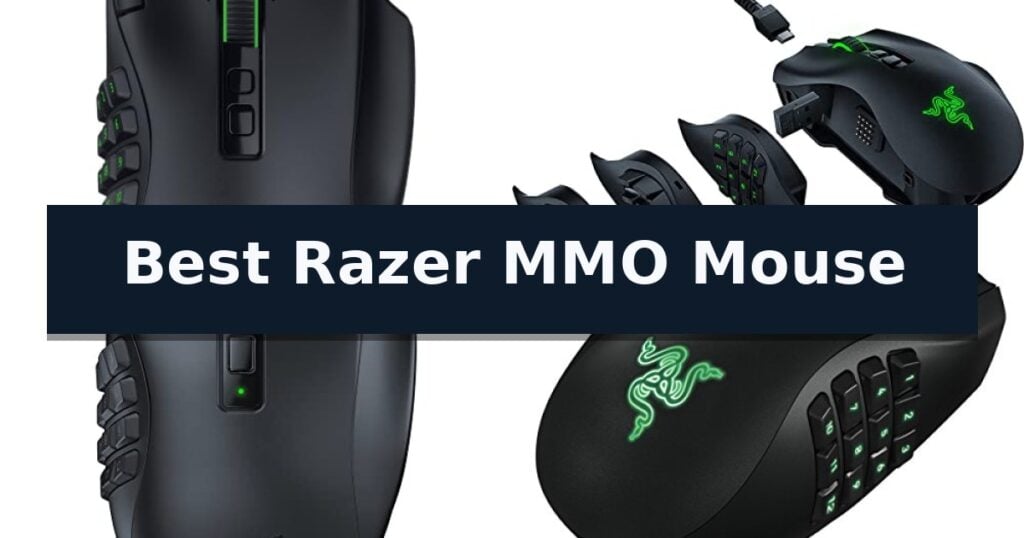
8 Best Razer MMO Mouse in 2026 Reviews
Quick Comparison
| Product | Best For | Key Strength | Score |
|---|---|---|---|
| Razer Naga V3 Pro Wireless Gaming Mouse | Best Overall | Modular side plates allow for 12, 6, or 2-button configurations. | 4.9 |
| Razer Naga Pro Wireless Gaming Mouse | Swappable layouts for every genre | Full modular customizability with three interchangeable side plates. | 4.8 |
| Razer Naga V2 HyperSpeed Gaming Mouse | Wireless freedom with nineteen buttons | 19 programmable buttons for extensive macro mapping | 4.4 |
| Razer Naga Left-Handed Gaming Mouse | Dedicated ergonomic design for lefties | Dedicated left-handed ergonomic design for improved comfort. | 4.4 |
| Razer Basilisk V3 Wired Gaming Mouse | Ergonomic comfort with thumb rest | HyperScroll Tilt Wheel offers both free-spin and tactile modes. | 4.7 |
| Razer Basilisk V4 HyperSpeed Gaming Mouse | Advanced controls for high-intensity play | 4-Way HyperScroll Tilt Wheel for versatile navigation and weapon cycling. | 4.9 |
| Razer Basilisk V3 Pro Wireless Gaming Mouse | High-precision sensor with deep customization | Configurable HyperScroll Tilt Wheel with smart-switching modes. | 4.9 |
| Razer Basilisk V3 X HyperSpeed Gaming Mouse | Long-lasting battery for extended sessions | Exceptional battery life reaching up to 535 hours on Bluetooth. | 4.9 |
How We Chose
Evaluating the best Razer MMO mouse requires a focus on how hardware configuration supports complex input requirements. We analyze the tactile response of side buttons, the reliability of wireless protocols during intense sessions, and the overall sensor accuracy to ensure each device provides a consistent, responsive experience for high-APM gameplay.
- Button layout and programmability
- Sensor tracking precision and DPI range
- Ergonomic design and weight distribution
- Wireless connectivity stability and battery longevity
- Build quality and switch durability
1 Razer Naga V3 Pro Wireless Gaming Mouse — Ultimate modular side plate versatility
The Razer Naga V3 Pro Wireless Gaming Mouse distinguishes itself through a highly adaptable modular design, featuring three swappable magnetic side plates that allow users to transition between 12, 6, or 2-button layouts. This versatility ensures the device can be tailored to the specific demands of MMO, MOBA, FPS, and battle royale genres, providing a customized control scheme for diverse gaming styles.
Performance is driven by the Razer Focus Pro 50K Optical Sensor Gen-3, which supports up to 50,000 DPI and 930 IPS for precise tracking. The integration of Razer Optical Mouse Switches Gen-4 provides tactile feedback with 12% lighter actuation and a durability rating of over 100 million clicks. For navigation and inventory management, the Razer HyperScroll Tilt Wheel Gen-2 offers dual tactile modes and automatic Smart-Reel switching.
Connectivity options include Razer HyperSpeed Wireless for low-latency performance, Bluetooth for extended battery life, and a USB-C wired mode. Users can achieve up to 155 hours of gameplay on HyperSpeed or up to 280 hours via Bluetooth. The mouse also supports advanced customization through Razer Synapse, enabling macro creation and performance fine-tuning on Windows systems.
The physical build includes two quick-access edge buttons and a lockable ring finger button, further expanding the programmable input options. With a weight of 0.258 pounds and a 4.7-inch length, the mouse is designed for ergonomic utility across long gaming sessions, while compatibility with optional wireless charging systems like the Razer HyperFlux V2 and Mouse Dock Pro adds to its functional longevity.
Best for: Gamers who require a single, highly modular device capable of switching between complex MMO button layouts and streamlined FPS configurations.
Skip if: Users who prefer a fixed-button, ultra-lightweight mouse design without the added weight of swappable side plates and modular components.
- Modular side plates allow for 12, 6, or 2-button configurations.
- High-precision sensor with 50,000 DPI and 930 IPS tracking.
- Extended battery life reaching up to 280 hours on Bluetooth.
- Versatile connectivity including HyperSpeed Wireless, Bluetooth, and wired USB-C.
- Modular design increases the overall weight compared to non-swappable mice.
- Advanced software features like full macro customization are limited to Windows environments.
2 Razer Naga Pro Wireless Gaming Mouse — Swappable layouts for every genre
Versatility in gaming peripherals often comes down to how well a device adapts to the specific demands of a genre, and the Razer Naga Pro Wireless Gaming Mouse addresses this by offering a fully modular design. With three interchangeable side plates, it provides configurations for 2, 6, or 12 buttons, allowing users to tailor their input layout to the complexity of their current game.
Performance is driven by the Focus+ 20K DPI Optical Sensor, which supports on-the-fly sensitivity adjustments for precision. The mouse utilizes Razer HyperSpeed wireless technology, engineered to reduce interference and latency, ensuring a connection that remains responsive during intense sessions. Furthermore, the integration of light beam-based optical mouse switches allows for rapid actuation, which is faster than traditional mechanical alternatives.
Beyond its core hardware, the mouse features up to 19 programmable buttons when using the 12-button side plate, all of which can be remapped via Razer Synapse for complex macro execution. The aesthetic is customizable through Chroma RGB lighting, supporting 16.8 million color combinations to match various desk setups.
While the modularity provides significant utility for MMO and MOBA players, the weight and complexity of the interchangeable system are factors to consider. The device balances its advanced wireless capabilities with a robust feature set, making it a comprehensive tool for those who require a high degree of control over their input environment.
Best for: Gamers who frequently switch between genres and require a highly customizable button layout for complex macro management.
Skip if: Users who prefer an ultra-lightweight, minimalist mouse for competitive first-person shooters where a high button count is unnecessary.
- Full modular customizability with three interchangeable side plates.
- Razer HyperSpeed wireless technology for low-latency performance.
- Optical mouse switches that register clicks at the speed of light.
- Up to 19 programmable buttons for extensive macro support.
- Increased complexity due to the modular side plate mechanism.
- Higher weight profile compared to non-modular, basic gaming mice.
3 Razer Naga V2 HyperSpeed Gaming Mouse — Wireless freedom with nineteen buttons
The Razer Naga V2 HyperSpeed Wireless MMO Gaming Mouse is defined by its extensive control layout, featuring 19 programmable buttons that provide a wide array of inputs for complex macro management. This mouse is engineered for users who require high-density command access during intensive gaming sessions, ensuring that essential actions remain within immediate reach.
Performance is driven by the Focus Pro 30K Optical Sensor, which is designed to maintain tracking accuracy across diverse surfaces, including glass. The integration of Razer HyperScroll Technology allows users to toggle between tactile feedback for precision and a free-spin mode for rapid navigation, adapting the scroll wheel behavior to specific task requirements.
Connectivity and power management are central to its design, offering both Razer HyperSpeed Wireless (2.4 GHz) for low-latency performance and Bluetooth for extended operation. The device supports up to 400 hours of battery life on Bluetooth or 250 hours via the 2.4GHz connection, reducing the frequency of battery replacements during prolonged use.
Durability is addressed through the inclusion of Mechanical Mouse Switches Gen-2, which utilize gold-plated contact points to resist degradation and support a lifespan of up to 60 million clicks. The ergonomic shape and button placement are specifically optimized to facilitate efficient command execution without compromising comfort.
Best for: Gamers who require a high number of programmable inputs for complex macro-heavy titles.
Skip if: Users who prefer a lightweight, minimalist mouse design or those who do not utilize programmable side buttons.
- 19 programmable buttons for extensive macro mapping
- Dual-mode wireless connectivity with HyperSpeed and Bluetooth options
- HyperScroll Technology for customizable tactile or free-spin scrolling
- Long battery life reaching up to 400 hours
- High-precision Focus Pro 30K sensor
- Higher weight and physical footprint due to the button-heavy design
4 Razer Naga Left-Handed Gaming Mouse — Dedicated ergonomic design for lefties
Finding a gaming mouse that accommodates a left-handed grip without sacrificing functionality is a common challenge for MMO enthusiasts. The Razer Naga Left-Handed Gaming Mouse addresses this specific need with a dedicated ergonomic form factor designed to ensure the hand fits snugly for maximum comfort during extended play sessions.
At the heart of this device is an 8,200dpi 4G Laser Sensor, which provides the precision and responsiveness required for high-stakes gaming. To manage complex inputs, the mouse is equipped with a 32-bit ARM processor, acting as an onboard computer that processes commands at high speeds to maintain performance consistency.
The standout feature for MMO players is the array of 12 programmable thumb buttons. These are fully customizable through an intuitive in-game configurator, allowing users to map macros and hotkeys via a non-intrusive overlay. Furthermore, the scroll wheel is designed for multi-directional input, capable of moving left, right, up, down, and inward to provide additional control options.
This model balances specialized ergonomics with technical depth, making it a tailored solution for left-handed users who require extensive button mapping for their MMO strategies.
Best for: Left-handed gamers who require extensive macro mapping and programmable buttons for MMO titles.
Skip if: Right-handed users or players who prefer a minimalist mouse design without a large thumb-button grid.
- Dedicated left-handed ergonomic design for improved comfort.
- 12 programmable thumb buttons for complex macro management.
- High-precision 8,200dpi 4G laser sensor.
- Multi-directional scroll wheel for additional inputs.
- Specialized form factor limits use to left-handed users only.
5 Razer Basilisk V3 Wired Gaming Mouse — Ergonomic comfort with thumb rest
Precision control over complex gaming inputs requires hardware that bridges the gap between rapid execution and ergonomic comfort. The Razer Basilisk V3 Wired Gaming Mouse centers its design around an iconic ergonomic shape with a dedicated thumb rest, providing a stable foundation for extended sessions while ensuring buttons remain within immediate reach.
Performance is driven by the Focus+ 26K DPI Optical Sensor, which tracks movement with zero smoothing for pixel-precise accuracy. Complementing this sensor, the Optical Mouse Switches Gen 2 deliver a 0.2ms actuation speed, rated for up to 70 million clicks to ensure consistent, responsive input without the risk of unintended misclicks.
Versatility defines the user experience, particularly through the HyperScroll Tilt Wheel. This component allows users to toggle between a free-spin mode for rapid scrolling and a tactile mode for precise, stepped feedback. With 11 programmable buttons, users can map macros and secondary functions directly to the mouse, streamlining complex actions like push-to-talk or skill cycling.
Aesthetic and functional customization is managed through 11 Razer Chroma RGB lighting zones, which integrate dynamically with over 150 supported games. To ensure optimal performance, the device is designed to work with the Razer Synapse App, allowing for granular adjustments to tracking and button assignments.
Best for: Gamers who require a high-precision sensor and extensive button mapping within an ergonomic, wired form factor.
Skip if: Users who prioritize a wireless workspace or require a lightweight, ambidextrous design.
- HyperScroll Tilt Wheel offers both free-spin and tactile modes.
- 11 programmable buttons allow for extensive macro customization.
- Focus+ 26K DPI sensor provides high-accuracy tracking.
- Optical Mouse Switches Gen 2 ensure rapid 0.2ms actuation.
- Wired connection limits movement range compared to wireless alternatives.
- Ergonomic thumb rest design is specific to right-handed users.
6 Razer Basilisk V4 HyperSpeed Gaming Mouse — Advanced controls for high-intensity play
The Razer Basilisk V4 HyperSpeed Wireless Gaming Mouse introduces a versatile 4-Way Razer HyperScroll Tilt Wheel, allowing users to toggle between tactile resistance for precise weapon cycling and free-spin mode for rapid navigation. This dual-mode scrolling capability makes it a highly adaptable tool for complex MMO rotations and fast-paced FPS environments.
Engineered for high-intensity performance, the mouse features the Razer Focus X 33K Optical Sensor Gen-3, which delivers 99.8% resolution accuracy and maintains tracking precision even on glass surfaces. The integration of Razer Optical Mouse Switches Gen-4 ensures durability with a lifecycle rated for over 100 million actuations, while the 12% lighter actuation force provides a responsive, crisp click feel.
Customization remains a core focus, offering 12 programmable controls including a dedicated multi-function trigger for rapid command execution. Users can manage complex macro assignments, push-to-talk functions, or secondary shortcuts directly through the interface. The device also supports Razer Chroma RGB underglow, which features dynamic lighting effects that react in real-time with over 300 integrated games.
Wireless connectivity is managed via Razer HyperSpeed technology, providing low-latency performance with up to 140 hours of battery life, or up to 225 hours when utilizing Bluetooth. The hardware is designed for advanced desktop setups, maintaining compatibility with the Razer Mouse Dock V2 Pro, HyperPolling Wireless Dongle, and the Wireless Charging Puck for up to 8000 Hz polling rates.
Best for: Gamers who require extensive macro customization and high-precision tracking for both MMO and FPS titles.
Skip if: Users who prefer an ultra-lightweight, minimalist mouse without the additional weight of a multi-function trigger and tilt-wheel mechanism.
- 4-Way HyperScroll Tilt Wheel for versatile navigation and weapon cycling.
- 12 customizable controls including a dedicated multi-function trigger.
- High-precision Focus X 33K sensor with glass surface tracking.
- Extended battery life up to 140 hours on HyperSpeed wireless.
- Increased weight due to the inclusion of advanced mechanical features and multi-function triggers.
7 Razer Basilisk V3 Pro Wireless Gaming Mouse — High-precision sensor with deep customization
Precision and versatility define the Razer Basilisk V3 Pro Wireless Gaming Mouse, a peripheral engineered for users who demand granular control over their input devices. At the heart of this mouse is the Razer Focus Pro 35K Optical Sensor Gen-2, which delivers 99.8% resolution accuracy and remains functional even on glass surfaces, ensuring consistent tracking across diverse desktop environments.
The standout feature for complex workflows is the Configurable HyperScroll Tilt Wheel. This 4-way scroll mechanism offers tactile cycling and a smooth free-spin mode, with a Smart-Reel feature that automatically transitions between these states based on how quickly you scroll. Users can further refine the tension and acceleration through the Razer Synapse software to match their specific preferences.
Efficiency in high-intensity scenarios is managed through 13 customizable controls. By utilizing Razer Hypershift, you can assign secondary functions to these buttons, effectively doubling your available command set without cluttering your workspace. The integration of Razer Optical Mouse Switches Gen-3 provides a 0.2 ms actuation speed and a rated lifespan of 90 million clicks, eliminating concerns regarding debounce delay or double-clicking.
Connectivity and power management are handled via tri-mode support, allowing for seamless switching between HyperSpeed Wireless, Bluetooth, and wired USB-C. When operating on HyperSpeed Wireless, the device provides up to 140 hours of battery life, or up to 210 hours when using Bluetooth. For those requiring the highest responsiveness, the mouse supports an 8000 Hz polling rate when paired with compatible accessories.
Best for: Users who require extensive button mapping and high-precision tracking for complex gaming or productivity tasks.
Skip if: Users who prefer a lightweight, ambidextrous design or those who do not require a multi-function scroll wheel and secondary command layers.
- Configurable HyperScroll Tilt Wheel with smart-switching modes.
- Razer Focus Pro 35K Optical Sensor for high-precision tracking on glass.
- 13 programmable controls with Hypershift for expanded functionality.
- Tri-mode connectivity including low-latency HyperSpeed Wireless.
- Higher weight profile due to the inclusion of advanced features and battery.
- Additional accessories required to unlock the full 8000 Hz polling rate.
8 Razer Basilisk V3 X HyperSpeed Gaming Mouse — Long-lasting battery for extended sessions
The Razer Basilisk V3 X HyperSpeed Gaming Mouse prioritizes long-term utility through its impressive battery life, offering up to 285 hours of operation via HyperSpeed Wireless or 535 hours when utilizing Bluetooth connectivity. This dual-mode wireless design allows users to balance ultra-low-latency performance for competitive gaming with power-efficient connections for general productivity tasks.
Engineered with the Razer 5G Advanced 18K Optical Sensor, this mouse provides pixel-precise tracking with customizable sensitivity settings to accommodate various gaming genres, including FPS, MOBA, and RPG titles. The inclusion of Razer Mechanical Mouse Switches Gen-2 ensures consistent actuation, with a rated lifespan of up to 60 million clicks to support extensive use over time.
The chassis features an iconic ergonomic form equipped with 9 programmable controls. By leveraging Razer Hypershift, users can assign advanced macros and custom commands to these buttons, streamlining workflows for streaming or complex in-game actions. The integration of Razer Chroma RGB lighting adds a layer of personalization, synchronizing with other compatible devices for a cohesive setup.
Built for reliable performance, the mouse incorporates 100% PTFE mouse feet to facilitate smooth gliding across surfaces. It maintains a 1000 Hz polling rate for responsive input and includes onboard profile storage, allowing users to save their preferred settings directly to the device for consistent performance across different computers.
Best for: Gamers and professionals who require a versatile, ergonomic wireless mouse with extended battery life and customizable macro controls.
Skip if: Users who prefer an ultra-lightweight mouse or those who require a wired-only connection for specific competitive tournament environments.
- Exceptional battery life reaching up to 535 hours on Bluetooth.
- Dual-mode wireless connectivity featuring low-latency HyperSpeed and Bluetooth.
- 9 programmable controls with Razer Hypershift for advanced macro customization.
- Durable Gen-2 mechanical switches rated for 60 million clicks.
- Requires AA battery for operation, which adds weight compared to internal rechargeable models.
Best Razer MMO Mouse Buying Guide
Modular Side Plates
Modular designs allow you to swap side panels to match the specific demands of your current game. This is particularly useful if you transition frequently between MMOs that require dozens of hotkeys and shooters that benefit from a simpler, lighter thumb grip.
When choosing a modular mouse, ensure the magnetic connection is secure and the buttons provide distinct feedback. Frequent swapping can lead to wear on the contact points, so prioritize models with robust, well-engineered attachment mechanisms.
Button Placement and Ergonomics
The layout of thumb buttons is critical for long-term comfort and input accuracy. A grid of 12 buttons can be overwhelming at first, so look for models that offer textured surfaces or distinct button shapes to help you identify keys by touch alone.
Consider the overall shape of the mouse in relation to your grip style. MMO mice are often wider to accommodate the thumb grid, which may feel different if you are accustomed to slim, ambidextrous designs.
Sensor Performance and Tracking
Modern optical sensors provide high DPI ceilings and excellent tracking on various surfaces, including glass. For MMOs, extreme DPI is less critical than consistent, jitter-free tracking during long, sustained movements.
Look for features like frame synchronization and lift-off distance customization. These settings allow you to fine-tune how the mouse reacts to your specific surface, ensuring that your cursor placement remains pixel-perfect during intense raids.
Wireless Connectivity and Battery Life
Low-latency wireless technology has reached a point where it is indistinguishable from wired connections for most users. However, battery life remains a significant factor, especially for those who play for extended periods.
Check the rated battery life for both 2.4GHz wireless and Bluetooth modes. While 2.4GHz offers the fastest response times, Bluetooth is often more power-efficient for non-gaming tasks or casual browsing.
Switch Durability and Actuation
MMO gaming involves a high volume of clicks, making switch durability a primary concern. Optical switches are generally more resistant to degradation over time compared to traditional mechanical switches, as they use light-based actuation to avoid physical contact wear.
Consider the actuation force required for each click. Lighter switches can help reduce finger fatigue during long sessions, but they may also increase the risk of accidental inputs if you have a heavy-handed clicking style.
Frequently Asked Questions
Do I need 12 side buttons for every MMO?
Not necessarily. While 12 buttons are standard for complex macro management, many players find that a 6-button or even a 2-button configuration is sufficient for their specific hotkey needs.
Are wireless MMO mice reliable for competitive play?
Yes, modern wireless technology provides low-latency performance that matches wired mice, making them suitable for both competitive and casual gaming.
How do I clean the side buttons on a multi-button mouse?
Use a soft, dry cloth or a cotton swab to gently remove dust from the gaps between buttons. Avoid using liquid cleaners that could seep into the internal components.
Can I use an MMO mouse for FPS games?
Yes, though you may prefer a model with swappable side plates to reduce the button count and overall weight for better maneuverability in fast-paced shooters.
What is the benefit of the HyperScroll tilt wheel?
The tilt wheel allows for horizontal scrolling and additional programmable inputs, which can be useful for inventory management or navigating complex game menus.
Conclusion: Our Top Pick
Our top pick is Razer Naga V3 Pro Wireless Gaming Mouse. Selecting the right Razer MMO mouse depends on your specific button requirements and how much you value modularity. For most users, the ability to adapt the side layout provides the best balance between specialized functionality and general gaming utility.
Always consider your grip style and the physical size of the mouse before committing. A device that feels comfortable during short sessions may cause fatigue over long playtimes if the weight distribution or shape does not align with your hand size.