Creative Pebble 2.0 Speakers are our top choice for the Best Simple PC Speakers because their 45-degree elevated driver design optimizes sound projection for desktop users while maintaining a minimal footprint.
When selecting audio equipment for a workspace, the primary considerations involve balancing physical desk space with connection simplicity. USB-powered models eliminate the need for bulky external power bricks, while specialized form factors like monitor-mount bars or compact spheres offer distinct advantages depending on your monitor setup and available surface area.
Experienced buyers should prioritize how these speakers integrate with existing hardware, specifically checking for cable length and power delivery requirements. While some models offer plug-and-play convenience, others provide additional features like headphone jacks or Bluetooth switching, which can significantly alter the utility of a basic audio setup.
For a broader look at how different designs perform in various office setups, our guide on Best Simple Computer Speakers provides additional context on balancing audio performance with desk ergonomics.
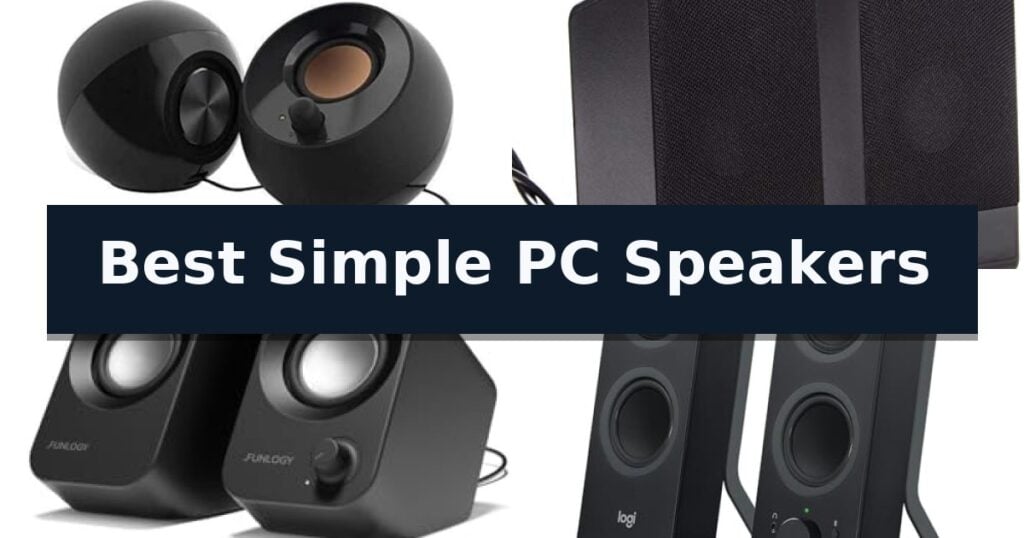
10 Best Simple PC Speakers in 2026 Reviews
Quick Comparison
| Product | Best For | Key Strength | Score |
|---|---|---|---|
| Creative Pebble 2.0 Speakers | Best Overall | Single USB cable connectivity for power and audio. | 4.9 |
| Amazon Basics USB-Powered Speakers | Budget-Friendly Desktop Essential | Plug-and-play USB connectivity requires no driver installation. | 4.4 |
| FUNLOGY 14W Stereo Speakers | Optimized Upward-Facing Audio | 30-degree tilt design for improved audio directionality | 4.3 |
| Logitech Z207 Stereo Speakers | Seamless Bluetooth Switching | Easy-Switch technology for simultaneous multi-device Bluetooth pairing | 4.6 |
| Cyber Acoustics CA-2890 Speaker Bar | Clutter-Free Monitor Mount | Single-cable USB connectivity for power and audio | 4.3 |
| Amazon Basics Stereo 2.0 Speakers | Enhanced Bass Radiator | USB-powered design eliminates the need for extra wall outlets. | 4.8 |
| Cirqon Monitor-Mount Speakers | Secure Sturdy Clamp Design | Space-saving monitor-mount design with a secure, adjustable clamp. | 4.8 |
| 1Mii 3.5mm Desktop Speakers | Compact Narrow Profile | Compact, narrow footprint ideal for crowded desks. | 4.6 |
| Cyber Acoustics CA-2014 Speakers | Classic Dedicated Power | Space-saving compact design ideal for small desks. | 4.9 |
| Uakinat Small Desktop Speakers | Minimalist Column Shape | Compact column-shaped design saves valuable desk space. | 4.9 |
How We Chose
To determine the best simple PC speakers, we evaluate how different designs address the common constraints of modern desk environments. An experienced reviewer focuses on the intersection of audio quality, cable management, and physical footprint to ensure that the chosen hardware enhances the user experience without creating unnecessary clutter or setup complexity.
- Connectivity and Power: Evaluating whether the system relies on a single USB cable for both power and audio or requires a separate 3.5mm jack and power adapter.
- Form Factor and Mounting: Assessing the physical footprint, including monitor-mount capabilities versus traditional desktop-standing designs.
- Acoustic Engineering: Reviewing the inclusion of passive radiators, driver angling, and frequency response ranges to determine sound clarity.
- Control Accessibility: Checking for front-facing or in-line volume controls that allow for quick, tactile adjustments without software interaction.
- Compatibility: Verifying support for standard PC, laptop, and monitor audio outputs across various operating systems.
1 Creative Pebble 2.0 Speakers — Iconic Space-Saving Design
Desktop audio setups often suffer from clutter, but the Creative Pebble 2.0 addresses this by utilizing a single USB cable for both power and audio connectivity. This design eliminates the need for bulky power adapters, keeping your workspace clean while providing a straightforward plug-and-play experience for laptops and PCs.
The speakers feature 45° elevated drivers specifically angled to project sound directly toward the listener, which helps create a more immersive personal audio experience. Internally, the system relies on custom-tuned far-field drivers paired with rear-facing passive radiators to enhance bass reproduction, providing a fuller sound profile than typical compact speakers.
Usability is prioritized with front-facing volume controls, allowing for instant adjustments without reaching behind the unit. With a frequency response of 100 Hz to 17 kHz, these speakers are designed to handle standard desktop audio tasks, from video calls to media playback, while maintaining a small footprint that fits easily on crowded desks.
The modern and stylish aesthetics of the Creative Pebble 2.0 make them a versatile addition to various workspaces. While they are highly efficient for personal use, their compact nature means they are best suited for near-field listening rather than filling large rooms with high-volume audio.
Best for: Users seeking a clutter-free, compact audio solution for personal desktop or laptop listening.
Skip if: Users who require high-fidelity, room-filling sound or deep, powerful bass performance.
- Single USB cable connectivity for power and audio.
- 45° elevated drivers for improved sound projection.
- Compact, space-saving design suitable for small desks.
- Convenient front-facing volume control.
- Limited frequency response compared to larger, dedicated speaker systems.
- Not intended for high-volume or large-room audio applications.
2 Amazon Basics USB-Powered Speakers — Budget-Friendly Desktop Essential
The Amazon Basics USB-Powered Computer Speakers are engineered for users who prioritize a streamlined, clutter-free workspace. By utilizing a plug-and-play USB setup, these speakers eliminate the need for external power adapters or complex driver installations, drawing power directly from your computer's USB port. This design choice makes them a practical, low-profile addition to any desktop or laptop environment where power outlets are limited.
Measuring just 2.76 x 3.55 x 5.3 inches, the speakers are built for portability and space efficiency. Despite their small footprint, they deliver 2.2 watts total RMS power across a frequency range of 103 Hz to 20 KHz. This output is specifically tuned for near-field listening, meaning they are optimized for proximity to the user rather than filling a large room with sound. The system includes a front-mounted control knob that integrates volume adjustment and On/Standby functionality into a single dial, allowing for quick, tactile adjustments during daily tasks.
For those who require occasional privacy, the inclusion of a dedicated 3.5mm headphone jack provides a convenient way to switch between speaker output and personal listening without needing to reach behind the computer tower or navigate software settings. Weighing approximately 1.4 pounds, the unit remains stable on a desk while being light enough to transport between different workstations. This balance of connectivity and compact design makes them a straightforward solution for basic audio needs.
While these speakers offer an efficient, compact solution, they are intended for close-range desktop applications. Users should note that the reliance on a USB connection for power and a 3.5mm jack for audio ensures broad compatibility with standard hardware, but the modest power output means they are not designed for high-fidelity audio or deep bass performance. They serve as a reliable, functional choice for standard system audio in personal computing setups.
Best for: Users seeking a compact, plug-and-play audio solution for desktop or laptop computers with integrated headphone support.
Skip if: Users requiring high-fidelity audio, deep bass performance, or a standalone sound system for large rooms.
- Plug-and-play USB connectivity requires no driver installation.
- Integrated 3.5mm headphone jack allows for private listening.
- Front-mounted control knob combines volume and power functions for ease of use.
- Compact, portable design suitable for limited desk space.
- Limited 2.2 watts total RMS power is optimized for near-field, personal use only.
3 FUNLOGY 14W Stereo Speakers — Optimized Upward-Facing Audio
The FUNLOGY 14W Stereo Speakers utilize a distinctive 30-degree upward-facing layout to direct sound toward the listener, optimizing audio clarity while minimizing the footprint on crowded desks. This design choice addresses the common issue of desktop speakers firing audio into the user's chest rather than toward their ears, ensuring a more immersive listening experience in compact workspaces.
Engineered for simplicity, these speakers feature a USB-powered system that eliminates the need for bulky external power bricks or additional wall outlets. Connectivity is straightforward, relying on standard 3.5mm AUX input cables, which ensures broad compatibility with laptops, PCs, monitors, and gaming consoles without requiring driver installations or complex software pairing.
The audio profile is driven by dual 48mm full-range drivers paired with passive radiators, delivering a 14W total output. To maintain signal integrity, the unit incorporates a noise-reducing design and a gold-plated AUX input, which works to prevent static interference during startup or shutdown cycles, providing a consistently clean sound output.
With a compact, palm-sized form factor and a matte finish, the speakers are built to integrate into various workspace aesthetics. The inclusion of a dedicated volume dial control allows for immediate, tactile adjustments, providing a practical alternative to software-based volume sliders, though users should note that the wired-only connection limits placement flexibility compared to wireless alternatives.
Best for: Users seeking a space-saving, plug-and-play audio solution for desktop or laptop setups that prioritizes direct sound delivery.
Skip if: Users who require high-fidelity studio-grade sound, wireless Bluetooth connectivity, or a dedicated subwoofer for deep bass frequencies.
- 30-degree tilt design for improved audio directionality
- USB-powered for simplified cable management
- Plug-and-play compatibility with no drivers needed
- Noise-reducing audio components to minimize static
- Wired-only connection lacks Bluetooth functionality
- Compact size limits the depth of bass response
4 Logitech Z207 Stereo Speakers — Seamless Bluetooth Switching
Desktop audio often suffers from cluttered cables and limited connectivity, but the Logitech Z207 Stereo Computer Speakers address this by integrating wireless versatility directly into a compact, dual-speaker footprint. Designed for those who need to manage audio from multiple sources without constantly swapping cables, these speakers offer a streamlined solution for modern workstations.
The core of the Logitech Z207 Stereo Computer Speakers experience is the Easy-Switch technology, which allows you to maintain connections with two Bluetooth devices simultaneously. You can transition between audio sources simply by pausing one device and playing another, making it efficient to switch from a computer video call to smartphone music playback. For traditional setups, a 3.5mm input remains available for wired devices.
Performance is driven by a combination of an active driver and a passive radiator in each unit, which work together to produce 10W peak power and 5W RMS. This configuration is engineered to deliver full-range sound with enhanced bass response, providing a noticeable upgrade over standard integrated monitor or laptop speakers while maintaining a small, desk-friendly profile.
Usability is prioritized through front-facing controls that provide immediate access to Bluetooth pairing, power, and volume adjustments. A built-in headphone jack is also conveniently located on the front, allowing for private listening sessions without needing to reach behind your computer tower or monitor for port access.
Best for: Users who need to seamlessly toggle audio between a computer and a mobile device without manual cable swapping.
Skip if: Users requiring high-fidelity studio monitoring or a dedicated subwoofer for deep, room-shaking low-frequency performance.
- Easy-Switch technology for simultaneous multi-device Bluetooth pairing
- Passive radiators for enhanced bass performance in a compact size
- Front-access controls and integrated headphone jack for convenience
- Flexible connectivity options including both Bluetooth and 3.5mm wired input
- Limited power output compared to larger 2.1 speaker systems with dedicated subwoofers
5 Cyber Acoustics CA-2890 Speaker Bar — Clutter-Free Monitor Mount
Maximizing desk space while maintaining clear audio output is a common challenge for modern workstations. The Cyber Acoustics CA-2890 USB Speaker Bar addresses this by utilizing a space-saving, clip-on design that attaches directly to the bottom of most monitors, keeping your desk surface free from clutter.
This USB-powered speaker simplifies connectivity by requiring only a single USB cable for both power and audio, eliminating the need for separate 3.5mm jacks. It is designed for broad compatibility, including a USB-A to USB-C adapter to accommodate newer laptops that may have limited port options.
Usability is a core focus of the Cyber Acoustics CA-2890 USB Speaker Bar, featuring integrated controls for volume, mute, and playback. An LED status light provides visual confirmation of the mute setting, ensuring you have immediate control during calls or media playback without needing to navigate software menus.
Despite its compact footprint, the unit is engineered to deliver 10W of power with enhanced bass and clear highs. The elevated, forward-projecting design is intended to improve sound directionality toward the user, creating a more focused listening experience for daily tasks, video conferencing, or streaming.
Best for: Users seeking a clutter-free, space-saving audio solution that mounts directly to a monitor and connects via a single USB cable.
Skip if: Users who require high-fidelity, room-filling sound for professional audio production or those whose monitors exceed 1 inch in thickness.
- Single-cable USB connectivity for power and audio
- Clip-on monitor mount design saves valuable desk space
- Integrated controls for volume, mute, and play/pause
- Includes USB-A to USB-C adapter for modern hardware
- Limited to monitors with a thickness of 1 inch or less
- Compact size may not provide the deep bass response of larger, dedicated desktop speakers
6 Amazon Basics Stereo 2.0 Speakers — Enhanced Bass Radiator
The Amazon Basics Stereo 2.0 Speakers prioritize desk efficiency by integrating a bottom radiator directly into the speaker housing, which is engineered to deliver a springy bass response without requiring a separate bulky subwoofer. This compact design allows for easy surface placement on crowded workstations while providing a clear audio upgrade for standard laptop or PC output.
Connectivity is streamlined through a USB-powered interface, eliminating the need for an external power adapter and reducing cable clutter. The speakers connect via a standard 3.5mm Aux input, ensuring broad compatibility with most desktop and laptop audio ports. Users can manage sound levels directly through the in-line volume control, which provides tactile adjustment without needing to navigate software menus.
The build quality features a metal finish paired with a scratch-free padded base, designed to protect desk surfaces while maintaining a professional aesthetic. For added visual feedback, the units include integrated blue LED lights that activate during operation, serving as a subtle indicator of power status.
These speakers are intended for users seeking a straightforward, plug-and-play audio solution for general computing tasks. While they offer a compact footprint, they are best suited for near-field listening environments rather than filling large rooms, making them a practical choice for home offices or dorm setups.
Best for: Users who need a compact, USB-powered audio solution for a desktop or laptop setup with limited space.
Skip if: Users who require high-fidelity audio, deep sub-bass performance, or wireless Bluetooth connectivity.
- USB-powered design eliminates the need for extra wall outlets.
- Bottom radiator enhances bass response in a small form factor.
- In-line volume control allows for quick, accessible audio adjustments.
- Scratch-free padded base protects desk surfaces.
- Wired-only connection limits placement flexibility compared to wireless models.
- Integrated LED lights cannot be turned off independently.
7 Cirqon Monitor-Mount Speakers — Secure Sturdy Clamp Design
Maximizing desk real estate often requires creative hardware solutions, and the Cirqon Computer Speakers for Desktop PC address this by utilizing a sturdy, non-slip clamp that attaches directly to your monitor. By mounting to the top, bottom, or sides of your screen, these speakers eliminate the need for traditional footprint-heavy desktop units, allowing for a cleaner and more organized workspace.
Connectivity is streamlined through a USB and USB-C plug-and-play interface. This single-cable design handles both power and audio transmission, removing the need for auxiliary cables or additional software drivers. The package includes a USB-C adapter, ensuring compatibility across a wide range of devices including Windows PCs, Macs, tablets, and gaming consoles like the Switch.
Usability is centered around an innovative easy volume knob that provides tactile control over power and audio levels. This single-control design simplifies adjustments, allowing for quick volume changes without navigating through complex software menus or tiny buttons. The unit is built with a slim, lightweight profile and includes a 51-inch cable with a cable tie to further assist in cable management.
Designed for clarity, these speakers deliver consistent audio output suitable for daily office tasks and general media consumption. The clamp system is adjustable, accommodating screen thicknesses between 0.1 and 0.98 inches, providing a secure fit for most standard monitor frames. Note that these speakers require a powered USB port capable of audio output, as some monitor-integrated USB ports may not support this function.
Best for: Users with limited desk space who want a clutter-free audio solution that mounts directly to their monitor.
Skip if: Users whose monitor USB ports do not support audio output or those who require high-fidelity audio for professional studio production.
- Space-saving monitor-mount design with a secure, adjustable clamp.
- Single-cable USB/USB-C connection for both power and audio.
- Intuitive volume knob for simple, one-touch control.
- Wide device compatibility including PC, Mac, and gaming consoles.
- Limited compatibility with monitors that do not support USB audio output.
- Fixed cable length may be restrictive for specific desk setups.
8 1Mii 3.5mm Desktop Speakers — Compact Narrow Profile
Finding a streamlined audio solution for a workspace often leads to cluttered cables and bulky hardware. The 1Mii 3.5mm Desktop Speakers address this by offering a compact, narrow profile that measures just 10.2 x 2.4 x 2.5 inches, allowing it to tuck neatly under most monitors or into tight desk corners.
These speakers utilize a USB-powered design, which simplifies cable management by combining the power and audio connections. The rotary volume control knob located on the front provides immediate, tactile adjustments without requiring users to navigate through system software menus. This straightforward interface is ideal for those who prefer physical controls over digital sliders.
Equipped with dual 3W stereo speakers, the unit is engineered to deliver clear vocals for daily media consumption, including videos, music, and gaming. The inclusion of anti-slip silicone pads on the base ensures the speakers remain stable on various surfaces while protecting furniture from scratches.
Setup is designed for immediate use via a standard 3.5mm AUX audio plug. While the USB-A and 3.5mm cables are integrated for a tidy appearance, they can be separated if needed for specific hardware configurations. For optimal audio performance, the manufacturer recommends using a dedicated USB power adapter to minimize potential static interference.
Best for: Users seeking a space-saving, plug-and-play audio solution for desktop or laptop setups with a standard 3.5mm output.
Skip if: Users requiring high-fidelity audiophile performance or those whose devices lack a 3.5mm AUX output port.
- Compact, narrow footprint ideal for crowded desks.
- Integrated rotary volume knob for quick, physical adjustments.
- Simple plug-and-play installation via USB and 3.5mm connections.
- Anti-slip silicone pads prevent movement and surface damage.
- Requires both USB and 3.5mm ports to be occupied simultaneously.
- Not compatible with devices lacking an AUX output.
9 Cyber Acoustics CA-2014 Speakers — Classic Dedicated Power
When desk space is at a premium, the Cyber Acoustics CA-2014 2.0 Computer Speakers offer a streamlined audio solution designed specifically for compact workstations. These speakers prioritize a small footprint without sacrificing the essential functionality required for daily desktop computing, including music playback, video streaming, and voice applications.
The system delivers stereo audio performance through a 2.0 configuration, ensuring clear sound output for standard media needs. Its design is centered on utility, featuring a front-mounted volume control and a dedicated headphone jack for private listening, which allows users to switch audio output without reaching behind their computer tower or laptop.
Installation is straightforward, utilizing a standard 3.5mm audio connection compatible with most laptops, desktops, and Chromebooks. The unit is powered by an included AC power adapter, ensuring consistent energy delivery compared to USB-only powered alternatives. The right speaker houses the primary controls and an integrated LED power indicator, providing immediate visual confirmation of the system's status.
Measuring approximately 7 by 3 by 3.75 inches per satellite, these speakers are engineered for environments where desk real estate is limited. The compact design ensures they fit neatly alongside monitors or on crowded workstations, providing a functional balance between audio clarity and physical size.
Best for: Users needing a compact, dedicated-power audio solution for basic desktop and laptop media playback.
Skip if: Users requiring high-fidelity audio, deep bass response, or a wireless Bluetooth connection for their setup.
- Space-saving compact design ideal for small desks.
- Front-mounted controls for volume and headphone access.
- Dedicated AC power adapter for reliable performance.
- Simple 3.5mm wired connectivity for broad compatibility.
- Wired-only connection lacks modern wireless Bluetooth capability.
- 4W total output is limited to near-field desktop use.
10 Uakinat Small Desktop Speakers — Minimalist Column Shape
Finding the right audio setup for a workspace often involves balancing desk real estate with sound quality. The Uakinat Small Desktop Speakers utilize a unique column-shaped design that minimizes their footprint while providing a dedicated solution for desktop audio needs.
These speakers are built for simplicity, featuring a USB plug-and-play setup that eliminates the need for external drivers. Connection is handled via a standard USB cable for power and a 3.5mm audio cable for sound input, ensuring compatibility with most PCs and laptops. The in-line volume control allows for quick adjustments without needing to navigate software menus.
Constructed with high-quality plastics and a matte metal panel, the speakers include anti-slip foot pads to maintain stability on various surfaces. The internal hardware is designed to deliver crisp, distortion-free Hi-Fi sound, suitable for general media consumption, music, and gaming. With 31.5 inches of cable length between the two units, they offer flexible placement options for different desk configurations.
The Uakinat Small Desktop Speakers prioritize a clean aesthetic and straightforward operation. While they lack advanced features like wireless connectivity or complex equalization, their focus on a compact, reliable form factor makes them a practical choice for modern home or office environments.
Best for: Users seeking a compact, plug-and-play audio solution for basic desktop media and gaming needs.
Skip if: Users requiring high-fidelity studio performance, wireless Bluetooth connectivity, or deep bass output.
- Compact column-shaped design saves valuable desk space.
- USB plug-and-play functionality requires no driver installation.
- In-line volume control provides convenient, immediate access to sound levels.
- Anti-slip foot pads ensure the speakers remain stable on smooth surfaces.
- Wired-only connectivity limits placement flexibility compared to wireless models.
- Basic feature set lacks advanced audio customization options.
Best Simple PC Speakers Buying Guide
The Importance of Form Factor
The physical shape of your speakers dictates how they interact with your workspace. Compact, spherical, or column-shaped speakers are designed to fit into tight corners, whereas monitor-mount bars are specifically engineered to reclaim desk surface area by attaching directly to your display.
Consider the depth of your desk and the thickness of your monitor bezel before choosing a mounting solution. While bars provide a clean look, they may not offer the same stereo separation as a traditional two-piece speaker set placed on either side of your screen.
Power and Connectivity Trade-offs
Most simple PC speakers utilize USB power, which is convenient but can occasionally lead to ground-loop noise if the power source is shared with other high-draw components. Using a dedicated USB power adapter can sometimes mitigate this static.
If you require high-fidelity audio, look for systems that include dedicated AC adapters. These provide more consistent power to the drivers, which can result in a more robust sound profile compared to models strictly limited by the power output of a standard USB port.
Understanding Driver Orientation
Speakers with tilted or elevated drivers are designed to project sound directly toward your ears rather than at your chest or desk surface. This simple adjustment can significantly improve the perceived clarity of vocals and mid-range frequencies in a near-field listening environment.
Passive radiators are another feature to look for in small enclosures. These components help move air within the speaker housing, allowing for a more impactful bass response than what would be possible with a standard full-range driver alone.
Control and Accessibility
The location of volume controls is a frequently overlooked detail. Front-facing knobs provide the most immediate access, allowing you to adjust levels without reaching behind the speaker or navigating through operating system menus.
Some models include integrated headphone jacks, which are essential if you frequently switch between speakers and private listening. Ensure the cable length provided is sufficient to reach your computer's ports without creating tension or requiring extensions.
Compatibility with Modern Hardware
Many modern laptops lack traditional USB-A ports, making compatibility a key concern. Look for speakers that include USB-C adapters or support standard 3.5mm auxiliary inputs to ensure they function with your specific hardware configuration.
Always verify the audio output requirements of your monitor if you plan to connect speakers directly to it. Some monitors do not support audio pass-through via USB, requiring a direct connection to the PC for the speakers to function correctly.
Frequently Asked Questions
Do I need to install drivers for these speakers?
No, the vast majority of simple PC speakers are plug-and-play devices that use standard USB audio protocols, requiring no additional software or driver installation.
Can I use USB-powered speakers with a monitor that has a USB hub?
It depends on the monitor's power output. Some monitors provide enough power through their USB ports to drive speakers, while others may not, potentially leading to distorted sound or connectivity issues.
Why do some speakers have both a USB cable and a 3.5mm jack?
In these configurations, the USB cable is typically used solely for power, while the 3.5mm jack carries the audio signal. This setup is common in speakers that require more power than a standard USB data port can provide.
Are monitor-mount speakers compatible with all screens?
Most mountable speakers are designed to fit a range of monitor thicknesses, but you should check the manufacturer's specifications for the maximum clamp width to ensure it fits your specific display.
Does a higher wattage rating always mean better sound?
Not necessarily. While wattage indicates power, the quality of the drivers, the enclosure design, and the inclusion of passive radiators often have a greater impact on the clarity and richness of the sound than the raw power output alone.
Conclusion: Our Top Pick
Our top pick is Creative Pebble 2.0 Speakers. Selecting the right speakers comes down to balancing your available desk space with your specific audio needs. For most users, a simple USB-powered 2.0 system provides the best balance of ease-of-use and improved sound quality over built-in monitor or laptop speakers.
By focusing on features like driver orientation and control placement, you can find a reliable setup that fits your workflow. Always verify your device's connectivity options to ensure a seamless installation.