TOALLIN 1080P Wireless Webcam is our top choice for the Best Wireless Webcams, offering a reliable 2.4G connection that eliminates cable clutter in professional meeting spaces. For those prioritizing extended endurance, the Gsou Wireless Streaming Camera provides a significant battery advantage for long-form sessions, while the Gsou W33 Wireless Webcam excels in versatile mounting scenarios with its manual focus precision.
Selecting a wireless camera requires balancing freedom of movement against the realities of signal stability and power management. Unlike wired alternatives, these devices rely on dedicated USB receivers to maintain low-latency transmission, making them ideal for rooms where running long cables is impractical or aesthetically undesirable.
When evaluating these options, consider that wireless performance is highly dependent on the environment. Obstructions between the camera and receiver can impact signal integrity, and battery-powered units necessitate a disciplined charging routine to ensure readiness for your next call.
For a broader understanding of how these devices integrate into your workflow, our guide to the Best Wireless Webcam provides additional context on signal management and setup tips.
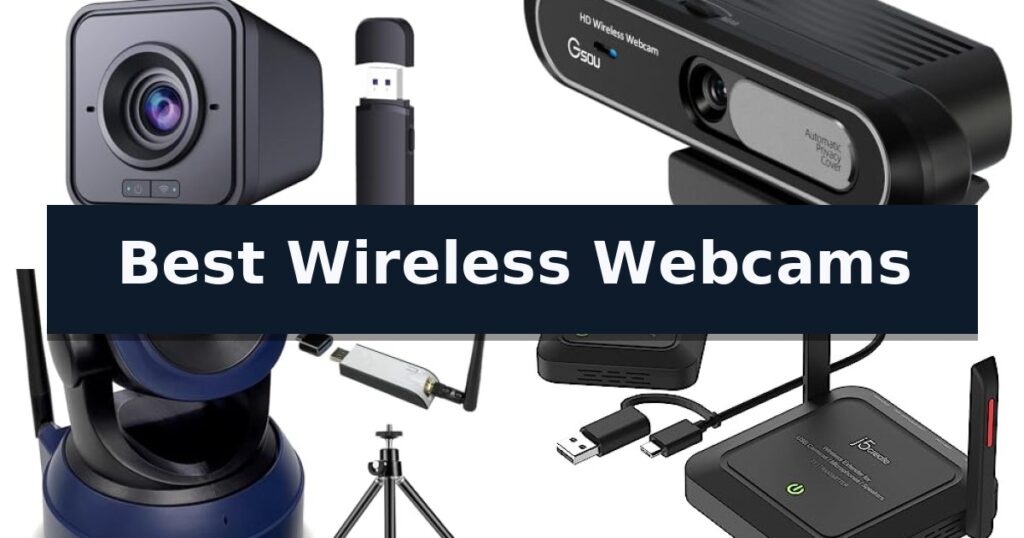
6 Best Wireless Webcams in 2026 Reviews
Quick Comparison
| Product | Best For | Key Strength | Score |
|---|---|---|---|
| TOALLIN 1080P Wireless Webcam | Best Overall | 2.4G wireless transmission for flexible camera placement | 4.9 |
| Gsou W33 Wireless Webcam | Long-Range Wireless Streaming | 65ft wireless range via a dedicated 2.4G protocol. | 4.4 |
| Gsou Wireless Streaming Camera | Extended Battery for Long Meetings | Extended 9-hour battery life for long-duration use. | 4.7 |
| j5create Wireless Webcam Extender | Convert Any Wired Camera Wireless | Provides wireless freedom up to 82 feet (25m) for USB devices. | 4.4 |
| BALILA S980 4K Wireless Webcam | Dual Mics for Two-Person Calls | Two independent wireless microphones with individual mute controls. | 4.4 |
| SynthMeet 1080P Wireless Webcam | Flexible Angles Without Cables | 2.4GHz wireless connectivity allows for flexible placement up to 65 feet from the receiver. | 4.7 |
How We Chose
To identify the most effective wireless webcams, we evaluate how each model handles the inherent trade-offs between portability and signal reliability. We prioritize cameras that offer consistent 2.4GHz transmission, sufficient battery longevity for standard workdays, and clear 1080p output, ensuring that convenience does not come at the cost of professional video quality.
- Wireless connectivity range and signal stability
- Battery capacity and total continuous runtime
- Video resolution and sensor performance
- Mounting versatility and physical adjustment options
- Plug-and-play compatibility with major conferencing software
1 TOALLIN 1080P Wireless Webcam — Best for Cordless Conference Rooms
Eliminating the clutter of cables in a professional meeting space requires a reliable, cordless solution. The TOALLIN 1080P Wireless Webcam addresses this by utilizing 2.4G wireless connectivity, which allows for placement up to 20 meters indoors or 50 meters in open sight lines, providing flexibility for various room configurations.
This device simplifies setup through a wireless USB plug-and-play system. The camera and receiver are pre-paired at the factory, requiring only a simple connection to a computer port and a press of the power button to begin operation. For those needing to re-establish a connection, the manual pairing process is straightforward, involving a quick press of the pairing buttons on both the camera and the USB receiver.
Visual performance is handled by a 1080p 1/2.9" CMOS sensor that captures video at 30fps with a 70-degree wide-angle view, ensuring participants remain visible during video calls. Audio clarity is supported by a built-in noise-canceling microphone featuring a noise reduction algorithm capable of far-field voice pick-up up to 5 meters away.
Power is supplied by a rechargeable 1500mA lithium battery, offering a maximum of 3 hours of operation on a single charge. The unit requires 2.5 hours to reach a full charge from a shutdown state. Users should note that the camera is not fully charged upon arrival and should be powered off when not in use to preserve battery life.
The camera also includes a functional feature for image orientation: a long press of the wireless pairing button on the camera toggles horizontal image mirroring. This provides additional control for users who need to adjust their video feed layout during live streaming or conferencing.
Best for: Professional video conferencing and live streaming in rooms where cable management is a priority.
Skip if: Users who require continuous, all-day operation without the need for battery recharging or those who prefer a wired connection for absolute signal stability.
- 2.4G wireless transmission for flexible camera placement
- Pre-paired USB receiver for immediate plug-and-play functionality
- Noise-canceling microphone with 5m far-field pick-up
- 1080p resolution with a 70-degree wide-angle field of view
- 3-hour maximum battery life limits long-duration sessions
- Manual power management required to maximize battery efficiency
2 Gsou W33 Wireless Webcam — Long-Range Wireless Streaming
The Gsou W33 Wireless Webcam eliminates the constraints of traditional wired setups by utilizing a dedicated 2.4G private protocol for high-bandwidth, interference-free transmission. This design choice allows for a wireless range of up to 65 feet, providing significant flexibility for users who need to move their camera around a workspace or studio without being tethered to a computer.
Equipped with a 5000mAh rechargeable battery, this camera supports 5–6 hours of continuous operation, making it suitable for extended meetings or presentations. The device features a professional manual focus ring, which allows users to achieve precise image clarity for close-up product demonstrations or wide-room shots, effectively bypassing the common issues associated with automated focus hunting.
Security is addressed through an auto-electric privacy shield that automatically opens when a call begins and closes when it ends. For additional peace of mind, the cover can be manually slid into place to physically block the lens. The unit is designed for versatility, fitting securely on ultra-thin monitors, flat-screen TVs, or standard tripods via a 1/4-inch screw mount.
Setup is streamlined through a plug-and-play interface that requires no additional drivers, ensuring compatibility with Windows, macOS, and Linux systems. By combining a 1080P Full HD sensor with a minimalist, portable form factor, the device offers a balance between high-resolution video output and a clean, cable-free desk environment.
Best for: Professionals who require a portable, cable-free camera setup for long meetings or presentations in varied room environments.
Skip if: Users who prefer a permanently mounted, hardwired solution and do not require the mobility or battery-powered operation of a wireless unit.
- 65ft wireless range via a dedicated 2.4G protocol.
- 5000mAh battery provides 5-6 hours of continuous use.
- Auto-electric privacy cover for enhanced security.
- Manual focus ring for precise image control.
- Battery-dependent operation requires periodic recharging.
- Manual focus requires user adjustment rather than automated tracking.
3 Gsou Wireless Streaming Camera — Extended Battery for Long Meetings
The Gsou Wireless Streaming Camera offers a distinct advantage for remote setups by utilizing a 2.4GHz USB receiver that provides a wireless transmission range of up to 65 feet. This design choice eliminates the need for long cable runs, allowing for flexible placement during video calls or streaming sessions.
Equipped with a 5200mAh rechargeable battery, this camera supports up to 9 hours of continuous operation on a single charge. It features a 1080p HD CMOS sensor that captures video at 30FPS, utilizing H.264 encoding to maintain clarity even when bandwidth is limited. The system is designed for ease of use, functioning as a plug and play device that requires no additional drivers across most modern operating systems.
The included detachable telescopic tripod stand enhances stability and height adjustment for various environments. For audio, the device incorporates a built-in microphone capable of picking up voices clearly within a 2-meter range. Privacy is addressed through the use of 2.4GHz FHSS and digital encryption technology, which is intended to secure the wireless signal against unauthorized access.
While the camera provides significant freedom of movement, users should note that it features manual focus rather than an automated zoom function. The unit requires approximately 4 to 5 hours to reach a full charge using a 5V output, ensuring it is ready for extended use in professional or personal conferencing applications.
Best for: Users who require a portable, cable-free camera setup for long-duration video conferencing or streaming sessions.
Skip if: Users who prioritize automated autofocus or integrated optical zoom features for their video production needs.
- Extended 9-hour battery life for long-duration use.
- 65ft wireless transmission range via 2.4GHz receiver.
- Secure digital encryption for privacy protection.
- Plug and play compatibility with major operating systems.
- Manual focus requires physical adjustment.
- No integrated zoom function for framing adjustments.
4 j5create Wireless Webcam Extender — Convert Any Wired Camera Wireless
Managing video conferencing hardware often involves dealing with restrictive cable runs that limit where you can place your equipment. The j5create Wireless Webcam Extender addresses this by providing a dedicated, cable-free solution that allows you to position your USB camera, microphone, or speaker up to 82 feet away from your computer.
This system utilizes a stable 5 GHz frequency to maintain a reliable connection, which is essential for consistent video streaming. It is engineered to support standard video formats such as H.264 and MJPEG, ensuring that your high-quality video feed remains synchronized with low latency during broadcasts or meetings.
Designed for versatility, the extender is compatible with Windows, macOS, and Chrome OS, making it a straightforward addition to various professional or streaming environments. Its compact, lightweight build ensures it does not add significant bulk to your existing hardware setup.
For optimal performance, it is recommended to operate the transmitter and receiver within the same room to prevent signal obstruction from walls. Users should also be mindful of potential interference from other wireless signals in the area to maintain the highest possible image quality and transmission stability.
Best for: Users who need to relocate USB cameras or audio equipment up to 82 feet away from their computer without running long physical cables.
Skip if: Users who require compatibility with USB peripherals such as mice or keyboards, as this device is specifically optimized for video and audio hardware.
- Provides wireless freedom up to 82 feet (25m) for USB devices.
- Utilizes a stable 5 GHz frequency for reliable transmission.
- Supports low-latency audio and video for synchronized performance.
- Offers broad compatibility with Windows, macOS, and Chrome OS.
- Not compatible with USB mice or keyboards.
- Performance may be impacted by signal obstruction or wireless interference.
5 BALILA S980 4K Wireless Webcam — Dual Mics for Two-Person Calls
The BALILA S980 4K Wireless Webcam distinguishes itself by integrating two independent wireless microphones, allowing for flexible audio capture during interviews or co-hosted sessions. Each microphone features its own dedicated mute control, enabling participants to manage their audio input separately without interrupting the overall stream or meeting.
Engineered for high-fidelity visual output, this device supports native 4K UHD at 30fps or smooth 1080P at 60fps video. It utilizes a 1/2.5-inch image sensor paired with PDAF autofocus to maintain clarity during movement. The 77-degree field of view is optimized to provide a natural, focused frame suitable for professional video calls and content creation.
Usability is enhanced through physical manual exposure control, which allows users to adjust brightness directly to compensate for varying ambient lighting. For privacy, a detachable magnetic cover is included to physically block the lens when the camera is not in use. The unit is designed for a simple plug-and-play experience, requiring no drivers for compatibility with major operating systems like Windows 10/11 and macOS 10.14+.
Versatility in placement is supported by an adjustable monitor clip and a standard 1/4-inch tripod thread, accommodating various desk or studio setups. While the webcam is highly compatible with applications like Zoom, Microsoft Teams, and OBS Studio, it is important to note that it does not support Windows Hello facial login.
Best for: Two-person interviews, co-hosted livestreams, and professional meetings requiring independent audio control for multiple speakers.
Skip if: Users who require Windows Hello facial recognition login or those who prefer a wider field of view than 77 degrees.
- Two independent wireless microphones with individual mute controls.
- High-resolution 4K UHD video support with PDAF autofocus.
- Physical manual exposure adjustment for lighting control.
- Flexible mounting options including 1/4-inch tripod thread.
- Not compatible with Windows Hello facial login.
- 4K output requires specific software like OBS Studio.
6 SynthMeet 1080P Wireless Webcam — Flexible Angles Without Cables
Achieving a versatile camera angle without being tethered to a desktop setup is the primary advantage of the SynthMeet 1080P Wireless Webcam. This device utilizes a 2.4GHz wireless connection to provide freedom of movement, allowing users to position the camera up to 65 feet away from the USB receiver for optimal framing during video conferences, live streaming, or content creation.
The camera captures video at 1080P 30fps and features a 92-degree wide-angle lens, which is designed to capture more of the environment in a single frame. For precise adjustments, the unit supports 360-degree rotation and a 90-degree downward tilt, ensuring the view can be tailored to specific needs such as online teaching or gaming.
Audio quality is supported by a built-in noise-reducing microphone, which works to minimize background interference for clearer communication. The system is built for convenience with plug-and-play functionality, requiring no additional drivers for installation on Windows, MacOS, or Chrome OS environments.
Because this is a USB-powered version without an internal battery, the camera must remain connected to a power source via its USB cable during operation. This design choice ensures consistent performance without the need for recharging, though it does necessitate proximity to a power outlet or a powered USB port.
Best for: Users who need flexible camera positioning for streaming or meetings and have access to a nearby USB power source.
Skip if: Users who require a truly portable, battery-operated webcam for use in locations without available USB power.
- 2.4GHz wireless connectivity allows for flexible placement up to 65 feet from the receiver.
- 360-degree rotation and 90-degree tilt provide extensive control over camera angles.
- Plug-and-play setup ensures compatibility with major operating systems without driver installation.
- Noise-reducing microphone helps improve audio clarity during calls.
- No internal battery requires a constant USB power connection during use.
- Requires USB receiver to be plugged into the host computer for wireless signal.
Best Wireless Webcams Buying Guide
Understanding Wireless Transmission
Most wireless webcams utilize a 2.4GHz USB receiver to communicate with your computer. This dedicated protocol is designed to provide lower latency than standard Wi-Fi or Bluetooth connections, which is critical for keeping audio and video synchronized during live calls.
Range is a primary factor when choosing a wireless model. While many units claim distances up to 65 feet, real-world performance is often limited by physical barriers like walls or furniture. For the most stable experience, maintain a clear line of sight between the camera and the receiver.
Battery Life and Power Management
Battery-powered webcams offer the ultimate freedom for placement, but they require consistent charging. Models vary significantly in capacity, with some supporting a few hours of use while others are designed for longer sessions.
If you frequently participate in back-to-back meetings, consider a model that allows for USB-powered operation or one with a high-capacity battery. Always remember to power down the device when not in use to preserve the internal lithium-ion cells.
Image Quality and Focus Control
A 1080p sensor is the standard for professional video conferencing, providing enough detail for clear facial recognition. Look for models that include noise-reduction algorithms in their microphones to ensure your voice remains clear even if the camera is placed further away from your desk.
Focusing mechanisms vary between fixed, autofocus, and manual focus rings. Manual focus is often preferred by streamers and presenters who need to ensure the camera remains locked on a specific subject without the risk of the lens 'hunting' for focus during a movement.
Mounting and Positioning Flexibility
The primary advantage of a wireless webcam is the ability to place it anywhere in a room. Look for standard 1/4-inch tripod threads, which allow you to mount the camera on a dedicated stand for better angles than a standard monitor clip can provide.
Consider the weight and size of the unit if you plan to move it frequently. A compact, lightweight design is easier to transport, but ensure the mounting hardware is robust enough to hold the camera securely in your chosen position.
Privacy and Security Considerations
Privacy is a valid concern for any camera connected to a network. Many modern wireless webcams include physical privacy covers or motorized shutters that block the lens when the device is not in use.
Check for digital encryption features, which help prevent unauthorized access to your video feed. Using a dedicated 2.4GHz protocol rather than open Wi-Fi is an additional layer of security that keeps your transmission localized to your specific receiver.
Frequently Asked Questions
Do I need to install special drivers for these wireless webcams?
Most wireless webcams are plug-and-play devices. You simply insert the included USB receiver into your computer, and the system should recognize it as a standard webcam without requiring additional software.
Can I use these cameras with any video conferencing software?
Yes, these cameras are generally compatible with all major platforms including Zoom, Microsoft Teams, Skype, and Google Meet, as they function as standard USB video devices.
What should I do if the wireless connection is unstable?
Ensure the USB receiver is plugged into a port with a clear path to the camera. Avoid placing the receiver behind the computer tower or near other electronic devices that might cause signal interference.
Are these webcams compatible with Mac and Windows?
Most models are cross-platform compatible and work seamlessly with both Windows and macOS, though you should always verify the specific model's documentation for OS version requirements.
Can I use a wireless webcam while it is charging?
Many models allow for simultaneous charging and operation, but this depends on the specific design. Check the product specifications to see if the camera supports 'charge-and-use' functionality.
Conclusion: Our Top Pick
Our top pick is TOALLIN 1080P Wireless Webcam. Choosing the right wireless webcam depends on your specific environment and how you plan to use the device. If you need maximum portability for conference rooms, prioritize battery life and range; if you are setting up a permanent streaming station, focus on image clarity and mounting options.
By selecting a model that matches your workflow, you can enjoy the freedom of a cable-free setup without sacrificing the professional quality required for modern video communication.